HC-X1000 - Problem with microphone holder...its too 'low'.

mrveronn

Active member
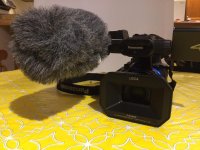
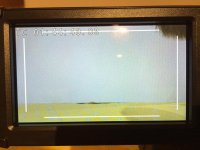
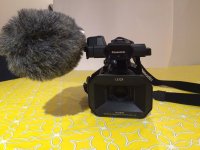
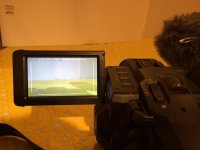
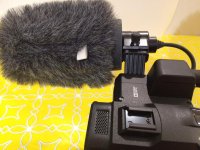
Got a bit of a shock yesterday. First day with my new HC-X1000. I installed my Azden SGM-PD11 shotgun microphone (which I had been using on my AG-AC90) and the furry wind gag (since I was about to start shooting a soccer game in the great outdoors). But to my horror I realized that the wind gag was showing in the upper right side of the monitor. Yes, the lens was set at its widest setting, but this had never happened with my AG-AC90. Anyway, the game was about to begin, so I lowered the camera (it was mounted on my camera jib) and quickly swapped out the furry wind gag for a foam mic cover, which did not intrude on the image, and luckily the wind was very gentle (so no annoying wind noise)...and I got the footage I needed.

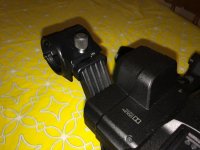
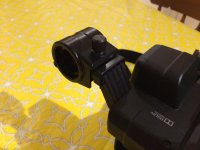
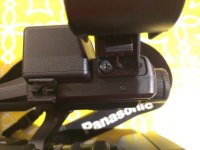
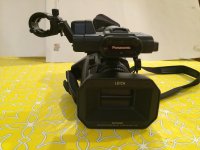
But when I got home, I put the two cameras side by and quickly saw the problem..., and funny that no one has mentioned this till now (at lease a search of the forum didn't turn up any comments). The Azden microphone is a very small shotgun...5.9" (150mm), and there was no way I was expecting it to show in the field of view...but looking at the cameras side by side I realized that the AG-AC90 has an 'extension' that lifts the shotgun microphone up above the front of the camera and lens, but the HC-X1000 mic mount is at the same level as the cold shoe mount and so it does not take much length before the microphone starts to get in the field of view. And the furry wind gag is very wide and so protrudes down into the field of view...but with an 11" shotgun mic I think you'll see the mic even without a foam cover, let along a furry wind gag...
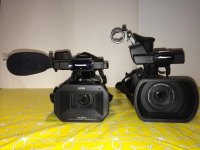
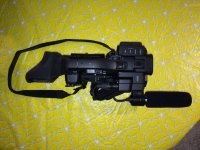
IMG_0378.jpgIMG_0379.jpg
IMG_0382.jpgIMG_0380.jpg
 
Last edited:
Feel your pain. Had the same thing happen to me using an Audio-Technica AT875R (only 7") using a furry gag. But in my case I was outdoors in bright light using the LCD and concentrating on directing the talent, shooting, and getting the audio levels right. Completely missed the gag showing in the upper right and it got recorded — didn't notice it until I got to my editing suite and saw it on a larger monitor. No excuse, but never really had to even think about that possibility using the same mic and gag with my AF100 or AC160.

Seems to be the same type of non-thoughtful design that resulted in no display info being available to an external monitor when shooting 4K 60p. Try using a jib and having no idea what's going on with the camera. Brilliant! I ended up buying a pair of close-focus binoculars so I could see the camera's LCD.
 
Thank you tflak and dcrowley...

@tflak - I am using a jib also, although still shooting Full HD at the moment...I'll check out the situation...was hoping that I could shoot 4k60p, but set the output to just show HD...??


@dcrowley, yes, I will probably go the same route, but not a good fit for my Kata Raincover...which expects the shotgun mic to be out to the right of the camera. And I need the raincover a whole bunch shooting sports events outside in the fall/winter... I am going to scout out the options here in town, hoping there is a metal working shop or some vendor who can mock up the mic extension piece, like from the AG-AC90, but for the screw hole spacing of the X1000...and I guess a 3D printer is not going to do the trick...!!
 
Well, in a way the AG-AC90 came to my rescue. A while back I had to order a replacement "MIC HOLDER ADAPTER" (Panasonic part no. VYC0890)for my AG-AC90. This is the part that attached to the camera body and supported the microphone holder...and it was broken when something fell onto my camera case. Well, when I placed the order, I ordered two, thinking that it might happen again...so why not have a spare. Well, forgot that I had the second adapter until I was gathering up all the parts in preparation for selling my AG-AC90. When I came across this spare part...I realized that this might hold the answer for the HC-X1000 microphone holder being 'too low' for my shotgun's furry wind gag.

I see the part is available on eBay/Encompass and various other sites, so it should not be too difficult to find for now...(hmmm, should I order a spare?). The weak part of the adapter is where the screws enter the camera body...too much pressure and that will break.

Anyway, have a look at the results and then I'll let you in on one issue that remains...
Image1
IMG_0405.jpg
Image 2
IMG_0406.jpg
Image 3
IMG_0407.jpg
Image 4
IMG_0408.jpg
Image 5
IMG_0409.jpg
Image 6
IMG_0410.jpg
Image 7
IMG_0411.jpg

Image 4 shows you that the microphone holder is raised about 1-1/4" and a bit further away from the camera. And in image 6 you see that the screen is clear even with the camera completely zoomed out.

Did you spot the issue in image 3..? The only fly in the ointment is that the screw mounts on the adapter are a bit narrower than the holes on the HC-X1000 body, where it attaches to the camera. The holes are perfect for the microphone holder itself. So the issue is that there is only one screw holding the adapter to the camera (see image three). Not satisfactory for a permanent solution. So one option is to tap a new screw hole into the metal pad in the HC-X1000, or to find another way to secure the adapter in place. But this is pretty close to a final solution...and the fit and finish is almost a perfect match for the HC-X1000 itself...

Actually, I see that there are other adapters VYC1083 and VYC1086...so maybe one of these adapters has a wider screw mount where it attaches to the camera...would be great to find one that allows both screws to go into the existing holes on the HC-X1000.
 
Last edited:
Yup - I've had this issue too with the Rode NTG4+ - which is actually quite long. It's annoying. Shooting in 4K though and outputting to 1080 it isn't too much of an issue as I can crop it out. That said, the mount also covers the buttons on the mic which is equally annoying.
 
Back
Top