GH4 Having trouble with the GH4

roxics

Veteran
I just picked one of these up on the first of the month and while I love the image quality, I'm having trouble with the usability of this camera.
I owned a GH1 and 2 in the past but it's been three years since then, where I was on a Canon DSLR inbetween.

My biggest issue is that I'm having trouble focusing this thing. It's really hard to see what is and isn't in focus on either the back LCD or the EVF.
If I lock the camera off it's ok because I can spend more time dialing it in, but going handheld I'm really struggling.
I've used the little focusing box and the peaking but even so it's really difficult to tell what is and isn't in focus compared to my Canon, even when I was just using the back screen on the canon without a loupe I could easily tell if something was in focus.

Is there something I'm missing here? I want to love this camera, I should love this camera, it's loaded with features, quality and is highly praised by everyone. But I'm about ready to ship it back and go back to a Canon DSLR with inferior video quality.

There are other issues I'm having as well. Is there a magnification button I can use to punch in to set focus? Canon has the dedicated magnification buttons.

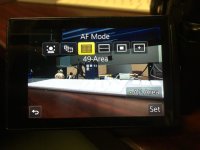
Also when shooting photos I can't seem to find the button that lets me switch to the different AF focus points on screen. On the Canon it was easy, you hold down the button and spin the wheel to get to your different focus points. I can't figure out how you do that on the GH4.
 
With a loupe I have no problem judging focus. Can even do it without peaking on. I have the Kamerar QV1-M. There is a magnification tool. I believe the default is F3 which is just above the menu wheel. Hit that, and then using the dials you can zoom in and out and pan around the image with the menu wheel. Best peaking setting is L, and I prefer the yellow highlight. With a soft, low contrast lens the peaking might not work as well. Also, lowering contrast will also impact it.
 
Last edited:
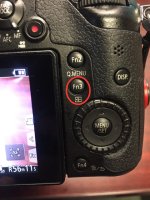
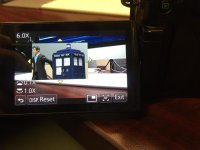
This button is essentially your focus assist button:
T4q5zq1l.jpg

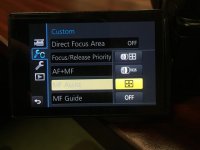
On page 3 of the custom menu, you can change its behavior for manual focus from four options:
oMRWbAyl.jpg
1) punch in when either rotating the focus ring on the lens OR after pressing the Fn3 button
2) punch in only when rotating the focus ring
3) punch in only after pressing the Fn3 button (what I personally use)
4) OFF


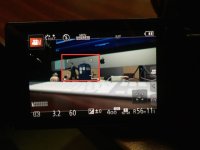
If MF assist isn't turned off, the white box on screen will show you where it will punch in.
XdABI6pl.jpg

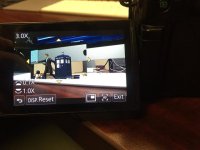
Pressing Fn3 will punch in, and you can use the dials to change the magnification level. You can move the box around using the directional pad, or just use the touch screen to drag it around with your finger.
EkkCXBrl.jpg ZiolfkJl.jpg

In photo mode and set to auto focus, the Fn3 button will bring up your auto focus modes.
SbVyCFil.jpg

My standard procedure for grabbing focus is setting the shot, pressing Fn3 to punch in, focusing, pressing Fn3 to punch out and done. Once it becomes second nature it only takes a second or two to grab clean focus, and as with any camera it becomes easier to see/feel what's in focus and rack focus for unpredictable shots the more you use it and get comfortable with it. The downside of course is that you can't punch in using Fn3 while a clip is recording.
 
Last edited:
Peaking can be a little tricky. With talking heads for example it'll show the eyes and nose as being in focus but actually the nose is what's sharp. Now I use the magnification for talking heads and just use my own judgement without peaking to get the eyes sharp.

I also have Fn1 to change monochrome live view. It turns everything black and white but peaking colours still work.

Stick with it! BTW I think the Canon 5d iii is as bad as it gets for telling what's in focus so it's probably just getting used to the Panasonic.
 
if you set it up right, in manual focus, you simply double tap the screen at the point you want to focus and if you dial it in to 10x magnification you can see that spot perfectly. Even with native lenses I use mf to dial things in.

I will admit that the zoom button on the canon's can be more logical at first glance, but once you get your GH4 setup correctly it is amazing.

Cheers,
Pete
 
Peaking can be a little tricky. With talking heads for example it'll show the eyes and nose as being in focus but actually the nose is what's sharp.

Yeah I've never had a camera with peaking so this is throwing me off a bit. Now that you mention it I just figured out what my issue is. Like you I'm seeing someone's face show up as being in focus with the peaking but also things slightly behind them and it's throwing me off. I guess it's that I'm not used to dealing with this much DOF. I'm shooting with a 14-140 f4-5.8 on a smaller sensor than I shot on my old 60D or the C100 mkII I use at work. Typically I'm at f4 on those. So this is giving me more DOF and thus less difference between what is and isn't in focus. Add to that everything that is on the GH4 screen that I'm not used to seeing, like the peaking dots, the level, and so on. It's all a little distracting and making things hard to judge.

That said. I haven't shot a client video with the camera yet. Just some photos. So I've only been doing more personal handheld stuff with the video features. A BBQ with friends at a park and walking around the house. I don't typically shoot handheld for client work. So I should really test it more for that.
 
Yes, and you'll notice on wide shots with peaking sometimes it looks like everything's highlighted. As you get used to it you'll notice that although everything's peaking, the areas in focus are more densely highlighted than other objects.

Ironically, it can be hard to nail focus with the iris stopped down using a m43 sensor! This is where opening the lens up can actually be easier to hit the focus - because the peaking isn't completely everywhere.

Get shooting roxics!
 
Peaking is not an exact science. It is kind of like auto focus where the camera tries really hard to determine if something is in focus or not. Cameras can do a really good job for a computer and a to of the time they can get very close but it will never be 100% perfect. Peaking is a tool to assist and not meant to be the ultimate solution for 100% perfect focus. Like auto focus it helps to get you close and almost there but again you are relying on a computer to make that judgement.

Peaking works off of edge contrast and can be confused by things in the scene like a bright window. I find it harder to use peaking with wide shots full of detail than on the tighter closeup shots where it has clear edge contrast to distinguish.

The type of lenses matter as well. Adapted lenses are not electronically enhanced in camera and have a harder time registering as high edge contrast for peaking. I can switch from a Panasonic 12mm lens to a Rokinon 12mm lens and the Rokinon will struggle to display the same level of peaking as an example. Peaking on the GH4 does have a level setting which will make it more aggressive in those cases. Depending on the types of lenses you are using you may want to play with that setting to see which level gives you the optimal results. Too low for the lis type and the peaking pixels will not show up enough. Set it too high for the lens type and you will get too many peaking pixels popping up.
 
One other note about the peaking on the GH4, it renders differently with a higher resolution external monitor. When using it on my 7" 1080p monitor, the peaking is also at a finer resolution and isn't as chunky and obtrusive as it is on the LCD and EVF.
 
There are also two modes of peaking. High and low. With a high detail scene, in ETC or 2x digital zoom you have to switch to High in the menu. For skin and low detail scenes you would use the Low setting.

Give that a try back and forth to see how it effects your ability to hit perfect focus.

Cheers,
Pete
 
Back
Top