Having trouble matching GH4 and DVX200

ROne

Well-known member
I have trawled the threads and got a little confused. I have the latest firmware for the DVX200 (recent purchase) but it doesn't seem to come anywhere close to matching our picture profile of our 2 GH4s. The Gh4 with the natural setting looks so much better, no yellow/green cast, flatter and less noisy - no smear.

I've tried using the V-log which was better but makes it difficult to judge certain things, and it turns off when recording.

Our GH4s were originally matched to our Epic Dragons (or as close as using the Natural Setting). Look great. Never felt the need to adjust much at all.

My question is, as I'm on the latest firmware I thought things were improved - or do I still need to completely mess with the Scene files? I did find reference to some scene files changes but they appear to be referring to an older firmware.

Any help much appreciated.
 
Try checking out this thread -

http://www.dvxuser.com/V6/showthread.php?345985-Panasonic-released-a-GH4-like-scene-file

You need to load the Still Like Scene file (Scene 4) if you haven't already. It's a good place to start. From there you can do whatever - dialing back the blacks, saturation, whatever you need. Also worth checking out the Noise Reduction setting (I have mine set at -3 and the results are very pleasing). Using this setting, V-Log looks much better, even internally. Bear in mind also that your lenses will be faster on the GH4 than that of the DVX200. Aside from that, you should be thoroughly going over Barry Green's book and watching his videos and tweaking each setting to your liking. There are lots of them, which is a good thing!

Good luck.
 
Ditto that last email. Download and install SC4. I shoot all the time with a GH4 and my 200 and I got them to match almost exactly. Back to Back hard to tell the difference.
Overall what's your impression of the DVX200? Love mine but had to go with on-board 7" monitor. Just can't use the internal monitor for focus in 4K or in daylight.
 
I have trawled the threads and got a little confused. I have the latest firmware for the DVX200 (recent purchase) but it doesn't seem to come anywhere close to matching our picture profile of our 2 GH4s. The Gh4 with the natural setting looks so much better, no yellow/green cast, flatter and less noisy - no smear.

I've tried using the V-log which was better but makes it difficult to judge certain things, and it turns off when recording.

Our GH4s were originally matched to our Epic Dragons (or as close as using the Natural Setting). Look great. Never felt the need to adjust much at all.

My question is, as I'm on the latest firmware I thought things were improved - or do I still need to completely mess with the Scene files? I did find reference to some scene files changes but they appear to be referring to an older firmware.

Any help much appreciated.

DVX200 Check List For Multi Camera Shoots

Tests made on 5-19-16 proved that both the Panasonic AG-DVX200 and the GH4 cameras could be matched perfectly for multi camera shoots, see the following filmed at Encore Broadcast. https://vimeo.com/167443202

DVX200 Settings;

Make sure that you have Firmware Version 1.65 installed in your DVX200 camera and set the Color Palette to NATURAL then install the Panasonic Scene File commonly referred to as “Like GH4” this should be installed so that it replaces Scene File 4 in your DVX200 camera. Then always use Scene File 4 for multi camera shoots that include a GH4. Noted below are the actual settings for the “Like GH4” Scene File.

MASTER DETAIL +10
DETAIL CORING 1
SKIN TONE DTL OFF
V DETAIL LEVEL 0
KNEE APE LEVEL 3
RB GAIN CONTROL SETTING
CROMA LEVEL 0
CROMA PHASE 0
MATRIX NORM2
COLOR CORRECTION SETTING
MASTER PED -3
GAMMA MODE FILMLIKE2
BLACK GAMMA -8
BLACK GAMMA RANGE 3
KNEE MODE MANUAL
KNEE MASTER POINT 80.0
KNEE MASTER SLOPE 10
DRS OFF
DRS EFFECT 1
AUTO IRIS LEVEL ON
AUTO IRIS LEVEL EFFECT +5
V-LOG L MODE OFF

GH4 Settings;

When our tests were conducted the GH4 camera used for the test had Body Firmware Version 2.4 and the Photo Style was NATURAL.
 
Overall what's your impression of the DVX200? Love mine but had to go with on-board 7" monitor. Just can't use the internal monitor for focus in 4K or in daylight.

On paper and for the price we paid it's the true do all camera of our fleet.

But so far a bit frustrated. Shot with v-log and it's such an irritation to shoot with. Especially since the v-log lut on the cameras monitor clears off as soon as you start recording! So switched to cinelike-d and it's poor cousin to previous cameras cinelike-d implementation.

Other frustrations is the sound stage is hissy.

The GH4 with sound devices mixer is so much better for interviews and so far shoots a far superior image.

However I still like the camera , I've just just had a bad start with it. Too many settings on the scene files.

I do like the physicallity of the camera though. I've always loved the GH4 though.
 
Overall what's your impression of the DVX200? Love mine but had to go with on-board 7" monitor. Just can't use the internal monitor for focus in 4K or in daylight.

On paper and for the price we paid it's the true do all camera of our fleet.

But so far a bit frustrated. Shot with v-log and it's such an irritation to shoot with. Especially since the v-log lut on the cameras monitor clears off as soon as you start recording! So switched to cinelike-d and it's poor cousin to previous cameras cinelike-d implementation.

Other frustrations is the sound stage is hissy.

The GH4 with sound devices mixer is so much better for interviews and so far shoots a far superior image.

However I still like the camera , I've just just had a bad start with it. Too many settings on the scene files.

I do like the physicallity of the camera though. I've always loved the GH4 though.

The trend to interchangeable lens cameras caused a lot of us to abandon our more traditional video cameras; those of us that did soon learned that although interchangeable lens cameras like the Panasonic AF100 were great they did have limitations. The MFT-DVX200 solved that problem and when combined with the GH4 and some fast lenses you literally have the best of both worlds. The secret for us was matching these cameras; hence my earlier post on that subject.

So far our DVX200 has preformed flawlessly and we love the “Like GH4” look. We also have a Video Devices PIX-E5 Monitor Recorder and have recently started recording UHD 10bit 422 Pro Res HQ to a speed drive and HD to an SD Drive. The low-res HD files are great for our clients to review and will play back on any laptop.

In short, the DVX200 is a great camera……………and even better with the “Like GH4” look.
 
DVX200 Check List For Multi Camera Shoots

Tests made on 5-19-16 proved that both the Panasonic AG-DVX200 and the GH4 cameras could be matched perfectly for multi camera shoots, see the following filmed at Encore Broadcast. https://vimeo.com/167443202

DVX200 Settings;

Make sure that you have Firmware Version 1.65 installed in your DVX200 camera and set the Color Palette to NATURAL then install the Panasonic Scene File commonly referred to as “Like GH4” this should be installed so that it replaces Scene File 4 in your DVX200 camera. Then always use Scene File 4 for multi camera shoots that include a GH4. Noted below are the actual settings for the “Like GH4” Scene File.

MASTER DETAIL +10
DETAIL CORING 1
SKIN TONE DTL OFF
V DETAIL LEVEL 0
KNEE APE LEVEL 3
RB GAIN CONTROL SETTING
CROMA LEVEL 0
CROMA PHASE 0
MATRIX NORM2
COLOR CORRECTION SETTING
MASTER PED -3
GAMMA MODE FILMLIKE2
BLACK GAMMA -8
BLACK GAMMA RANGE 3
KNEE MODE MANUAL
KNEE MASTER POINT 80.0
KNEE MASTER SLOPE 10
DRS OFF
DRS EFFECT 1
AUTO IRIS LEVEL ON
AUTO IRIS LEVEL EFFECT +5
V-LOG L MODE OFF

GH4 Settings;

When our tests were conducted the GH4 camera used for the test had Body Firmware Version 2.4 and the Photo Style was NATURAL.


Thank you for sharing. So on the GH4 the scene style is Natural..are there any other changes on it i.e. contrast, NR, sharpness, sat?
 
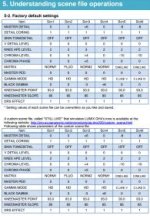
I'm curious about page 46 of Panasonic's "AG-DVX200 handbook_e" PDF. Page 46 shows a chart comparing the factory default scene file settings and the custom "still-like" one. They look identical to me. Having looked at the actual scene file text it's obvious that SCN4 is different from the original, so I assume their PDF needs a revision.

Page 46 of dvx200 handbook.jpg
 
I'm curious about matching AG-DVX200 with Lumix DMC-GX8 as they share the same sensor. :laugh: lol, jk. GX8 has no support for V-Log L.

...but it might still be something to look at, actually.... I'll get back to you...

After doing some Google-ing, GX8 actually seems like a capable little video camera despite not support log or DCI formats. I think it might be a good C-camera next to GH4's B-camera to the DVX200's A-camera.
 
Last edited:
How does one set the color palette to natural? I'm not familiar with that - running F/W 1.81 (or are we talking about the NAT on the Gh4?)
 
Great, not seen that before but it appears to be set.

To further match my GH4 - I've had to back off the Colour Level a fair bit (-20) and I think the blacks are a bit crushed so I've sorted them.

Is there any real need for Master Detail being so high ?
 
My understanding is that Panasonic's "Still Camera" SCN4 on the DVX200 is supposed to match the GH4 when it is set to the Natural Picture Profile. That's not been my actual experience, though; I'm having better luck with Cine D.
 
testing GH5S with 14-140mm lens and "natural" scene and dvx200 gh4 still like scene. Both camcorders WB set to tungsten . the dvx200 gives a more orange color. I tested cine d & v in the dvx200 and here the colors are more red and not orange. So I guess it's the scene file "gh4 still like" that is too orange/yellow. Somebody has tips for better color match these 2? Image3.jpg
 

Attachments

  • Image2.jpg
    Image2.jpg
    63.9 KB · Views: 0
Back
Top