GH2 Hack settings: Motion looks bad, what's up?

Jester2138

Well-known member
So I'm trying out the GH2 hack. It's pretty cool, but I've run into a problem. I mainly want it to improve motion quality (watching film projections will really make you hate digital motion).

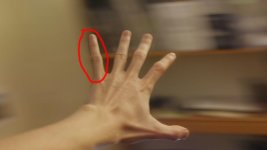
Settings for this picture are 88mb/s GOP 3, frame export from Premiere. I was waving my hand around and following it with the camera to stress test the codec. Why is the codec breaking up around my fingers? Do I just need a higher bitrate?
GH2 Hack Seq2_108.jpg
 
VERY good question.
Most testers seem to be going for the highest possible detail.
I personally would prefer smoother motion.
 
codec breakup/artifacts in motion is generally due to not enough bitrate. because the codec is variable and not constant it gets surprised when it is ambushed by quick motion. I notice that most gh2 settings are for detail too, ie Q4 stuff...not sure if playing with this particular setting is the solution. you could always change it and do your own tests. that said, 88mb is pretty darn high. must say though that pic you posted, i see more artifact from the jpeg compression of the red outline than in the finger itself lol. you must hav eagle eyes or projector eyes =)
 
Easy...
It's GOP3. The lower the GOP the less efficient the compression.
Why... because you now no longer have motion vector frames (b.p)
We counteract this by raising the bitrate.
Jester, Did the 88Mb/s GOP3 file have AQ set to 3?

If so, AQ2 will allow more bitrate for motion vectors., try it.

driftwood and many others are spending a lot ot time balancing the trade-offs
(stream cadence, buffers, AQ settings, etc..)

With GOP1, to support larger size i-frames, driftwood is running at 176Mb/s.
 
It could also be that the 88M GOP3 in question isn't entirely stable, and the stream is showing the cadence pulsing problem. Have you looked at the file using streamparser ? The Lowest GOP3 I think thats stable at the moment is driftwoods 132M, and stevet is right about the way the codec works. The other thing to consider is that when you're running at a higher bitrate you probably don't need to run AQ as high anyway. I'm pretty sure running GOP3 at 88M and with an AQ of 3 isn't going to be entirely stable.
 
Last edited:
I would also like to see better motion performance.

Than GOP1?....
You do realize GOP1 is 24 i-frames per second (assuming your recording in 24P of course). There are no motion b,p frames.
driftwood 176Mb/s GOP1 offers this.
 
Last edited:
The 88mb/s GOP 3 settings I used were recommended somewhere on these forums. But I'm willing to try anything. What are the current "best" settings for motion? Driftwoods?
 
Jester, It depends really, have you tried Chris Brandins 66M AQ2 settings ? They're a long GOP setting though, but the motion looks good. I think the motion is a bit better in the max variation version which is here http://personal-view.com/talks/discussion/989/gh2-maximum-variation-experiment/p1Lower GOP settings are always going to look better with motion but the bitrate has to be larger. There are two to try at GOP3, Driftwoods 132M and bkmcwds 154M both are stable. Most of the patches are in here http://personal-view.com/talks/disc...ult-most-popular-patches-in-one-place#Item_12 Ralph_B posted the Driftwood 132M in there, but I think its the wrong one as it has T4 set to T1, I'm not sure where the correct one is (but I'm pretty sure just unchecking the T4 T1 in the Quantizer tables section of Ptools is all you'ld have to do to it). Driftwoods GOP1 settings are also in that thread. Bkmcwds is here http://personal-view.com/talks/discussion/comment/20179#Comment_20179 (the Q=10 version). My 88M Max variation is in the patch vault too, I'm currently tweaking it as some people are having problems using it with variable movie mode at 80%, and one person has reported a very odd breakup with ETC mode (which I'm trying to replicate it and fix).
 
Last edited:
Than GOP1?....
You do realize GOP1 is ONE i-frame per second. There are no motion b,p frames.
driftwood 176Mb/s GOP1 offers this.

Actually, GOP1 is 24 I-frames (infra frames with full information) per second... when you're shooting at 24fps. GOP12 is only 2 I-frames (or REAL frames) per second. GOP3 is 8 real-frames per second. And so on... you just divide your frame-rate by the GOP to fins how many real frames the camera is actually encoding. A GOP of 24 would be just one I-fame per second.
 
Actually, GOP1 is 24 I-frames (infra frames with full information) per second... when you're shooting at 24fps. GOP12 is only 2 I-frames (or REAL frames) per second. GOP3 is 8 real-frames per second. And so on... you just divide your frame-rate by the GOP to fins how many real frames the camera is actually encoding. A GOP of 24 would be just one I-fame per second.

Woops.. yes of course.. typed it to quick..lol
I corrected this.. I know how gop works...

The bottom line is as I mentioned before, there are no b,p motion vector frames, just pure i-frames.
 
Last edited:
Woops.. yes of course.. typed it to quick..lol
I corrected this.. I know how gop works...

The bottom line is as I mentioned before, there are no b,p motion vector frames, just pure i-frames.

Yea, it sounded like you had the right idea... I just thought I'd clear it up to avoid any confusion in case you didn't catch it. Cheers! :)
 
I have a 88Mb GOP 6 patch, I tried doing the same quick movements with my hand in front of the lens (feeling like a retard) and I had no problems.

We also need to account for the unpredictability of the codec. Sometimes they just go cuckoo.
 
Pietro, that's good info. I saw your post with the image.
I also believe the patch your refering to is with AQ3.
Try setting it to AQ2, you will get more support for motion, and give up a little for detail.
Ideally, you need to look at the stream data for cadence issues. Also, looking at buffers are important.
 
Back
Top