
Navigation
Install the app
How to install the app on iOS
Follow along with the video below to see how to install our site as a web app on your home screen.
Note: This feature may not be available in some browsers.
More options
You are using an out of date browser. It may not display this or other websites correctly.
You should upgrade or use an alternative browser.
You should upgrade or use an alternative browser.
green screen keying
- Thread starter deleuze3
- Start date

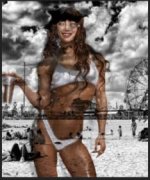

Yes. The model is WAY too close to the green screen. There shouldn’t be a thick shadow surrounding her like that.
Move the model forward and light her separately from the screen. You want to avoid shadows, but you also want to avoid spill (green bouncing off the screen and onto her). Both can affect how clean a key you’re able to get. As for the green screen, light it evenly behind her.
You want to be able to select the green, and only the green, to remove and replace. If you’re also trying to replace the dark shadows, you’re going to replace pretty much anything else with that chroma value.
Move the model forward and light her separately from the screen. You want to avoid shadows, but you also want to avoid spill (green bouncing off the screen and onto her). Both can affect how clean a key you’re able to get. As for the green screen, light it evenly behind her.
You want to be able to select the green, and only the green, to remove and replace. If you’re also trying to replace the dark shadows, you’re going to replace pretty much anything else with that chroma value.
Imamacuser
Veteran
You'll have to rotoscope this one.
I'm not a green screen expert, I've avoided it due to the large potential for something to go wrong. With that said, here are a few general best practices when shooting green screen:
Subject should be > 6' from the background
Use a proper green screen background
background and subject should be exposed at the proper ratios
Background needs to be clean, wrinkle free, and evenly lit.
And the list goes on.
Here are a few tutorials on how to light and expose for green screen.
I'm not a green screen expert, I've avoided it due to the large potential for something to go wrong. With that said, here are a few general best practices when shooting green screen:
Subject should be > 6' from the background
Use a proper green screen background
background and subject should be exposed at the proper ratios
Background needs to be clean, wrinkle free, and evenly lit.
And the list goes on.
Here are a few tutorials on how to light and expose for green screen.

paulears
Veteran
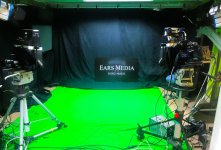
What are you keying with? Some keys are better than others - this is the best I can do with the ultra keyed in Premiere.

In my studio we do green and blue screen and we have white and black backgrounds too. Green is the most useful, but you MUST separate the talent from the background and if you have a less capable keyed, you also need a little backlight to remove the green reflections that bounce back and tint the shoulders and the hair which messes up the key. Your front lighting also needs to be softer than perhaps you would like so that the shadows from these don't create hard edges on the backing.
Your green looks a rather dark green,
Mine's quite a bit 'greener'
In my studio we do green and blue screen and we have white and black backgrounds too. Green is the most useful, but you MUST separate the talent from the background and if you have a less capable keyed, you also need a little backlight to remove the green reflections that bounce back and tint the shoulders and the hair which messes up the key. Your front lighting also needs to be softer than perhaps you would like so that the shadows from these don't create hard edges on the backing.
Your green looks a rather dark green,
Mine's quite a bit 'greener'
Attachments
mothmachine
Active member
Shooting in a 10-bit codec is also important, yes? I am supposed to try to do some greenscreening on Monday, and I'm thinking I will need to record externally to an Atomos and record Prores 4:2:2.
Imamacuser
Veteran
There's also the old trick of using a pan-tilt head or L-bracket to shoot vertically so that you cam maximize the camera's resolution, which is one of the few occasion where it's acceptable to shoot vertical video. I remember reading that 4K 8-bit keys better than HD 10-bit, but I'm not sure that's true or not.