F35: Green and Blue Lines when shooting Wide Open

torresfilms

Well-known member
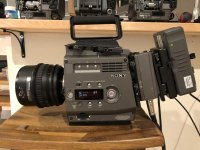
Today I filmed some stuff on my recently purchased F35 and came across these weird blue and green lines while shooting with the lens wide open. The sun was hitting the lens while the lens was wide open causing these weird artifacts but on my previous F35 this never occurred. Once I stopped down the lens, the artifacts went away.
Just got the camera from ebay a few days ago. Should I be returning this camera or is there something minor I can do to remove/fix this? Any suggestions?

Here are a couple clips showing the issue: https://www.youtube.com/watch?v=wrT7-V-Osb0&feature=youtu.be
 
Looks like vertical smear, but I’ve never seen a normally functioning camera do that. But maybe someone with experience specifically with the 35 will weigh-in.
 
Looks like vertical smear, but I’ve never seen a normally functioning camera do that. But maybe someone with experience specifically with the 35 will weigh-in.

Yea it’s weird because the camera functioned well when the lens was not wide open. Not sure what to do at this point but I’m most likely returning it since it could get worst potentially. It sucks because I really would love to keep it.
 
It almost looks like something might be wrong with the cabling that attaches the optical block to the rest of the camera but I honestly dont know. Something tells me its a bad ribbon cable maybe? You should see if you can talk with your seller and get a partial refund for repairs and then keep the camera, that way both parties win, you can keep it and have money to fix it and the guy still has somewhat of a sale.
 
Yea it’s weird because the camera functioned well when the lens was not wide open. Not sure what to do at this point but I’m most likely returning it since it could get worst potentially. It sucks because I really would love to keep it.

I don't think the lens being wide open is in itself the problem. The chip is being "overloaded", because it looks like the anomaly is happening when the sun was directly down the barrel, but I've never seen that exact manifestation of that. Just for sh**s & giggles, try the same thing with the lens wide open, but with a couple of stops of ND(2-4) in place to drop exposure and see if it still happens. I'm wagering it won't(doesn't mean there isn't still a problem, but takes the wide open lens out).
 
It almost looks like something might be wrong with the cabling that attaches the optical block to the rest of the camera but I honestly dont know. Something tells me its a bad ribbon cable maybe? You should see if you can talk with your seller and get a partial refund for repairs and then keep the camera, that way both parties win, you can keep it and have money to fix it and the guy still has somewhat of a sale.

Why say this? Extremely Unlikely. I'm not saying it's certainly not damage in the camera, but this should be the last explanation not the first.


I'm with Run and Gun, it's not about being wide open, it's about massively overexposing the light to the sensor. I can't seem to replicate it exactly with my camera. I'm on terrible internet but I am uploading a clip to youtube I will share.

Can you post more of the effect with other lens, other light sources? Try a flashlight once you see my clip.

Firmware updated? Don't trust the previous owner to have done it right, there are 3 steps you have to do. Read the directions fully and check after it has run that the version display is correct.

Cine-ei mode? Custom mode has a lot of little settings that could cause strange clipping. Try turning extended on and off.
 
This is almost most definitely some strange anomaly with light hitting the sensor. Seen this in all kinds of forms throughout my life, but not quite as profound as in this case.

As mentioned above, using ND and other light sources like a flashlight would be great troubleshooting.
 
Why say this? Extremely Unlikely. I'm not saying it's certainly not damage in the camera, but this should be the last explanation not the first.


I'm with Run and Gun, it's not about being wide open, it's about massively overexposing the light to the sensor. I can't seem to replicate it exactly with my camera. I'm on terrible internet but I am uploading a clip to youtube I will share.

Can you post more of the effect with other lens, other light sources? Try a flashlight once you see my clip.

Firmware updated? Don't trust the previous owner to have done it right, there are 3 steps you have to do. Read the directions fully and check after it has run that the version display is correct.

Cine-ei mode? Custom mode has a lot of little settings that could cause strange clipping. Try turning extended on and off.

It was just my thought as ive had things look similar due to the ribbon cable not being secured or scratched... but that was in an F900 so what do i know...

..none the less, i stand firm on him trying to recover part of his money and not giving up on the camera...
 
I have seen this before, not sure what it's called but it can happen with ccd chips. It looks almost like a vertical anamorphic streak. I have an old Sony point and shoot with a ccd that does this easily. Never saw it with my F35 or 9000PL but it would be relayed to overloading the sensor.
 
Why say this? Extremely Unlikely. I'm not saying it's certainly not damage in the camera, but this should be the last explanation not the first.


I'm with Run and Gun, it's not about being wide open, it's about massively overexposing the light to the sensor. I can't seem to replicate it exactly with my camera. I'm on terrible internet but I am uploading a clip to youtube I will share.

Can you post more of the effect with other lens, other light sources? Try a flashlight once you see my clip.

Firmware updated? Don't trust the previous owner to have done it right, there are 3 steps you have to do. Read the directions fully and check after it has run that the version display is correct.

Cine-ei mode? Custom mode has a lot of little settings that could cause strange clipping. Try turning extended on and off.

Thanks so much for all these tips man! I’ll try the menu stuff you suggested.

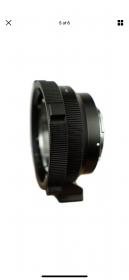
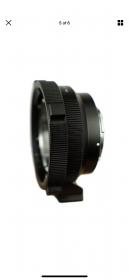
As I was planning to do more tests yesterday the mount on the camera for some reason did not allow me to mount my other 2 PL lenses. I’ve mounted cinealtas on my previous F35 no problem but this camera only allows me to mount the 85mm but not the 35mm. Both mounts on the lenses work just fine on my friends Alexa but for some reason they don’t want to mount on my f35. I also tried mounting my IRIX 45mm PL to no avail.

So since I can’t mount these lenses I think I’m leaning towards returning the camera unless you guys have any advice on fixing this mount? Just concerned other issues will occur and I don’t want any other surprises.

I did find however that the firmware is older firmware. (If I decide to keep the camera)How do I change the firmware? Do I need a Sony memory stick thing? If so, which one do I pick up? Also, where can I download the latest firmware?

Thanks for everyone’s help!
 
The Sony 35mm is a tight squeeze. You can take the back plastic piece off the lens and it will fit. I had one for a while and did this. Can't find any photos of it.

Can you see if the tabs are hitting the lens? Many lenses require the PL tabs to be removed to fit. It's just the nature of the F35 and the mount being so close to the front plate.

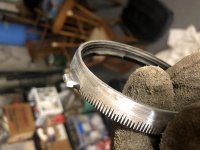
There are basically 3 PL rings that come on F35's, Black Sony ring, Silver Sony ring, Stainless Steel Clairmont ring. Perhaps your last camera had a different ring.

It took me a while but I did make a PL mount for F35. You don't really need much of a tab to get lens tightened.

You can kind of see the back of the SCL lens is removed in this photo.


IMG_2518.jpg
 

Attachments

  • IMG_3211.jpg
    IMG_3211.jpg
    3.4 KB · Views: 0
Last edited:
The Sony 35mm is a tight squeeze. You can take the back plastic piece off the lens and it will fit. I had one for a while and did this. Can't find any photos of it.

Can you see if the tabs are hitting the lens? Many lenses require the PL tabs to be removed to fit. It's just the nature of the F35 and the mount being so close to the front plate.


There are basically 3 PL rings that come on F35's, Black Sony ring, Silver Sony ring, Stainless Steel Clairmont ring. Perhaps your last camera had a different ring.

It took me a while but I did make a PL mount for F35. You don't really need much of a tab to get lens tightened.

You can kind of see the back of the SCL lens is removed in this photo.


View attachment 138750


I can’t tell if the tabs are hitting the plate but it feels as though something is blocking the lens from locking in. When I get home later today I’ll take a video of me trying to lock in the lens.

And just to give an update on my situation, the eBay seller will be sending me his other f35 as a potential replacement. So I’ll run some tests with that camera and see if I get the same weird green lines and will also see if the mount works better. I do also want to upstate the firmware but still unsure how to go about doing that. Is there a thread on here that can help with that?

In the mean time I may mess around with the pl mount on the camera and lens to see how I can make the lenses fit.
 
hold the camera vertical so the lens is perfectly flush with the mount before you tighten PL. I didn't think my Sony 35mm fit either when I first got it.
 
Are you positive it's not just chronic overexposure saturating the sensor. what is performance like when exposure is within usual limits? Any anomalies visible then?
 
I agree, the Sony PL mounts can be really tight, sometimes. Only one I've had "tighter" was on an Arri Amira.

Sometimes if you watched me try to mount my 17-120 on my F55 with the Sony PL, you'd think I'd never mounted a lens on a camera in my life.
 
I agree, the Sony PL mounts can be really tight, sometimes. Only one I've had "tighter" was on an Arri Amira.

Sometimes if you watched me try to mount my 17-120 on my F55 with the Sony PL, you'd think I'd never mounted a lens on a camera in my life.

LOL. That's exactly how I feel when I try mounting a lens on this camera.
 
Back
Top