Michael Carter
Veteran
Check this out - when scouting locations where you'll be augmenting practical fixtures with your own lights, here's a way to get close with gel combos to save some time on set.
Check out the Lee mired shift calculator at this link. Yeah, I know some people hear "mired shift" and start thinking physics and headaches, but this is a pretty simple process.
Shoot some raw stills at the location with the daylight or tungsten preset (I'll use HMIs and kinos here, so used daylight - actually shooting raw it doesn't matter). if possible throw in a gray card, or just make sure there are some whites in the scene. (This is to get you close, it won't be dead-on perfect).
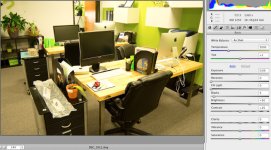
Next week's office for a corporate shoot - overhead modern fluorescents and a lot of green-theme. Daylight looks pretty bad:
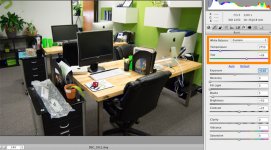
In camera raw, eye dropper white and gray points and find a white balance average - I got 3750 K and a lot of magenta to set things straight:
So what level of CTB will make a 5000-6000k fixture match this temp? The Lee Calculator will give you the answer:
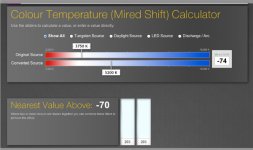
In this case, I enter the source (3700-3750 depending on where the eyedropper hit) and the conversion (5200k). The lee calculator tells me 1/4 to 1/2 CTB. BUT - I'm matching my lights, not correcting the office lights - so I actually need CTO, not CTB, in the same values, and I'll choose the value based on the color temp of my lights (some of my daylights are around 6000, some at 5200).
What about the magenta axis?
I opened the raw file twice - once with the recommended 3700k + magenta; and a second time at 3700k but no extra magenta. 1st file looked fine, 2nd file looked pretty green. To the 2nd file, I added a photofilter adjustment layer and chose the magenta filter (Photoshop's magenta filter correlates to minus green very well - the "green" photofilter doesn't work out for plus green though, it needs more yellow - so bear with me). I dialed it around until I had the closest match to the camera-raw's-best-guess color temp image, and then chose the closest percentage that matched with available gels (IE, 12% would be 1/8, 50% 1/2, etc). 11% gave me the best rendition.
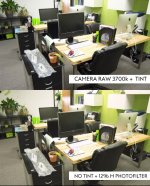
So in the still below, the top image is Camera Raw's best shot; the bottom is 3700k, no tint from camera raw, and a 11% magenta photoshop filter. I also dropped saturation on both images to mimic how my camera will be set. They're very close. Experience tells me I should start with 1/8 PLUS green along with the CTO needed to match the office lighting. Since minus green and plus green gels correlate well - they'll cancel each other out pretty closely and become a CTB - I know that my lighting needs to me more green at the same percentage that works for minus green to correct the image.
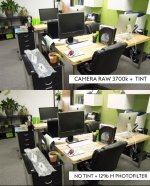
It's not dead-on - the bottom image shows more yellow as well; to cut the yellow cast from the lights, I'd need some violet, but since I want to match the lights, some yellow on my lights might be needed. Many non-photo flos (and even some of the cheaper biax) have a yellow cast (everyone assumes minus-green is the go-to, but again and again I find yellow spikes with flos). But my plan is to use the office lights for fill and use my lights to highlight people working, so I'll WB to my setup and see if the background looks natural enough.
This will be much faster than trying to gel all the overheads to match my lighting. If there are windows involved, they're usually bright enough to overtake the office lighting, and I'll match my lighting gels to the window light (which usually means some light CTB) or white balance to warm up the window light if it's too blue.
Give it a try - I've found you can go into a location and very quickly get your lights matched this way, and you'll have reference stills for planning the shoot.
Check out the Lee mired shift calculator at this link. Yeah, I know some people hear "mired shift" and start thinking physics and headaches, but this is a pretty simple process.
Shoot some raw stills at the location with the daylight or tungsten preset (I'll use HMIs and kinos here, so used daylight - actually shooting raw it doesn't matter). if possible throw in a gray card, or just make sure there are some whites in the scene. (This is to get you close, it won't be dead-on perfect).
Next week's office for a corporate shoot - overhead modern fluorescents and a lot of green-theme. Daylight looks pretty bad:
In camera raw, eye dropper white and gray points and find a white balance average - I got 3750 K and a lot of magenta to set things straight:
So what level of CTB will make a 5000-6000k fixture match this temp? The Lee Calculator will give you the answer:
In this case, I enter the source (3700-3750 depending on where the eyedropper hit) and the conversion (5200k). The lee calculator tells me 1/4 to 1/2 CTB. BUT - I'm matching my lights, not correcting the office lights - so I actually need CTO, not CTB, in the same values, and I'll choose the value based on the color temp of my lights (some of my daylights are around 6000, some at 5200).
What about the magenta axis?
I opened the raw file twice - once with the recommended 3700k + magenta; and a second time at 3700k but no extra magenta. 1st file looked fine, 2nd file looked pretty green. To the 2nd file, I added a photofilter adjustment layer and chose the magenta filter (Photoshop's magenta filter correlates to minus green very well - the "green" photofilter doesn't work out for plus green though, it needs more yellow - so bear with me). I dialed it around until I had the closest match to the camera-raw's-best-guess color temp image, and then chose the closest percentage that matched with available gels (IE, 12% would be 1/8, 50% 1/2, etc). 11% gave me the best rendition.
So in the still below, the top image is Camera Raw's best shot; the bottom is 3700k, no tint from camera raw, and a 11% magenta photoshop filter. I also dropped saturation on both images to mimic how my camera will be set. They're very close. Experience tells me I should start with 1/8 PLUS green along with the CTO needed to match the office lighting. Since minus green and plus green gels correlate well - they'll cancel each other out pretty closely and become a CTB - I know that my lighting needs to me more green at the same percentage that works for minus green to correct the image.
It's not dead-on - the bottom image shows more yellow as well; to cut the yellow cast from the lights, I'd need some violet, but since I want to match the lights, some yellow on my lights might be needed. Many non-photo flos (and even some of the cheaper biax) have a yellow cast (everyone assumes minus-green is the go-to, but again and again I find yellow spikes with flos). But my plan is to use the office lights for fill and use my lights to highlight people working, so I'll WB to my setup and see if the background looks natural enough.
This will be much faster than trying to gel all the overheads to match my lighting. If there are windows involved, they're usually bright enough to overtake the office lighting, and I'll match my lighting gels to the window light (which usually means some light CTB) or white balance to warm up the window light if it's too blue.
Give it a try - I've found you can go into a location and very quickly get your lights matched this way, and you'll have reference stills for planning the shoot.