Grading: How Do You Choose Contrast Level?

Ebrahim Saadawi

Carbonite Member
I'm grading a talk show piece for local television and finding a bit of a problem choosing contrast.

With the passing of time and rise of LOG gammas I am finding myself strangely being much more pleased with low contrast images, I even now find high contrast images to be ugly, crushed shadows and blown out highlights. Lower contrast just looks more filmic to me, or cinematic. The problem here is that I am afraid the end viewer will like higher contrast images and only us who shoot log video like these flatter images. Do you think this is the case?

How do you choose the "correct" contrast level? What determines that? What do viewers prefer?

Which one of these would you go for if you were grading this?

7y42Lpj.jpg

qvR7G3B.jpg


Oh and another separate issue I am finding with grading, whenever I add a post sharpening filter to a letterboxed image (4k 1:85:1 aspect ratio or 2:35 in a 16:9 window, both I love and use heavily) a distinct white border appears on the letterbox boundaries, as seen in the two images above. And here's a closer look on the line:

ld083od.jpg


Is this normal and does it happen to any of you who use post-sharpening? It just seems weird why sharpening would add an extra purely white line. And is it as ugly as my head sees it for normal audience? what do you guys think
 
Do whatever you feel looks best and is right for the project.

However, I will say that the super-low-contrast seems to be a fad brought on by, as you said, the influx of people shooting with LOG and similar flat styles. Personally I think it's just a passing trend that's irrespective of actual style and aesthetic and is more just because that's the thing to do these days... but make up your own mind. There's probably something to be said for the fact that even if it's a fad, it's what's popular and the whole goal is to shoot something people like.

And if you genuinely do just like the low-contrast stuff, go for it. Personally I prefer higher contrast.

Dunno what to tell you about the borders with the sharpening. If you can't figure it out and sharpening is important, maybe just do a 1% crop.
 
Switch to Unsharp Mask and that should fix the white line. Or Sharpen if you're using Unsharp Mask. One of those.
 
open up your rgb parade, for black levels you typically want some of your levels just touching 0. same goes for your highlights at 100, but that all also depends on where your skintones and other details are at
 
i always wonder, going by waveform HOW MUCH to let kiss that 0 line...just a few pixels? much more?

completely dependent on the footage.

if it's sparkly clean, the more i'd be willing to bring the darks up. if it's at all noisy, i'd want to crush them more
 
Is this normal and does it happen to any of you who use post-sharpening? It just seems weird why sharpening would add an extra purely white line. And is it as ugly as my head sees it for normal audience? what do you guys think

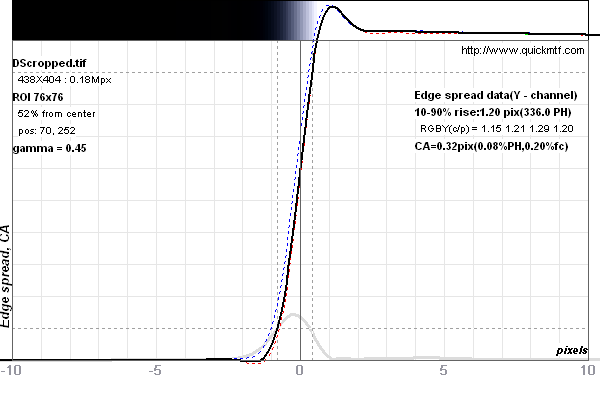
The 'white' band is due to 'overshoot/ringing' of the digital filter. It is an artifact of the contrast/edge enhancement process. When you 'sharpen' an image, you are not adding information, just adding edge contrast in general, which humans perceive as 'sharper'.

There is a difference between 'resolution' and 'acutance'. Here's an example of the 'brightening' at the edges. If the initial low value were above 0, there would be a corresponding 'dip' to give a dark band then a light band in the 'enhanced' edge.

DScropped%20edge%20spread.png


The trick is to adjust the edge 'sharpness', via say an 'unsharpmask' filter, such that the edge is more 'contrasty', yet does not produce the bumps of values that this illustration depicts.

This is also dependent on the target output resolution/display device. So, sharpening should be the last phase of processing before rendering to to that final output.

Switch to Unsharp Mask and that should fix the white line. Or Sharpen if you're using Unsharp Mask. One of those.

Unsharp mask will produce the ringing effect for some values of the parameters. So, the 'trick' is to adjust the filter parameters such that the image when viewed in the intended size, and viewer distance, has the 'sharp' look, but does not have the bright/dark bands at edges...

For example, processed with an unsharp mask filter...

220px-Usm-unsharp-mask.png


There is no free lunch...
 
Last edited:
I like the one with more contrast. You might get away with less contrast by slightly boosting the saturation, but personally I'd say more contrast looks natural, and less contrast looks muted and unnatural.
 
The contrast of the mids should be what it looks like in real life. The contrast of the highs and lows should be lower contrast than real life. This is the whole idea behind an S curve.

Since real life often has 12 or more stops, and any given TV screen has about half that at best, you have to squeeze real life onto TV somehow:

A. Clipped at the top. Just cut off the top five or six f-stops. This is also called "clipping the highlights."
B. Clipped at the bottom. This is also called "crushing the blacks."
C. Low contrast. Make every f-stop in real life turn into just half an f-stop on TV. This results in the video look and "plastic faces."
D. S-curve. Apply low contrast just to the shadows and highlights. Leave the mids at regular contrast.
 
Last edited:
The contrast of the mids should be what it looks like in real life. The contrast of the highs and lows should be lower contrast than real life. This is the whole idea behind an S curve.

Since real life often has 12 or more stops, and any given TV screen has about half that at best, you have to squeeze real life onto TV somehow:

A. Clipped at the top. Just cut off the top five or six f-stops. This is also called "clipping the highlights."
B. Clipped at the bottom. This is also called "crushing the blacks."
C. Low contrast. Make every f-stop in real life turn into just half an f-stop on TV. This results in the video look and "plastic faces."
D. S-curve. Apply low contrast just to the shadows and highlights. Leave the mids at regular contrast.

What ever happened to "Ahh, this looks right for the subject and the overall edit"??

There's no one answer to contrast.
 
Shouldn't you do the letterboxing after you do the sharpening? The edge is ringing only because there is an edge. Sharpen the actual footage and then stick it in a frame with the final aspect ratio, adding black bars. If the footage actually is recorded with the black bars, crop them off, do whatever post and sharpening, then put the bars back.

The higher contrast shot looks better.
 
Back
Top