FS7: Gotchas. quirks, problems & solutions

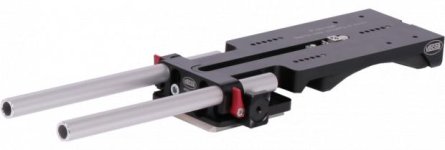
New light weight support with adjustable shoulder pad and 15mm rod support:

http://www.chrosziel.com/news.asp?wdid=17&wpid=273&sid=0

Wonder what the price is on that.

Oh, and Gene, forgot to mention that yeah the NATO handle is super easy to slide on and off. It has little spring loaded safety buttons on the edges of the rail so the handle can't slide off if you forget to tighten it. But simply pressing that down, you can slide it right off, then all that remains is the rail.
 
Pasted from the other topic, here are my thoughts on improvements for the S&Q button, to function more like the FS700:

On the FS700, the S&Q button toggles between all three modes: Standard - Slomo (60fps) - SuperSlomo (120-960). In SuperSlomo mode, HOLDING the S&Q button allows you to scroll through frame rates. My biggest gripe with quickly switching frame rates on the FS700 was that I had to manually set the shutter speed every time I switched, because the camera's shutter angle mode didn't work properly.

On the FS7, we finally have proper shutter angle that stays locked at 180º between modes... however, Sony has decided to tuck SuperSlomo (72-180fps) into the menus, as well as the ability to change frame rates for this mode. The camera took one step forward with fixing the shutter angle, but took two steps back with the interface for slow motion. It will now take me LONGER to switch between frame rates and modes on the FS7 than it did on the FS700 (even accounting for setting the shutter speed manually each time).

I don't know about you guys, but considering they are pushing this as a run-n-gun documentary camera, this seems like a massive misstep in user ease. How did they put this into the hands of shooters and no one complained about menu-digging to change frame rates? These are the things Arri nailed with the Amira. Frame rate toggle switch so you can set three frame rates and jump to them on the fly with a physical switch.

I'm sure I'm beating this into the ground but I shoot a good amount of run n gun documentary stuff and having to dig through menus means you miss the shot. Having the S&Q button toggle between 24/60/72-180 (and the ability to HOLD S&Q to determine SuperSlomo fps) would be a massive upgrade, in my opinion.

Anyone else have thoughts on this?

Side note, jumping back and forth between the FS700 menu and the FS7 menu, the FS7 menu just feels clunkier. It might just be that it's a wheel instead of the d-pad style menu controls, doesn't feel quite as accurate or responsive.


Side note, jumping back and forth between the FS700 menu and the FS7 menu, the FS7 menu just feels clunkier. It might just be that it's a wheel instead of the d-pad style menu controls, doesn't feel quite as accurate or responsive.

i tend to keep the handle back at the rear of the camera and access the menus via the custom button an the little joystick. That makes things much faster for me. I agree about the menu controls feeling slightly sluggish.
 
i tend to keep the handle back at the rear of the camera and access the menus via the custom button an the little joystick. That makes things much faster for me. I agree about the menu controls feeling slightly sluggish.
Good point. With the FS700 I basically took off the handle and put it in a drawer for two years. I prefer the smaller packing size of the boxy camera and never really found the grips to be useful enough to justify the space they take up in a bag or pelican case. Plus, I use the O-grips for my shoulder rig and I love the flexibility of them. But maybe I should give this handgrip a chance. I definitely love the shape and feel of it, it's incredible.
 
Did anybody already use the focus magnifier and tried to move the zoomed area inside
the frame?
Maybe I'm just blind here, but I don'T know how to move it.

I always use this when I frame peoples face, which is barely in the middle of the frame...
 
Some more info on the Metabones and Canon EF lens issue:

http://www.newsshooter.com/2014/11/...abones-ef-adapter-problem-and-best-solutions/

I have the Smart adapter MKII and the Speedbooster (non-ultra).
All my lenses work as far as I tested them, but the iris is slow.

The behavior of the lens on the adapter depends highly on the firmware of
your adapter and the lens itself and is therefore hard to guess before you try it out.
For me it's usable but very far from perfect. IT was way better on the FS100 and
I really wonder why. Did Sony change the mount in some way?
 
Last edited:
Some more info on the Metabones and Canon EF lens issue:

http://www.newsshooter.com/2014/11/...abones-ef-adapter-problem-and-best-solutions/

I have the Smart adapter MKII and the Speedbooster (non-ultra).
All my lenses work as far as I tested them, but the iris is slow.

The behaviour of the lens on the adapter seems depend highly on the firmware of
your adapter and the lens itself and is therefore hard to guess before you try it out.
For me it's usable but very far from perfect. IT was way better on the FS100 and
I really wonder why. Did Sony change the mount in some way?


Wow, I like this camera, but there is now way I am subjecting myself to this type of wonky operation on a professional shoot.
 
Did anybody already use the focus magnifier and tried to move the zoomed area inside
the frame?
Maybe I'm just blind here, but I don'T know how to move it.

I always use this when I frame peoples face, which is barely in the middle of the frame...

Barely! - Ever.

It is not clear if this is possible. And it is kind of one of the potential USPs of the whole camera!

EDIT
From dan (FS7 owner) on twitter..
Dan Chung ‏@DSLRinformer
@sammorganmoore Not as far as I’m aware. Needs that in an update for sure

S
 
Last edited:
Some more info on the Metabones and Canon EF lens issue:

http://www.newsshooter.com/2014/11/...abones-ef-adapter-problem-and-best-solutions/

I have the Smart adapter MKII and the Speedbooster (non-ultra).
All my lenses work as far as I tested them, but the iris is slow.

The behavior of the lens on the adapter depends highly on the firmware of
your adapter and the lens itself and is therefore hard to guess before you try it

Thanks for posting - This is pretty disturbing for me . As i wait for my camera, I already bought an EF speed booster Ultra and a Mark IV but have about 3 weeks left to return them to B&H. I have all Nikon right now and was going to switch to EF for speed booster and IS , but love the fact that all my Nikon lenses - even G - can have aperture controlled manually. I don't want to switch over and deal with all that nonsense , nor have to send the adapters back to metabones once and IF they fix it.
So i think I'll stick with Nikon for the while, return the EF adapters, get the Nikon Ultra and normal adapters and invest in a couple of the auto E mt lenses for handheld work with OSS (18-105 and 18-200) . its not what I hoped for and I will continue to have to deal with 2 different focus directions, but until this is straightened out, it just ain't worth it to me.
It may also kill my ability to rent the camera to people with their own EF lenses - which is a lot of people.

I am going to try an FS7 at my local rental house on Monday and see how the adapters work on that first.

I wish metabones or anyone would just make Nikon adapters that run power to the lenses Image stabilization, that would change the whole lens landscape.

Lenny
 
Just realized I could also forgo speed booster for now and get the EF > E Mark II which seems to work. That at least gives me a rentable camera ( I'm getting hernia surgery in a week so won't be able to use the camera for the first month - hence interest in renting)

Anyone know much about the difference between Mark II or Mark III (and Mark IV for the matter) . I can get either for around $150 on ebay. Has anyone tried the older speed booster ?
 
I would do that in a second, and have the Nikon G to E adapters, but metabones warns you not to, that a secondary adapter can short out the electronic connections and create havoc in the camera itself.
I am dubious but need to be careful,
Dubious, because:
1 - well wouldn't that be true for using any Nikon >EF adapter on any Canon camera with electronic connections (all of them)?
2 - On the metabones they specifically warn in detail about using certain lens adapters because of this problem, but say nothing about Nikon.
3. I actually tried this on an older metabones EF> E adapter and it didn't seem to cause any harm - optically it looked fine - but I wasn't even checking the electronics.

So i emailed metabones and they just gave me the stock answer, not to use a secondary adapter because it could short.

I have tried to find someone on the web who's tried it and haven't gotten any response, though I did find one guy a few years ago who seemed Ok with it , but I'd like to get a live answer.

Anyone here put a Nikon adapter over a metabones EF >E ?
 
I would do that in a second, and have the Nikon G to E adapters, but metabones warns you not to, that a secondary adapter can short out the electronic connections and create havoc in the camera itself.
I am dubious but need to be careful,
Dubious, because:
1 - well wouldn't that be true for using any Nikon >EF adapter on any Canon camera with electronic connections (all of them)?
2 - On the metabones they specifically warn in detail about using certain lens adapters because of this problem, but say nothing about Nikon.
3. I actually tried this on an older metabones EF> E adapter and it didn't seem to cause any harm - optically it looked fine - but I wasn't even checking the electronics.

So i emailed metabones and they just gave me the stock answer, not to use a secondary adapter because it could short.

I have tried to find someone on the web who's tried it and haven't gotten any response, though I did find one guy a few years ago who seemed Ok with it , but I'd like to get a live answer.

Anyone here put a Nikon adapter over a metabones EF >E ?


Metabones says that because they don't want somebody damage lenses and adapter because of this.
And they want to sell more of their own adapters...

A lot of people do this and I think I'll do this too very soon. If it works physically there should be no
further problems.
 
Back
Top