Google, where art thou default font!?!?

Marc Villafan

Well-known member
So for some reason, my fonts are out of whack or something.

I am on OSX.
When searching on Google, the font is no longer the font that it always was. Now its some weird, custom looking font. It is pretty difficult to read.
I have searched the internet for fixes but I haven't found much useful help.

Here is a screenshot from a google search, the font is really really annoying and its only been like this for one day. :violin:

Thanks for any attempts at helping me.
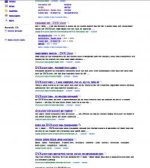
Google Where Art Thou Default Font.jpg
 
well there's your problem... the fonts are too small... can't read a damn thing!

(got a bigger screen shot?)
 
If you go into your browser preferences there should be an area for "default font"
In firefox its under Preferences, content.
 
well there's your problem... the fonts are too small... can't read a damn thing!

(got a bigger screen shot?)

Oh. You have solved it Jon Starr! +1. ;)
Looks like DVXuser has downsized my image. The recession has finally reached us here in our bubble.

Here it is: http://i252.photobucket.com/albums/...oogleWhereArtThouDefaultFont.png?t=1292914973

And its not just google, it seems like anything that uses that specific font name (which I have no idea of) it uses another font. Or maybe the system font got overwritten.

Edit: This happens in Safari, Firefox, and Chrome.
 
Is this happening on all of the websites you visit? or just google?

Not all of the websites. Just, certain parts of it. My assumption is that when a specific font is called up, its picking up the wrong one. Maybe the original was overwritten.
For example, DVXuser is exactly as it was before.....except for one minor thing.


Screen shot 2010-12-20 at 11.12.32 PM.png

And the dreaded font strikes again! (Although it doesn't look too bad on dvxuser for that one button, hehe.)

Just found it somewhere else:
Screen shot 2010-12-20 at 11.19.02 PM.png
 
Last edited:
go into your applications, font book. Make sure you have the font "Times" (seems to be the default mac font)
in case it got corrupted and also take a look in safari and firefox under preferences to see what it's saying is the default. (It should be "Times", least it is on the macbook im on right now)
 
go into your applications, font book. Make sure you have the font "Times" (seems to be the default mac font)
in case it got corrupted and also take a look in safari and firefox under preferences to see what it's saying is the default. (It should be "Times", least it is on the macbook im on right now)

Fixed! Deleted all my fonts, than copied the system fonts folder to my users fonts folder.

Thanks for the help guys. :)
 
Back
Top