GH4 GH5 V LOG Proper Exposure

Hey all,

I've been searching around for an answer to this, but I was wondering if anyone could shed light on the proper exposure for V Log on the GH5. I used V Log on the GH4 and remember that stopping up 1-2 generally provided better results than 0. Is this true for the GH5, too? I have not been able to get my hands on another copy of V Log yet, so I am unable to do any tests.

Thanks!
 
Well from my experience, shooting in log with Canon log 2,usually the skin tones should be within 45-60 IRE. Black around 12 and highlights clip at 88~92. Since its log your waveform should be within those confines but as long as you expose the subject properly, the highlights will take care of themselves. Slightly overexposed and bringing it down is alot better than underexposed footage.
 
Hey all,

I've been searching around for an answer to this, but I was wondering if anyone could shed light on the proper exposure for V Log on the GH5. I used V Log on the GH4 and remember that stopping up 1-2 generally provided better results than 0. Is this true for the GH5, too? I have not been able to get my hands on another copy of V Log yet, so I am unable to do any tests.

Thanks!

Looked better in terms of what? 1-2 stops over is not a rule. It was a suggestion by some people that wanted less noise. There are those who are appalled by noise and grain. There are other seasoned professionals like Shane Hurlbut and Barry Green who advise against shooting over. Barry feels shooting V-log at 0 is the most balanced and he is right. Shane thinks a stop under is the sweet spot and he is also right. So are those that think a stop over is better.

When it comes to exposure like this there isn't a hard rule. You shoot what looks best to you just like there is no hard rule how a movie should be graded. All methods of exposure have pros and cons. Shooting over means a very thin range for the highs and potentially blowing out highlights which is typically a signature look of lower dynamic range cameras. Shooting at 0 or -1 may have more noise but the colors can be more accurate and you get a more balanced dynamic range between the highs and lows.

There is an endless debate over ETTR and really it comes down to the personal choice of each shooter and how they prefer their image to look. ETTR is not a perfect end all magical solution however. It only really helps with noise but while doing that it sacrifices other aspects of the image.
 
Looked better in terms of what? 1-2 stops over is not a rule. It was a suggestion by some people that wanted less noise. There are those who are appalled by noise and grain. There are other seasoned professionals like Shane Hurlbut and Barry Green who advise against shooting over. Barry feels shooting V-log at 0 is the most balanced and he is right. Shane thinks a stop under is the sweet spot and he is also right. So are those that think a stop over is better.

When it comes to exposure like this there isn't a hard rule. You shoot what looks best to you just like there is no hard rule how a movie should be graded. All methods of exposure have pros and cons. Shooting over means a very thin range for the highs and potentially blowing out highlights which is typically a signature look of lower dynamic range cameras. Shooting at 0 or -1 may have more noise but the colors can be more accurate and you get a more balanced dynamic range between the highs and lows.

There is an endless debate over ETTR and really it comes down to the personal choice of each shooter and how they prefer their image to look. ETTR is not a perfect end all magical solution however. It only really helps with noise but while doing that it sacrifices other aspects of the image.

Thanks to you all. I have found this to be true depending on what I'm shooting, but I wanted to be sure I wasn't going to be breaking any cardinal rules of v log on the GH cams. I'll report back with my humble opinion once I get it installed. Cheers!
 
Pushed Panasonic to add False Color to the GH5, even if it meant getting rid of Waveform, &/or Vectorscope. Would have made determining the proper exposure for V-Log, or Rec. 709, so much quicker, & more intuitive.

When I work with Log C, or SLog, I'll look at the waveform if there's time, but live by False Color.
 
Well from my experience, shooting in log with Canon log 2,usually the skin tones should be within 45-60 IRE
Just as a point of reference, VLOG-L is not like Canon's or Sony's log curves, and should not be exposed as such. What may work for other curves such as Canon Log 2, won't work properly with VLOG-L, because the split between over & under is radically different on VLOG-L as vs. other gammas. Using the basis of 42 IRE for middle gray (which is "proper" exposure as per what VLOG-L was designed for) that would put the darkest skin tones down around 42 IRE, and the fairest/brightest peak skin tones at no higher than 55 IRE, for example. You wouldn't expose skin at 60 IRE in VLOG-L, because white is rendered at 61 IRE! That's why I say VLOG-L is very different from other LOG curves, and rules that work with other LOG systems are not properly applicable to VLOG-L.
 
Last edited:
Pushed Panasonic to add False Color to the GH5, even if it meant getting rid of Waveform, &/or Vectorscope. Would have made determining the proper exposure for V-Log, or Rec. 709, so much quicker, & more intuitive.

When I work with Log C, or SLog, I'll look at the waveform if there's time, but live by False Color.

Amen to that!
 
Just as a point of reference, VLOG-L is not like Canon's or Sony's log curves, and should not be exposed as such. What may work for other curves such as Canon Log 2, won't work properly with VLOG-L, because the split between over & under is radically different on VLOG-L as vs. other gammas. Using the basis of 42 IRE for middle gray (which is "proper" exposure as per what VLOG-L was designed for) that would put the darkest skin tones down around 42 IRE, and the fairest/brightest peak skin tones at no higher than 55 IRE, for example. You wouldn't expose skin at 60 IRE in VLOG-L, because white is rendered at 61 IRE! That's why I say VLOG-L is very different from other LOG curves, and rules that work with other LOG systems are not properly applicable to VLOG-L.

This is a quick DVX200 VLOG-L test using Barry’s exposure suggestions and the Varicam LUT. https://vimeo.com/208667381
 
I don't have V-LOG L for the GH5, but I did extensive testing on the GH4. The overexpose advice makes no sense unless your thing is the milky-shadow hipstermatic "film" look. The curve is already biased towards the shadows, and guess what, we don't watch shadows.

Exposing properly – or -1 stop for situations requiring extra highlight protection – is the way to go for overall best possible PQ. If your number one concern is shadow noise, this is the wrong profile on the wrong camera.
 
Exposing properly – or -1 stop for situations requiring extra highlight protection – is the way to go for overall best possible PQ.

From my limited time with V-Log on the GH5, I have to agree. It seems to me you can't treat the GH5 like a super GH4. It's almost a different camera and the old rules/suggestions don't apply. Don't over expose.
 
I do not see any difference in the advise for v log l and s log2/3 really. The general rule is to use the native iso, and apply white or gray cards to adjust the a waveform or zebra. The points of 50% and 90% are defined in the white papers and wellknown. If one wishes to reduce noise a typical approach is to reduce the ISO and stick to these points, if necessary. That is not different for the GH4 and the Shogun, or not different for my FS7 - and why should it be different for the GH5 beside the point that we have now an internal waveform monitor and internal 10bit recording up to UHD 30p/DCI 4K 24p?
 
I do not see any difference in the advise for v log l and s log2/3 really. The general rule is to use the native iso, and apply white or gray cards to adjust the a waveform or zebra. The points of 50% and 90% are defined in the white papers and wellknown. If one wishes to reduce noise a typical approach is to reduce the ISO and stick to these points, if necessary. That is not different for the GH4 and the Shogun, or not different for my FS7 - and why should it be different for the GH5 beside the point that we have now an internal waveform monitor and internal 10bit recording up to UHD 30p/DCI 4K 24p?

The technique isn't different, but the IRE values for midpoint and highlight differ from curve to curve.
 
I do not see any difference in the advise for v log l and s log2/3 really. The general rule is to use the native iso, and apply white or gray cards to adjust the a waveform or zebra. The points of 50% and 90% are defined in the white papers and wellknown. If one wishes to reduce noise a typical approach is to reduce the ISO and stick to these points, if necessary. That is not different for the GH4 and the Shogun, or not different for my FS7 - and why should it be different for the GH5 beside the point that we have now an internal waveform monitor and internal 10bit recording up to UHD 30p/DCI 4K 24p?
What you're quoting is the actual, sane, verified rules, and I agree with you.

What's different about VLOG-L vs. other logs is when we get to the "common advice" nonsense that floats around the web that "you should always overexpose log by a stop or two." That's the part I'm referring to. Whereas people have been able to get away with doing that with other logs that have symmetrical curves (-6/+6 around middle gray) it is utterly terrible advice for VLOG-L (which is asymmetrical, -8/+4). Overexposing VLOG-L by 2 stops would result in a curve of -10/+2! Your skin tone levels would be practically the same level as white.

It's just bad advice and needs to be stamped out.
 
Agreed. Any arbitrary "overexpose by X amount of stops" is just silly and really just shows the repeater's lack of knowledge about how digital sensors work.

Whether people like it or not, there is one surefire way to maximise exposure and dynamic range in any digital camera - Expose To The Right.

Do that and you will ALWAYS keep your highlights intact, and give your sensor the most latitude, as long as you white balance properly first. Then your shadow detail will be as clean as possible and you will see as deep into the shadows as possible, to the limit of the sensor.

I shoot like this 100% of the time with accurate, repeatable results. Yes, this method requires balancing the shots down in post to match what you saw on set. But if you are serious about image quality, you are doing this already. The result is clean, deep blacks with lots of shadow detail, no clipped highlights and a beautiful, filmic image.

Why shoot any other way, unless it's for instant handoff, and even then, it still helps to have your zebras set to ETTR clipping just so you know you haven't clipped your image.

Cheers,

Paul :)
 
What's different about VLOG-L vs. other logs is when we get to the "common advice" nonsense that floats around the web that "you should always overexpose log by a stop or two." That's the part I'm referring to. Whereas people have been able to get away with doing that with other logs that have symmetrical curves (-6/+6 around middle gray) it is utterly terrible advice for VLOG-L (which is asymmetrical, -8/+4). Overexposing VLOG-L by 2 stops would result in a curve of -10/+2! Your skin tone levels would be practically the same level as white.

It's just bad advice and needs to be stamped out.
I agree that that we have to take care with the asymmetrical curves of v log l - what is one of the major points for critisim of V log L since the curves were simply taken from the Varicam curves. So ending up with a asymmetical curve in combination with loosing everything about IRE 81 is not so great for V log L.

But beside that we have to be very specific, I think. According to Panasonic the native ISO for the GH4 is 800 (and the same for the GH5 I think). The dynamic range should have a maximum of the 12 stops with ISO 800. For the log shooting with FS7 a typical advice is to reduce the actual ISO below the native ISO - what reduces both noise but also the dynamic range. For the FS7 it is less important maybe, compared to the GH4/GH5 - due to the higher number of stops (14) but also the more symmetrical log curves both in slog2/3. So to adjust ISO in the GH4/5 for example from 800 to 400 is possible, but will harm the dynamic range. Because what will we do with our beloved white and gray cards (I use the same as shown in the link to Alisters page) - we will still stick to expose to the 42 IRE or 61 IRE. Means, that we will overexpose by 1 stop if we follow that approach. And then we reduce the footage again in the postpro by this 1 stop. So this is one possible form of ETTR - but limited in this example to 1 stop and not exposing as high as possible (until your footage reaches IRE81 and start to clip).


Agreed. Any arbitrary "overexpose by X amount of stops" is just silly and really just shows the repeater's lack of knowledge about how digital sensors work.

Whether people like it or not, there is one surefire way to maximise exposure and dynamic range in any digital camera - Expose To The Right.

Do that and you will ALWAYS keep your highlights intact, and give your sensor the most latitude, as long as you white balance properly first. Then your shadow detail will be as clean as possible and you will see as deep into the shadows as possible, to the limit of the sensor.
But how exatly do you implement the "expose to the right"? One way would be to increase the luminance compared to the approach above, using for example the new waveform monitor in the GH5 (or the Shogun together with a GH4). You can increase the luminance until the signal start to clip at the 81%. No idea where your are compared to the approach where you use a grey/white card - but you use the maximum of the luminance range that is available. So what approach do you follow in detail?
 
According to Panasonic the native ISO for the GH4 is 800 (and the same for the GH5 I think). The dynamic range should have a maximum of the 12 stops with ISO 800.

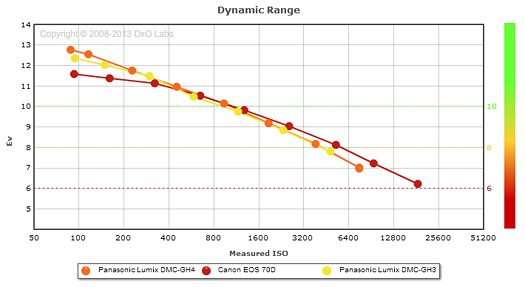
DXOMARK found this not to be true. The GH4's dynamic range is maximum at the lowest ISO. I've found this to be true and always shoot the GH4 at ISO 200 whenever possible. I wish you could shoot at 100 in video mode, but only possible with stills.
ZGH4DR1-525.PNG
 
But beside that we have to be very specific, I think. According to Panasonic the native ISO for the GH4 is 800 (and the same for the GH5 I think). The dynamic range should have a maximum of the 12 stops with ISO 800.

I'm not sure Panasonic has ever officially stated what the native ISO is of any camera. I think that was projected from other users based on their experience with other cameras. Even if the native ISO is 800 that doesn't mean the dynamic range has to follow that.
 
800 is what one find in the net - but you are right: I have not seen that published by Panasonic. By the way, that is something that is not great too. We have the same situation with Sonys FS7 - where a lot of people talk about a native ISO of 2000 in the CINE EI mode, but a lot of usere report that this is wrong.

It would be great if the industry would publish those figures really - since there the dynamic range should achive a maximum.
 
Back
Top