GH4 GH5 Really Impressing Me So Far

Erik Naso

Veteran
It's good to be back in the MFT world and the GH5. I've used the last three and the AF-100 over the years and the GH5 is by far the best by a long shot.

This is a frame grab from todays promo shoot. Shot in Natural -2 Saturation and sharpness at -5. Used Hoya pro ND on the Canon 24-105 with Speed Booster XL. White balance came in at 6000K. I had the new Aputure Tri-8 for a little fill on screen right. Nice light and packs a nice punch. No sun today so bounce was out.

I shot 10 bit 60p HD for 24p playback. Really impressed with the images I'm getting. I'm also shooting with a C300 as well and will intercut the GH5 with the C300. We have a lot more to shoot but i'm really happy with what I captured today and with confidence going forward.

The EVF is really nice on the GH5. I was able to nail focus easily. I do wish the punch in feature worked while recording but the image is really crisp and the colors are so good for a sub $2000 camera.

 

Attachments

  • GH5 60p HD Natural No Grade .jpg
    GH5 60p HD Natural No Grade .jpg
    48.2 KB · Views: 0
Wow, that does look really good. Nice rolloff and color - especially for no grading. I still like my GH4's though. Using Natural more now too on the GH4.
 
GH5... I know right? Great camera... even better when in the hands of a pro. You know you just upped the anticipation for Cinegear another notch. :)
 
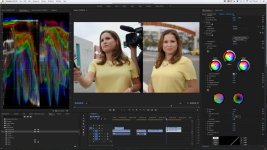
Matching the C300 MKI and GH5 was easier than I thought it would be.

C300 and GH4 Matching in post.jpg

Shot Clog with the C300. In Premiere Pro used Colorista IV and did a simple 5 minute grade. Very close. This is going to be much easier than I thought. Very pleased. Since I shot Log I matched the C300 to the GH5. I could have gone either way.

Matching GH5 and C300 in Premiere Pro.jpg

The 10bit file from the GH5 allowed me to pull down the highlights and still have some color in the blowout sky. In the waveform the overcast sky was flat lining at 100 IRE. As I brought it down RGB started showing up. So cool. I'm barely scratching the surface with the GH5. Now I really can't wait to see what Panasonic has at Cine Gear.
 
Last edited:
I do wish the punch in feature worked while recording

That failure was a big reason I switched form the GH4 to the BMPCC (which not only has FAR better peaking, but can punch in while recording).

I'm waiting for the August 400 Mb/s update before I make a final decision on switching back to Panny, but this is not a good start.
 
Matching the C300 MKI and GH5 was easier than I thought it would be.

View attachment 123320

Shot Clog with the C300. In Premiere Pro used Colorista IV and did a simple 5 minute grade. Very close. This is going to be much easier than I thought. Very pleased. Since I shot Log I matched the C300 to the GH5. I could have gone either way.

View attachment 123322

The 10bit file from the GH5 allowed me to pull down the highlights and still have some color in the blowout sky. In the waveform the overcast sky was flat lining at 100 IRE. As I brought it down RGB started showing up. So cool. I'm barely scratching the surface with the GH5. Now I really can't wait to see what Panasonic has at Cine Gear.

Great stuff Eric! If I may ask why did you shoot Clog on the C300 and not V-log on the GH5? I'm sure you would have been even more impressed with what you could do with the grading.
 
Matching the C300 MKI and GH5 was easier than I thought it would be.

The 10bit file from the GH5 allowed me to pull down the highlights and still have some color in the blowout sky. In the waveform the overcast sky was flat lining at 100 IRE. As I brought it down RGB started showing up.

I've found that in the regular picture profiles there's still chroma information available above clipping. This is using zebras, which only go to 105. But it looks like the in-camera waveform goes to 110.

I agree that the 10bit files are quite malleable. Here's my effort at matching V-Log to Magic Lantern RAW, but I've had good results matching Cine-D also.

https://vimeo.com/216300219
 
Matching the C300 MKI and GH5 was easier than I thought it would be.

View attachment 123320

Shot Clog with the C300. In Premiere Pro used Colorista IV and did a simple 5 minute grade. Very close. This is going to be much easier than I thought. Very pleased. Since I shot Log I matched the C300 to the GH5. I could have gone either way.

View attachment 123322

The 10bit file from the GH5 allowed me to pull down the highlights and still have some color in the blowout sky. In the waveform the overcast sky was flat lining at 100 IRE. As I brought it down RGB started showing up. So cool. I'm barely scratching the surface with the GH5. Now I really can't wait to see what Panasonic has at Cine Gear.

Thanks for sharing. Is it GH5 on the left and C300 on the right?
 
Thanks. I think the GH5 side has a some green issues going on compared to the skin tone of the C300. You will probably be able to bend the GH5 some more to improve the match.
 
Thanks. I think the GH5 side has a some green issues going on compared to the skin tone of the C300. You will probably be able to bend the GH5 some more to improve the match.

No doubt. This was just a quick grade to see how close they "can" get. I spent a whole 5 minutes on it :-D

The C300 had two lights and very low contrast in her face while the Gh5 shot had one light on the right. I pushed the yellow around to match pretty well. Again this is only to show that possibility is their. I'll be grading a few the spot next week and will show the spot when it's done.
 
Last edited:
Thanks. I think the GH5 side has a some green issues going on compared to the skin tone of the C300. You will probably be able to bend the GH5 some more to improve the match.

I have one and i can confirm this. Green or yellow tints often show up - i simply added some magenta in the custom white balance HUE menu and its all handled for me so far.

Back to OP, i also have been enjoying the camera using the Cine-V profile which is good but i have found some "plasticity" in skin tones. The Neutral profile so far has been better.

My main issue with the camera which i was aware of when i bought it - can't punch in the image while recording to check focus. While the gh5 screen is better then the a7sii, if you shoot completely open on a wide lens you can be slightly off. For sit down interviews with shalow depth of field, having a focus monitor is pretty essential.
 
I've found that in the regular picture profiles there's still chroma information available above clipping.
With video levels both chroma and luma can go above 100, this is as designed.
However during color correction luma should be brought into legal while chroma (in YUV) may go slightly beyond legal.

I saw a vectorscope from you on the EOS forum ( I do not post there anymore) and was wondering why your values went out of gamut, I was wondering if the luma perhaps was not yet brought into legal range?
 
I had a temporary node, boosting saturation, on both colour charts so that I could see more clearly what was going on. I disabled this before export.
 
No doubt. This was just a quick grade to see how close they "can" get. I spent a whole 5 minutes on it :-D

The C300 had two lights and very low contrast in her face while the Gh5 shot had one light on the right. I pushed the yellow around to match pretty well. Again this is only to show that possibility is their. I'll be grading a few the spot next week and will show the spot when it's done.

I am sure you will get it to look great. I am kind of torn because I committed to a Sony setup of smaller cameras a year ago. I really like the fact that Panasonic listened and produced a great camera for people. I always want to support this behavior, it just did not work out timing wise for me.
 
Back
Top