
As a former Magic Lantern user I know that there are certain ISO values that should better not be dialed in on Canon DSLRs, because they would increase overall noise floor, even compared to higher ISO values.
After examining the early Neumann Films GH5 footage, I noticed a very subtle vertikal line on the girl's right shoulder (while she is filming the mountain view). Brightness values on either sides of this line were minimally different. But hey, this scene was shot on a pre production model, and I never thought about it again.
With my new GH5 sitting on my desk and Magic Lantern in mind I was eager to find out how different ISO values would effect GH5's noise floor. I put the lens cap on and did a quick recording at Cinelike D, Contrast 0, Sharpness -5, NR-3. In FCPX I pushed the mids all the way up, something you would never ever do in a real world color correction process. I did this just to emphasize and examine the noise. Would there be any ISOs that should better be avoided?
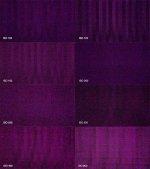
Please note that my findings will most probably not affect the excellent video image quality of the GH5 in real world scenarios. As I stated, nobody would crank up the values like I did in post. When I laid out the Photoshop document, I increased the brightness even further. ISO 200 looks „cleanest“ to me. Looking at the results, it makes me instantly wish that Panasonic would let us use ISO 200 when filming in V-LOG. So I repeated the test in V-Log and was only able to find slight FPN from ISO 640 onwards. Now I'm quite sure that the subtle line in the Neumann footage has nothing to do with it. Damn – I was Pixel Peeping!
After examining the early Neumann Films GH5 footage, I noticed a very subtle vertikal line on the girl's right shoulder (while she is filming the mountain view). Brightness values on either sides of this line were minimally different. But hey, this scene was shot on a pre production model, and I never thought about it again.
With my new GH5 sitting on my desk and Magic Lantern in mind I was eager to find out how different ISO values would effect GH5's noise floor. I put the lens cap on and did a quick recording at Cinelike D, Contrast 0, Sharpness -5, NR-3. In FCPX I pushed the mids all the way up, something you would never ever do in a real world color correction process. I did this just to emphasize and examine the noise. Would there be any ISOs that should better be avoided?
Please note that my findings will most probably not affect the excellent video image quality of the GH5 in real world scenarios. As I stated, nobody would crank up the values like I did in post. When I laid out the Photoshop document, I increased the brightness even further. ISO 200 looks „cleanest“ to me. Looking at the results, it makes me instantly wish that Panasonic would let us use ISO 200 when filming in V-LOG. So I repeated the test in V-Log and was only able to find slight FPN from ISO 640 onwards. Now I'm quite sure that the subtle line in the Neumann footage has nothing to do with it. Damn – I was Pixel Peeping!