GH4 GH4 Settings ignored by Odyssey 7Q+

Kennfilms

Member
I'm finding that the Odyssey 7Q+ is ignoring the contrast and saturation controls, I have set on my GH4. I just did a test - sending out an 8bit HD signal to the Odyssey and recording the same signal internally. The highlights in the Odyssey were clipping far more than the internally recorded video. I was able to clamp down on the super-whites in AE, and get a little more detail - but the internally recorded video still held more highlight detail.

Settings: Natural
-5 Contrast
-5 Sharpness
-5 NR
-5 Color
0/0 Highlight/Shadow

Odyssey is on the Left - Internal GH4 on the Right.
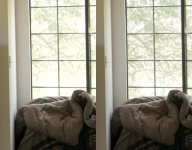
Odyssey (L)-GH4 (R).jpg
Edit: I checked the Odyssey 7Q+ with the GH4 in 4K and the Odyssey appears to use the GH4 settings. I, again, reset everything for standard HD recording and found the Odyssey was either ignoring, or the GH4 was not sending, the settings-adjusted video.
 
Last edited:
The Odyssey7Q+ doesn't know HOW to ignore what the camera settings are; it takes what is sent to it. The only difference possible in HD v. 4K in the Odyssey is Legalizing, which limits the range and cuts off Superwhites. Try this adjustment:

On the Upper Tool Bar, tap the INPUT button (3rd from the left, normally reads something like 1080p 29.97).
A menu should appear on screen.
At the bottom should be the selection LEGALIZE HDMI: ON/OFF.
Whatever it is switched to, try the other one and see if this makes a difference for you.

Some cameras will legalize their output, some will not. Some do it in HD but not in 4K. So we added the control.

I hope you can get the best image possible out of your camera. Once you do, you should definitely switch from 8-bit output to 10-bit. It's worth it.
 
Mitch, the only reason I used 8 Bit - was to record in both camera and Odyssey - understanding that, of course, 10 Bit is better than 8 Bit. Also, my problem wasn't with the legalization of the video signal - it was with an inability to control the signal with the camera settings. Upon further investigation: it appears that this is one of those "intermittent problems" that seems to occur when switching the camera from 8 Bit to 10 Bit or HD to 4K. I experienced this problem, again, today - but cycled the power in the GH4 and that seemed to resolve the problem. As I stated in the previous post - this looks like a camera issue, not an Odyssey issue.
 
Glad you found where the issue lay and how to address it. I was just spitballin' what was otherwise a real head scratcher.
 
No worries, Mitch. You all have a great product and have been very impressed with what I'm able to get out of the Odyssey.

One other thing: Is it possible to shoot .dpx out of the GH4 with the HDMI cable? Every time I try with that setting, I lose the signal and cycling the power for the GH4/Odyssey has no effect.

I was able to shoot .dpx with my EX-1 over HDSDI - with no problems and got a really beautiful image with it.
 
Right - still not having any luck with any of the HD settings being recognized by the Odyssey in .dpx mode. I have, occasionally, seen an image on the Odyssey - nothing I'd want to record, though. Most of the time I just see a black screen with the warning: NO INPUT PANASONIC
The example, below was shot with the GH4 in 10Bit and set to:
1920x1080, 29.98p
Image Sensor Output 23.98p
200Mbps, ALL-INTRA
LPCM
CLIP0000036.jpg
 
Back
Top