GH2 official discussion thread

It is exactly the same unless they use digital cameras and open shutter like "Public Enemies".
It´s just that the camera in a professional movie always follows someone/thing.
Watch such a scene again and look at the background. The background is as jerky/stroby as a on a DSLR.

I had the same thought you have but as I analyzed the cameramovement in movies a lot I found out it´s just very good camerawork!

23,976 is 23,976 on any camera^^
 
It is exactly the same unless they use digital cameras and open shutter like "Public Enemies".
It´s just that the camera in a professional movie always follows someone/thing.
Watch such a scene again and look at the background. The background is as jerky/stroby as a on a DSLR.

I had the same thought you have but as I analyzed the cameramovement in movies a lot I found out it´s just very good camerawork!

23,976 is 23,976 on any camera^^

thanks :)
yea that the logical conclusion i got also, but every time i shoot i get a bit worried.. and i was also thinking that maybe it shows less/more jerkiness when watching on different output sources?
 
On a native 24p TV it should be stroby in a "consistent" way. On a 60 hz Computerscreen it´s more jerky because of the pulldown.
 
thanks :)
yea that the logical conclusion i got also, but every time i shoot i get a bit worried.. and i was also thinking that maybe it shows less/more jerkiness when watching on different output sources?

Well one thing that is not helping is the rolling shutter, as now you've got a whole new motion to the scene that is A LOT more than the shutter effect on a film camera (and it does have rolling shutter effect as well, but it is VERY fast and the edge isn't hard, it's soft due to the proximity to the film, since it is a mechanical process.)
 
On a native 24p TV it should be stroby in a "consistent" way. On a 60 hz Computerscreen it´s more jerky because of the pulldown.

hmmm... i was thinking along that. that's what i'm using most of the time, while on my projector it looks a lot more fluid.
i need to find a native 24p monitor for workflow (are there any computer monitors that can support this somehow?)
 
hmmm... i was thinking along that. that's what i'm using most of the time, while on my projector it looks a lot more fluid.
i need to find a native 24p monitor for workflow (are there any computer monitors that can support this somehow?)

There is only one affordable. Sorry, but I only found a german test
http://www.slashcam.de/artikel/Test/EIZO-Foris-FX2431---Referenzklasse-unter-1000-Euro--.html#Einle

I had a look at this monitor at the store I buy my equipment and it´s more than great. Very good contrast and smooth at every common framerate.
 
There is only one affordable. Sorry, but I only found a german test
http://www.slashcam.de/artikel/Test/EIZO-Foris-FX2431---Referenzklasse-unter-1000-Euro--.html#Einle

I had a look at this monitor at the store I buy my equipment and it´s more than great. Very good contrast and smooth at every common framerate.

funny, i think my friend told me about this one.. couldn't tell how much it cost

that's better :)
http://www.trustedreviews.com/monitors/review/2009/08/10/Eizo-Foris-FX2431---24in-Monitor/p1
 
Last edited:
Yeah 1/50th would be ideal. After a quick test I can pretty much get the band to show at 1/50th at the same place from iso 400 upwards using extremely bad lighting. Gets less obvious as you go down the isos.

I have a North American (Canada) NTSC GH2 and I dont have any of the horizontal banding. I have filmed in all shutter and iso's ranges with different lenses and f stops, under and over exposed, and different film style modes. over cranked and under cranked plus ETC. All seems good to me so far.
 
I have a North American (Canada) NTSC GH2 and I dont have any of the horizontal banding. I have filmed in all shutter and iso's ranges with different lenses and f stops, under and over exposed, and different film style modes. over cranked and under cranked plus ETC. All seems good to me so far.

this starting to get weirder by the minute
 
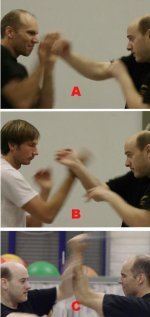
Interlace-Progressive Test

Interlace-Progressive Test

I have a little test here for you.

i have filmed tonight during martial arts training in differnt modes.

Then I have taken 3 stills out of the films.
One from 720/50p, one from 1080/50i and one from 1080/24p

Each with a shutter speed of 1/50

I have marked them A,B and C.

Please try to tell, which is from 50p, which from 24p and which comes from an interlaced source.

progrressiv-Interlace.jpg

Good luck and I am curious, if you find it out.
 
I have a little test here for you.

i have filmed tonight during martial arts training in differnt modes.

Then I have taken 3 stills out of the films.
One from 720/50p, one from 1080/50i and one from 1080/24p


Each with a shutter speed of 1/50

I have marked them A,B and C.

Please try to tell, which is from 50p, which from 24p and which comes from an interlaced source.

View attachment 26695

Good luck and I am curious, if you find it out.

Ummm, first of all, you need to at least use the lowest resolution of the 3 being 720p. You've shrunk the pictures down so much, you've covered up any issues. Sure, I can take pictures from ANY camera and make them 1x1 pixel and you can't determine which is which :)
 
I'll bite :)

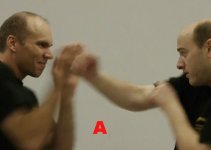
A) 1080/50i
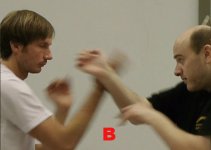
B) 720p
C) 1080/24p

I could be completely wrong (read, probably am), but the blur from A looks like when you combine interlaced frames. B and C slightly harder to discern, as they're quite different and the detail in the hair in B is a bit of a red herring I think. The only thing that makes me think C is 24p, is the fact that in cinema mode the tonal curve seems to be quite different to shooting FSH and SH, and it does look really different.

EDIT: When I looked at the original, you'd not posted an attachment to the larger file. I'll still stand by what I said though :)

EDIT 2: In fact, it was just me being a muppet and didn't click on the image in the pop up screen.

EDIT 3: By the way, if you want to keep the guessing going, feel free to PM me. I won't say nowt.
 
Last edited:
f3.5 1/50 with indoor lighting will require ISO 800 if it's a well lit room. Otherwise likely ISO 1600 will probably do. I'd say through the range of f3.5-5.6 ISO 1600 would be safe bet indoors at 1/50....which I can happily report the GH2 is excellent at.
 
Not really, all 3 pictures are a lot larger and I have only cut out the relevant moving part.

Then I have cut them to roughly the same size.
Originally the picture of the 3 is larger, but the forum software cut it down to the size you see.

OK, here are the pictures single I hope larger in size.


A.jpgB.jpgC.jpg

Klick on the pictures and see them large.
 
I know its alot to ask but any chance you could shoot a short clip 24p highest settings, 1/50th shutter, 3200 iso, bad indoor lighting, underexposed, leave it on 1/50th shutter for 10 seconds and then slip upto 1/100th shutter slowly and make the mts file available. If its not there I guess we have GH2's that dont have it and those that do. Or maybe theres a little setting somewhere that you have set different than ours that stops it occuring. This would help clear things up abit. If not would love to see footage from anyone else that doesent have it. Please note this is a nasty test that no one would ever shoot under but is the best test to highlight if you have the line or not and would make the line show immediately. It would be great if you could do this for those of us that might have faulty cameras as it might help our case.

Heres an exmaple of the bug http://vimeo.com/17281822

Heres an a real world example of it happening http://vimeo.com/17369205

Thanks to memphishills for shooting the clips.

Also would be good to know if you shot in natural or artificial daylight, and if artificial, what type of lighting.
 
Well, I'll guess for the fun of it anyways :) By the way, do all martial arts schools have those big swiss exercise balls? I core train at a Kung Fu / Arnis school and they have like 15 of them :)

A) 1080i50
B) 1080p25 (To me, this frame has the most detail everywhere I look in the image, although it could just be focus issues with moving people)
C) 720p

:)
 
I am new here; hello, everybody.

I noticed an undocumented feature in my Canadian GH2 and the 14-140mm. In 1080p capture, the shutter speed is capped at 1/25 (except the 80% and 160% variable modes, where it is 1/30). However, if I switch to manual focus with M exposure mode, I can extend the shutter anywhere up to 1/2 (I believe it was taking at 2fps, 360-degree shutter, and encoding with the 24H codec).

A question: how do I engage AF+MF (AF override) with the AF Lock button while taking? So far, I only got it to work with a half-pressed shutter release, but that button is so tender that I tend to unintentionally stop recording. The manual is extremely cryptic on the subject of AF+MF.

I am pretty sure I've got the following figured out:
* no AF tracking while taking video
* no switching in and out of Extended Teleconversion while taking
* no AF Assist (magnifier) while taking
* no AUTO option for ISO when shooting in M mode
* no way to lock shutter in open position to permit lenses with real elements protruding more than 8.5mm behind mount flange
 
Last edited:
Not really, all 3 pictures are a lot larger and I have only cut out the relevant moving part.

Then I have cut them to roughly the same size.
Originally the picture of the 3 is larger, but the forum software cut it down to the size you see.

OK, here are the pictures single I hope larger in size.


View attachment 26698View attachment 26696View attachment 26697

Klick on the pictures and see them large.

Wow to be honest I find it really hard to tell from stills, but I'd guess

a) 720p60
b) 1080i60
c) 1080p24

I think I'd have better luck at guessing the marital arts style :) Wingchun?
 
I know its alot to ask but any chance you could shoot a short clip 24p highest settings, 1/50th shutter, 3200 iso, bad indoor lighting, underexposed, leave it on 1/50th shutter for 10 seconds and then slip upto 1/100th shutter slowly and make the mts file available. If its not there I guess we have GH2's that dont have it and those that do. Or maybe theres a little setting somewhere that you have set different than ours that stops it occuring. This would help clear things up abit. If not would love to see footage from anyone else that doesent have it. Please note this is a nasty test that no one would ever shoot under but is the best test to highlight if you have the line or not and would make the line show immediately. It would be great if you could do this for those of us that might have faulty cameras as it might help our case

Your request is on Vimeo


I hope it helps
 
Last edited:
Back
Top