GH2 GH2 Card folders suddenly showing up as .exe files..

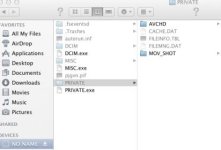
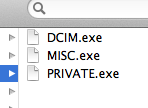
I opened up my GH2 card and for some reason the DCIM, MISC and PRIVATE folders are not showing up as folders anymore. Instead, they are showing up as .exe files that will not open (DCMI.exe, MISC.exe, PRIVATE.exe).

This card & camera has not done this before. The videos & photos play back fine on the camera. I tried to see if FCX or Premiere would recognize them as containing media, neither does. I sure hope I don't lose this footage.

I am on a Mac. The card is a Transcend 32gb Class 10.

Thank You.
 
It's probably a virus. Scan the card with a virus scanner, and make sure you don't put the drive into any PCs without antivirus on them.
 
Can you right click the .exe files/folders and choose Get Info, then physically remove the .exe from the file name?
 
I am on a Mac. The card is a Transcend 32gb Class 10.

Be careful.

Don't do anything with the card other than trying it with another computer, Mac or PC, doesn't matter. If the folders return to normal, then backup the original Mac and do a clean OS install.

The fact that the footage plays in camera most probably means the content is intact.
 
^ "be careful" about what?
Why should do a clean os install?
Everything else is operating normal, even other SD cards. It's just this one. But unfortunately its footage I need.
Also, the card has never been in another computer nor does it have any hacks riding along.
 
Can you right click the .exe files/folders and choose Get Info, then physically remove the .exe from the file name?

I just tried this. I was able to take off the .exe extension. But it still thinks its a .exe file and not a folder. Grrr.. mucho frustration.
GH2exe.jpg
 
Problem Solved! Thanks folks!
I was searching more specifically within the GH2 realm and was coming up empty. Regardless, yes.. the .exe files were bunk and the real files were hidden. I ran the thing in Terminal where you can view hidden files and found my footage. Thank you again!Screen Shot 2013-03-30 at 8.42.35 PM.jpg
 
Back
Top