GH13 GH13 Slow Motion - Looking for tips using my existing GH13 footage

zorkiii

Member
Hello, I have some clips I recorded last night that I want to make into slow motion. I used my GH13 with the blackout powell patch, using AVCHD, FHD settings. I accidentally rolled my shutter speed back to 80 it looks like when I recorded the clips, I read a few threads here that recommended 125 for slow motion. I'm not able to recreate these clips easily and am hoping I can get away with using what I have.

I use Sony Vegas and After Effects, wondering if anyone has a few tips with slowing down footage recorded at these settings? I used this patch and settings based on a previous thread here, however I didn't see any threads that explained the process of slowing the footage down.

Also for anyone interested, here's one of the test clips I uploaded to check out what the settings of the footage were, if you feel like helping in a direct way, I would be ever so grateful.


It's the 00005.mts file in the folder there.

Thanks for any help, hoping to get a little further with some tips from users with some experience with this.
 
Last edited:
You didn't mention the speed you shot at or the speed you want it played...

Bring it into AE.
Use the Time Remapping or speed change.
Render out.
 
I'm pretty new to the GH13, as far as speed goes I just used the AVCHD FHD settings, using the blackout powell patch. In ptool I just used the standard "b" settings that came with the patch, and put it on a card and loaded it. The properties of the clip in Vegas show as 23.971 fps progressive, 1920x1080x12, AVC.

I don't have a target speed in mind, but looking for something between 2 to 4 times slower.
 
You should shoot 60fps for slo-mo.
Then edit @ a slower speed.
If you shot 24p, you don't have anywhere to go down...
 
You can use timewarp plugin or pixel motion in after effects to generate fake "in between" frames as if you shot a higher fps, or 3rd party plugins like twixtor.

But things like sparks and fire don't interpolate very well, because the motion is non linear and non predictable. You will get morphing edge artifacts and it's very unlikely that you will get good results . Only certain types of shots work well for interpolation

When you shoot higher fps, every frame is "real", so you don't have those side effects. You would have to shoot 96 fps for 4x slow mo, 48fps for 2x slow mo
 
Thanks for the info. There is little I can do with this footage it looks like. I'll have to set these shots up again with the right settings.

So just to clarify, do I need to set custom settings in ptool to get 60p? Or do I just select the MJPG settings in the camera? This must be frustrating to those of you who understand this stuff to see questions like this, but I am struggling to get a grip on how to set it to 60p, as it doesn't appear to say that anywhere in my camera menus.
 
Thanks videoatlanta, I understand the camera can do it, I'm just not certain how to set it to 60p before I shoot.
 
Looks like the AVCHD mode it the one you can do 60 p with:

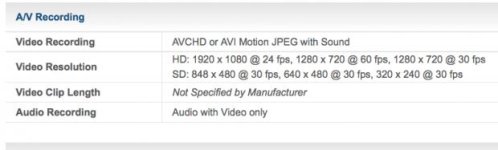
Motion Image (AVCHD) NTSC NTSC: [Full HD] 1920 x 1080, 60i (sensor output is 24fps)(FHD: 17Mbps) [HD] 1280 x 720, 60p (SH: 17Mbps, H: 13Mbps, L: 9Mbps)
 
So just to clarify, do I need to set custom settings in ptool to get 60p? Or do I just select the MJPG settings in the camera? This must be frustrating to those of you who understand this stuff to see questions like this, but I am struggling to get a grip on how to set it to 60p, as it doesn't appear to say that anywhere in my camera menus.

PTools do not have much with 60p footage. You'll have to switch to 60p mode on your camera. I think that only FHD records at 1920x1080p25 (50i wrapper), but other (SH, H and L) record at 720p50 or 720p60 (PAL). I am only 90% sure, since I was/am using only 1920p25 mode (50i wrapper).
Mpeg, as far as I know (I never used it) takes footage at 30FPS and not 60FPS.

You cannot get good results on a footage similar to yours where you have very rapid motion AND/OR "flashes" like on your footage, where, due to CMOS sensor and "flash", you get half of the frame bright and the other half dark.

You can try the following AviSynth script, but the result is not ideal (although part of the footage is quite good):

---
DirectShowSource("00005_zorkiii.MTS")
AssumeFPS(25, 1, true)
ResampleAudio(48000)
super = MSuper(pel=2)
backward_vec = MAnalyse(super, isb = true)
forward_vec = MAnalyse(super, isb = false)
MFlowFps(super, backward_vec, forward_vec, num=50, den=1, ml=100, blend=false) # get 50 fps
AssumeFPS(24, 1, true)
ResampleAudio(48000)
---

You will need to put mvtools2.dll in a plugins folder of AviSynth.
 
Thanks all. I just used the AVCHD SH setting in the camera, took some footage and put it on my computer, it says it's 59.940 fps progressive, 1280x720x12, AVC. That's the one I want.... right? I mean as far as the frame rate goes.
 
That's the one I want.... right? I mean as far as the frame rate goes.

Exactly! Then you can simply get 24 FPS by using the following script in AviSynth:

DirectShowSource("your_60FPS_clip.MTS")
AssumeFPS(24, 1, true)
ResampleAudio(48000)

There must be many equivalent solutions with pro video SW, but I trust the above method more, since I always know what has been done to the clip.
 
Um ..... If I recall correctly the Gh1's sensor is not running at 60fps, so although 60fps is available in the menu I fairly certain there won't be 60 unique frames or fields per second.
 
I fairly certain there won't be 60 unique frames or fields per second.

This is correct for 1920x1080 AVCHD mode. However, in 1280x720 AVCHD mode it should take 60 (50) different frames per second, except when using some of the patches which decrease framerate to 30 (25) unique frames in order to increase stability. I think 100Mbps patch is the representative of such a patch, but I am not 100% certain, since I'm using 75Mbps patch. Lpowell?
 
Sorry, my mistake. I knew the GH2 (which I have) has double the sensor scan rate of the GH1, but I now see that it scans at 120Hz .... so the GH1's sensor is indeed 60fps capable.
 
Back
Top