Gh1 with External Monitor Possible? Flip-out screen enough?

Nityananda_SCSMath

Active member
To what extent can you use an external monitor with a GH1 or hacked Gh13? (Please link to/explain how to do it.)

And for those of you using the GH1 without a monitor, how difficult is it to use with just the flip-out screen for focus/exposure/etc. ?

I am partly considering the Canon T2i simply because I can easily use an external monitor with it, although I'd rather have a GH1 to color match my HMC150 (and because I'm inspired seeing some people's work (like kholi) here on DVXuser)

Thanks for your advice.
-Chris
 
All covered in previous threads. There is no way to get the HDMI out while the camera is recording, only play back. They are trying to hack it but who knows.

If you hold down the trash can bin I believe you can get regular video out but again, not during recording.
 
Yes I had read that before, I was hoping there had been some new developments.
I need to figure out how to atleast have "regular" video out while framing/focus to set up the shots.


So using the flip out works well enough for you?
 
The flip out screen is small but gives a more easily focused image than the back lcd screen on my Canon 5D2.
However ALL small lcd screens are virtually useless in bright sunlight. To cope with that I've got 3 products from Hoodman
1: A small Hoodman HD300 folding cover that provides some help. It's a fraction small and therefore obsures the on-screen info text.
2: Another slightly larger screen, the H300 fitted with a 2x magnifier...they call this the H-3C. This works well in shady conditions.
Neither of the above will really suffice in really bright sun however, so then I go for
3: a modified Hoodloupe to which I fit a UK made eyepiece shroud that screens the viewing magnifier on the Hoodloupe.
All 3 of these are fitted with velcro side strips and additional rubber elastic to the flip out screen. Do note that their weight will cause the lcd to drop down easily.

Even semi-pro video camera users, such as those with Sony EX1-3s, have trouble using small lcd's in bright conditions, but then 'proper' video cameras also have optical viewfinders that are easier to use than the GH-1's.
My 5D2 however copes because I can run a Small HD1 monitor, which has a bright screen and a well designed canvas hood.
David
 
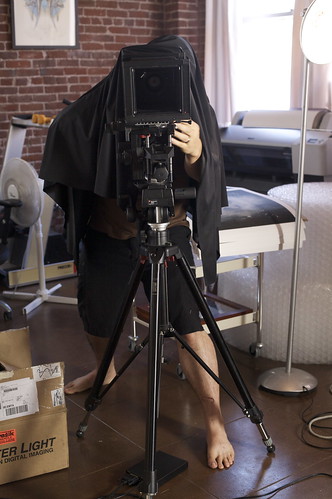
I have this thing I call a black tee-shirt.... I put it over the camera and my head when I need to see the lcd in bright sunlight.

Regular ones are about $5 each, but if you want a special custom one that says 'official gh1 light blocker kit" that will be $550.00
 
Last edited:
I have this thing I cann a black tee-shirt.... I put it over the camera and my head when I need to see the lcd in bright sunlight.

Regular ones are about $5 each, but if you want a special custom one that says 'official gh1 light blocker kit" that will be $550.00
Does hat go over or under T-Shirt?

I guess these will be making a comeback soon

2775541162_40084e167b.jpg


For a more discreet look you can use the viewfinder, which has higher resolution and actually works when recording (no mirror).
 
Hat goes over. Must stay stylish when shooting.

Does the viewfinder really have higher resolution? Doesn't seem like it.
 
Last edited:
Oops, that's what I meant.. does the viewfinder have a higher resolution.. it doesn't seem like it. it's too uncomfotable too to be squinting in that thing all the time. I use it every now and then to double check when in bright light, but a full monitor solution is desperately needed. I am probably going to do what I have heard some others do and buy a cheap $100 panasonic blu-ray player with the card reader, and then bring a nice 24 inch 1080 monitor and just check takes on that after. Still a ***** pulling a card in and out of the cam but better than having to reshoot something later.
 
Sounds like an effective workable option for some situations and just not an option for other situations.

But so is the flip-out screen good enough for critical focus or not??
 
Oops, that's what I meant.. does the viewfinder have a higher resolution.. it doesn't seem like it.
LCD has 460,000 pixels vs viewfinder's 1,440,000.
it's too uncomfotable too to be squinting in that thing all the time. I use it every now and then to double check when in bright light, but a full monitor solution is desperately needed. I am probably going to do what I have heard some others do and buy a cheap $100 panasonic blu-ray player with the card reader, and then bring a nice 24 inch 1080 monitor and just check takes on that after. Still a ***** pulling a card in and out of the cam but better than having to reshoot something later.
Well, might as well playback from the camera then.
 
One thing to note on the t2i and 5D2 is that you don't get the same resolution during record. The 7D, which I have, does. The other cameras switch to 480p and it's useless at that point in terms of quality versus the LCD.

I have a smallHD monitor, but I really only use it when I am doing shots where the camera is facing up at ground level or on a boom. I also use the zoom feature to set focus before recording.

I say this because if you aren't going to get the 7D, then really, the GH1 has a better LCD from what I have read than any of the Canons.
 
You can get critical focus on the LCD using the magnifier, but keeping it in focus one you started shooting is a completely different ball-game. I would say that NONE of the LCDs on ANY DSLR type camera OR current crop of HD camcorders are good enough for maintaining critical focus of HD on their own. While it's possible to approximate the focus, without an external monitor or other focus assist you can't be sure until playback.
 
Back
Top