GH1 IDA Pro database research

I am working on third-party patches support for pTool.
But it is not ready yet.

Do you want to add all this constants?

Code changing around constants on right screenshot is used in preset bitrates as far as I remember.
 
Actually I'm more interested in the first one (the one with only two constants). If you add all of them, though, I'll run them through their paces.

Am I right in understanding that the constants on the right are changed according to Presets changes, but not the ones on the left? Which ones? I don't recognize any of the numbers from PTool.

Chris
 
Last edited:
Download PTool, all constants added (plus one more 234 constant, used in loop).

As for Preset bitrate, you can see that it is 234 by default :) Actually it also involves code changes so always only this option (from all set) will be used.

 
I also suggest to look at this
"cmp 0x12D, D0" - slightly above right screenshot.
If D0 will be larger it jumps to set error code (as I understand).
Same comparison is right before this error set location.

Really I do not believe that something very useful can be done changing this constants only (as they are selected based on some bitrate related things, again, look at part above).
 
Download PTool, all constants added (plus one more 234 constant, used in loop).
Vitaliy, could you add the latest GH1 AVCHD Research patches to the GF1 side of PTool as well? I've gotten several requests for a GF1 version of the 50Mbps AVCHD Fast Action Patch, and these patches are what I need to support the GF1 as well as the GH1.
 
Vitaliy, could you add the latest GH1 AVCHD Research patches to the GF1 side of PTool as well? I've gotten several requests for a GF1 version of the 50Mbps AVCHD Fast Action Patch, and these patches are what I need to support the GF1 as well as the GH1.

And more specifically? Which ones do you need?
 
Vitaliy,

I've been digging deeper into the video plug-ins. Here are my findings so far:

Video_Encode_Plugin is for FHD mode. I'm fairly certain about this.

Video_Encode_Plugin_0 is for SH, H, and L modes.

The new patches I asked for appear to be P frame quality settings. If I raise them too high the codec appears to run out of steam easily with big P frames and then eventually empty P frames right before the next I frame. The I frames also appear to be a little too small, like they have been robbed of bitrate allocation. Interestingly, though, the codec appears to only make the last P frame empty - like a GOP value calculation used for individual frame size is off by 1 frame. I think the "pulsing" is caused by this. Making these smaller seems to eliminate empty frames (or, at least reduce their frequency). When I doubled their value absolutely every last P frame before an I frame was empty when shooting a detailed static scene. Also, up until the empty frame the P frame sizes increased the closer they got to the end of the GOP. Without increasing these numbers the P frame sizes were pretty consistent (flat).

It's the video encoders that appear to be assembling the raw stream for the Mux, including audio. There are a couple of subroutines in them that call the audio encoder.

Native mode still crashes with a write error. A couple of times, however, there was no crash but the MTS file contained invalid packets. This leads me to believe that we are seeing a buffer overrun caused by an inadequate buffer allocation for full 1080p frames vs half 1080p frames (or, maybe full 720p frames). I'm going to study the invalid frames to see if I can determine anything about the data in them - they appear not to be video data of any kind, they are something else.

It appears that pulsing and crashing aren't related - they are two separate issues.

Chris
 
You can also try to look at frame slices.
As I understand, encoder do not know about 1080p mode, so use slices sizes for 720p, making too many slices in one frame.
 
Vitaliy,

I did a deep disassembly of the video encoding routines and I think I found the Native patch problem. As I suspected, there appears to be a buffer overrun condition. As far as I can tell the codec's encoder basically deals with either full 720p frames of half 1080p frames. Unfortunately, the routines that process each frame, or half frame, when doing quantization (the 52 entry quantization table - which is standard AVCHD stuff), use a statically allocated buffer (I have attached a screenshot of the location). This means that the maximum frame size it can deal with is 897,152 bytes before it overruns the buffer. Correspondingly, that means the largest 720p, or 1080 Native p frame is limited to this. I believe that when a 1080 frame is wrapped, these routines operate against half frames, which means a total 1080p frame can be twice as big as long as it is not Native p.

In other words - I think we are screwed with the Native option checked if any single frame gets bigger than 897,152 bytes. Sorry for the bad news.

Chris
 

Attachments

  • Loc1.jpg
    Loc1.jpg
    16.2 KB · Views: 0
Last edited:
It sounds like this puts a limit on the maximum size of any single 720p frame as well. I take it that the max bitrate per frame is then 7,177,216?
 
I'm not sure what you mean - bitrate is per second, so I'm confused.

I think I understand, you're asking the maximum size in bits - right? That won't really translate to a bitrate because I frames are almost always considerably bigger than P frames. That translates to a 54MBs(that's Bytes) rate if it were sustained.

Both 720p and 1080 routines use the same buffer, so you're correct in that assumption.

Chris
 
Yes, bitrate is the wrong term, I was thinking of the max number of bits allocated to an individual frame. I think this is displayed in the Y-axis scale in Stream Parser? Though I've seen P-frames that were larger than the preceding I-frame, I'm not sure whether P-frames have a lower max size limit than I-frames?
 
As I remember there were a couple of constants that affected max I frame size. The problem is that lowering them affects I frame quality. I think this means that the maximum potential I frame size is effectively cut in half when Native 24/25p mode is checked. I've noticed that there are separate parameters that appear to affect P and I frame sizes - I'm not sure there is a hard limit, though.

Chris
 
block at 9C024F8 - size of that block is small, loop by D2 ended at 0x30, size=word, so 0x60 bytes
 
Last edited:
Good call! I think you're right - I was looking at the wrong reference. Maybe we aren't screwed after all.

I've tried to identify all RAM buffers, and this is the largest one. Have you found any RAM locations not accounted for in the segments? This is the largest buffer I could find. Do you have any opinions as to where frames might be buffered as they are processed by the codec for output?

Chris
 
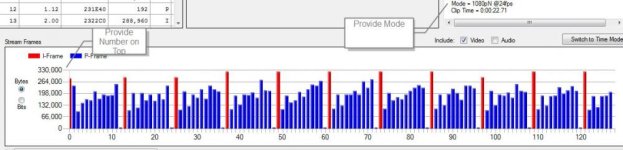
I need a little help. Attached is a screenshot from a clip. If any of you have saved any test files I would like some information: the Mode, and the maximum frame size - you don't actually have to give me the actual frame, just the highest value on the left hand scale (in bytes). I've attached a screenshot showing what I mean. For that clip it would be "1080pN @24fps, 330000".

I'm primarily interested in the highest numbers you've seen so I can determine where the buffer fails. Also, sometimes Native clips will fail, but the camera doesn't lock up, producing corrupted files (the Check File feature in Stream Parser will diagnose this when you load the file) - if you have any of those I'd like that information too (just that it failed, I don't need details).

Thanks,

Chris
 

Attachments

  • Help.jpg
    Help.jpg
    45.2 KB · Views: 0
I have a top value of 540,000 with a 1080 @ 25 fps clip.
Table values
663 52,00 6B0FAC0 537.216 I
(676 53,00 6D1A600 512.640 I)

File: H:\LumixGH1\20100920_Hack\00011.MTS
Size = 133.066.752 Bytes (693.056 Packets)
Stream: Max Speed = 110.297.900 bps (Buffer Required = 104.783.000 bits)
Mode = 1080p @25fps
Clip Time = 0:00:31,73
Max GOP Size = 2.762.688 Bytes (22.101.504 bits)
 
Last edited:
Back
Top