GH1(3) DNxHD and TMPGng for pulldown

Soldier

Well-known member
Does anyone pull down their 1080p MTS files with TMPGng 4 using the DNxHD codec? I've tried it and it seems to work but I want to make sure I've got my workflow right. I've attached some screengrabs of my workflow because it is just easier that way. I work in either PAL (pulldown from the 50i wrapper to 25p) or NTSC (pulldown from the 60i wrapper to 24p) depending on the job.

My workflow is this:
1. SOURCE TAB: select an MTS file.
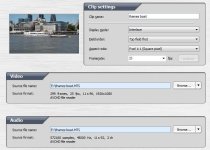
Clip settings.jpg

2. Choose .mov and DNxHD output format
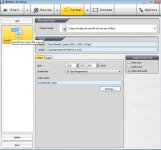

format.jpg

3. Use these settings. I'm not sure whether I should convert to 701 or RGB?
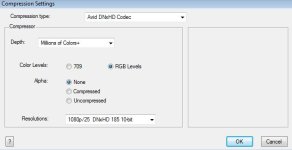
compression.jpg

Then encode it, import it into Avid (where I'll have to do another conversion to an MXF).

Does this look about right? Is there an easy way to check if it has been converted to Native progressive?

Thanks!
 
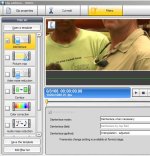
To Deinterlace you need to go back to Source menu, click on filters, enable deinterlace and select the type of deinterlace you require.

solder.JPG
 
Last edited:
Thanks for that. Which deinterlace method do you use? interpolation - adjusted? or inverse pulldown?
 
Depends on the footage. Try them all see what you prefer. I use convert to 50p a lot, but interpolate - adjusted is the default and works ok on low to medium motion in the clips. Lot's of high motion, i use convert to 50p
 
I didn't know there was a number of ways you could deinterlace. I thought a pull down was different from deinterlacing. My understanding is that the MTS 24/25p (not Native) was wrapped in the 60/50i but wasn't an interlaced file made up of 50 odd and even frames. I thought that is why it looked like progressive footage and not like normal 50i/60i. hmmm... I'm so over interlaced files! That's why I quit HDV!
 
Yes 1080 PAL is in interlaced stream, no pull down needed like 24p. That's why i still shoot mostly 720 to get proper progressive without needing to process it.
 
Ok thanks, rambooc1: I'll deinterlace when I use PAL.

Does anyone know which TMPGng pull down settings I would use for 60i-24p?
 
Ok thanks, rambooc1: I'll deinterlace when I use PAL.

Does anyone know which TMPGng pull down settings I would use for 60i-24p?

1. Capture/import
2. Click "Filters"
3. Check "Deinterlace"
4. Change Deinterlace Mode to "24fps special animation"
5. Change Deinterlace Method to "Inverse Pulldown"
 
You're welcome, i love TMPGenc, very underrated program. The noise filter is almost as good as Neat Video.
 
Yes 1080 PAL is in interlaced stream, no pull down needed like 24p. That's why i still shoot mostly 720 to get proper progressive without needing to process it.

It's 25p in an interlaced wrapper. Doesn't make it 'not' progressive. If you're in PAL, there's no pulldown required either. Try importing it without de-interlacing - it will still look progressive.
 
Back
Top