GH13 Getting an edited JPG to show on GH1 LCD for frame guides etc?

jrhagan33

Member
Hi,

I'm sure there must be an easy way of doing this that I am overlooking but I can't seem to get a JPG that I have edited in photoshop to then display on the GH1 LCD after being loaded onto the SDHC card.

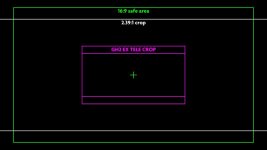
I want to do this so that I have a reference image of frame guides for 2.35:1 and also just to experiment with the behaviour of the RGB histogram.

I have tried taking a still, editing the image and then replacing the EXIF data before loading back onto the camera but these refuse to show on the LCD or will only show the thumbnail image that is encoded in the metadata.

Anyone got a method for achieving this?

Thanks!
 
I'd be curious about this myself.

I do wish camera makers would simply include 1.85 and 2.40 safe action guides in all their models.
 
One way that might work is to open a blank file in your NLE, set it to a solid white color then change the properties to 2:35, render out 10 sec or so then play it in a loop and point your camera at the screen and make sure it's level and record for a bit. That should give you a file that would be close enough.
 
One way that might work is to open a blank file in your NLE, set it to a solid white color then change the properties to 2:35, render out 10 sec or so then play it in a loop and point your camera at the screen and make sure it's level and record for a bit. That should give you a file that would be close enough.

Yeah this is the only alternative I could come up with too, I think Panasonic must use a specific JPEG decoder that won't read JPEGs created in Photoshop which is a bit of a pain! I might try a few other programs and mess around with JPEG export settings to see if I can get anything to work as it would be useful to be able to get images to display back on the LCD for colour reference etc, not just the frame guides.
 
Many digital cameras are very fussy about the EXIF data in images. If any of the required data isn't there, they will indeed refuse to play it back.

I tried to do this using metadata editing, but just couldn't get it quite right.
The solution I came up with was to overlay an image directly onto an original, from-camera JPG image and save it with the complete, original metadata intact.

There's a method I used to make a frame guide for the GH1 / GH2, using an excellent free image viewer called IrfanView:
- Take any photo JPG from the camera (3:2 or 16:9)
- Open it up in IrfanView.
- Find - Edit -> Insert overlay/watermark image. Select file.
- Options - Start corner: center / Overlay transparency: 0% / OK
- Save a new JPG file, increment file number. In options, make sure "Keep original EXIF data" is ticked.

Here's one I made a while ago:
P1180353.jpg
https://picasaweb.google.com/117075...key=Gv1sRgCPXGntCitNfkqgE#5859236722886797682
(To download, select Actions / Dowload photo)
 
Many digital cameras are very fussy about the EXIF data in images. If any of the required data isn't there, they will indeed refuse to play it back...

Ah brilliant, thanks Geoff I'll give this a go when I get home tonight. I was using EXIFER to copy and then replace the metadata in the JPGs before but I guess it was still changing something somewhere along the line which the GH1 didn't agree with!

EDIT: This works perfectly, many thanks for the solution Geoff!
 
Last edited:
Back
Top