Gamma shift when recording to Hyperdeck DNxHD

cuervo

Veteran
I've been doing some quality comparisons of the native FS100 AVCHD capture to a DNxHD capture on a Hyperdeck 2. I'm seeing quite a gamma shift, the Hyperdeck gamma shifting the entire range upwards. Holey moley, is this the Quicktime gamma problem, again? Working with Win7 Pro, I see the gamma shift in both Media Composer and davinci resolve.

Anyone else seeing this?
 
Are you using the new 2.5 beta firmware upgrade? It was just released and adds Quicktime wrapping. Also, does remote trigger work with the FS100 and the HyperDeck 2?
 
Not much help but the original shuttle doesn't do this to the uncompressed quicktime files it creates. Can't you switch to uncompressed in firmware and try and compare?

Looking forward to seeing some results if at all possible?

cheers
Paul
 
I'm using the new 2.5 beta 1 firmware. I do believe the codec used by BMD is using a gamma of 16-235; and, bringing it into Media Composer or resolve is causing it to "remap" to something like 32-215. This looks like the old Quicktime gamma problem.

just realized there's a beta 2 release, so I need to go try that.

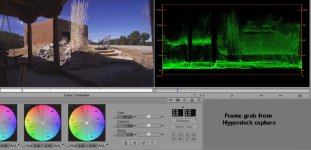
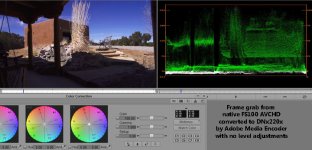
edit: OK, I used the beta2 firmware. I also tried both the raw DNxHD codec and the QT wrapped DNxHD codec. Both variants exhibit a gamma shift that compresses the entire color range. By comparison to native AVCHD footage, it appears that super whites and super blacks are being clipped, as well as an overall compression of the color range.

Hyperdeck_RAW_DNxHD.JPGAVCHD2DNXHD.JPG
 
Last edited:
I've upgraded to the latest beta firmware, beta3, I beleive, and the problem still exists. If you're satisfied with what you're getting, then by all means, stick with it. AFAIK, BMD has not denied nor confirmed that highlites and shadows aren't being clipped. If they are, you're losing information in those areas. If they are not being clipped, what happens when you recurve the gammas so you get an appropriate B&W? Because if you're re-expanding the data too much, you're gonna get that banding you're referencing.

As a side note, converting any 8-bit data stream to 10-bit will get you nothing on the conversion. BUT, having said that, 10-bit will grade with finesse, while 8-bit will collapse fairly quickly. Prores, uncompressed, DNxHD are all 10 bit codecs. Recording directly from 8-bit input does nothing but help when you get to do the color timing.

One more note: levels appear to be working correctly in Premiere. I don't edit in Premiere so I can't confirm this. However, in both Avid and Davinci Resolve, the levels are, most definitely, incorrect.
 
Back
Top