gain and picture profile settings for green screen

editatjoes

Active member
Just finished shooting/posting a green screen shoot with the F3. We shot Slog to ProRes 422 HQ (Pix240), which turned out to be the wrong decision. With the flatter gamma curve, the grays of the product being shot tended to be in the same range as the grays in the green screen. In addition there was more noise than I anticipated, which I assume is because of the native 800 iso of Slog. Green screen was lit well and we're well versed in pulling keys from all types of camera footage.

So for our current green screen shoot, I'm going to try not using Slog, turning gain down and using a nice clean picture profile...but since I always shoot Slog, I could use some pointers in what settings to adjust up or down in the PP for best results with green screen. Appreciate any advice and will post back comparing this shoot with the last one once we get into post.
 
Last edited:
I just finished a green screen (actually blue screen as their was lots of green) shoot myself. Did not use SLog. Used the Abel norm picture profile. I'll post the spot once it is complete in a week or two. So far it looks great and the key is fantastic. With keys the lighting and background are more important than any camera setting to get a good key.
 
I tested S-Log also and didn't find it useful. You will first have to grade it and then cut it. Too mush work.
Last time I used either Cinegamma 1 or 2 but 709 would have been the same since it was under control lighting.
I use Apple Motion with plugin from DVmatte. What do you use to key?
 
I tested S-Log also and didn't find it useful. You will first have to grade it and then cut it. Too mush work.
Last time I used either Cinegamma 1 or 2 but 709 would have been the same since it was under control lighting.
I use Apple Motion with plugin from DVmatte. What do you use to key?

We usually key with After Effects but I've also been experimenting with Smoke which is really powerful. Just for fun I also tried a clip in FCP X - its keyer is surprisingly quick and good, but without all the options for finessing the key that you find in AE or Smoke.

We ended up using the standard picture profile and recording uncompressed DPX frames to a Gemini. Lots of data to wrangle but it seems to have been worth it.
 
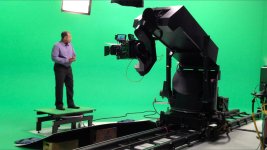
OK, here's my update now that the project is finished. We ended up using the standard Rec 709 picture profile which worked just fine for green screen. Used the Pix 240 as a backup recorder and Gemini as primary recorder to 4:4:4 DPX sequences (sent PA out for larger hard drives, those files are massive...) The Pix ProRes HQ footage probably would have been adequate in this case, but the Gemini footage is marginally cleaner. Here's a shot of our moco rig with the F3, Pix 240 and Gemini on board, and one of the final spots can be seen here: https://vimeo.com/47044529

PixPlusMilo.jpg
 
Back
Top