jonpais
Well-known member
FSI will be releasing the XM312U this fall – a 5,000 nit mastering monitor with 2,300 individually controlled LED backlight zones and priced at $22,000. It appears that we’ll be reaching the dizzying 10,000 nit peak brightness of PQ HDR sooner than most people think.
Keep in mind though, that with PQ HDR, anything above 100-200 nits is reserved for spectral highlight detail only – like reflections off the chrome of an automobile, fire, lightbulb filaments, backlighted clouds, etc. After all, HDR is not about increasing the brightness of the entire picture, but increased luminance range. Which is why it shouldn’t be necessary to reach for the remote to adjust brightness when switching between SDR and HDR content on TVs.
The average picture level (APL) of HDR PQ content should not depart radically from that of SDR content for the most part – and in fact, much HDR content actually has lower APL than the SDR version. The sample iPhone Dolby Vision video I posted yesterday is in fact a good example of how not to expose HDR – if watched in a darkened room, you can feel your pupils contract when viewed on an iPhone 12 Pro Max because it is too intense – which is fine for very bright scenes that call for it, but not so cool for an entire clip, let alone an entire film.
Interestingly, when it comes to SDR monitors, grade 3 displays are actually required to be brighter than grade 1 monitors:
Grade 1 Monitor:
70 to at least 100 cd/m2.
Grade 2 Monitor:
70 to at least 200 cd/m2.
Grade 3 Monitor:
70 to 250 cd/m2 or to 400 cd/m2 in adverse conditions.
Fun fact: 100 nits is already 50% of the 10,000 nit PQ HDR peak level and to the human visual system (HVS), the jump from 5,000 nits to 10,000 nits is much smaller than the leap from SDR 100 nits to HDR 1,000 nits.
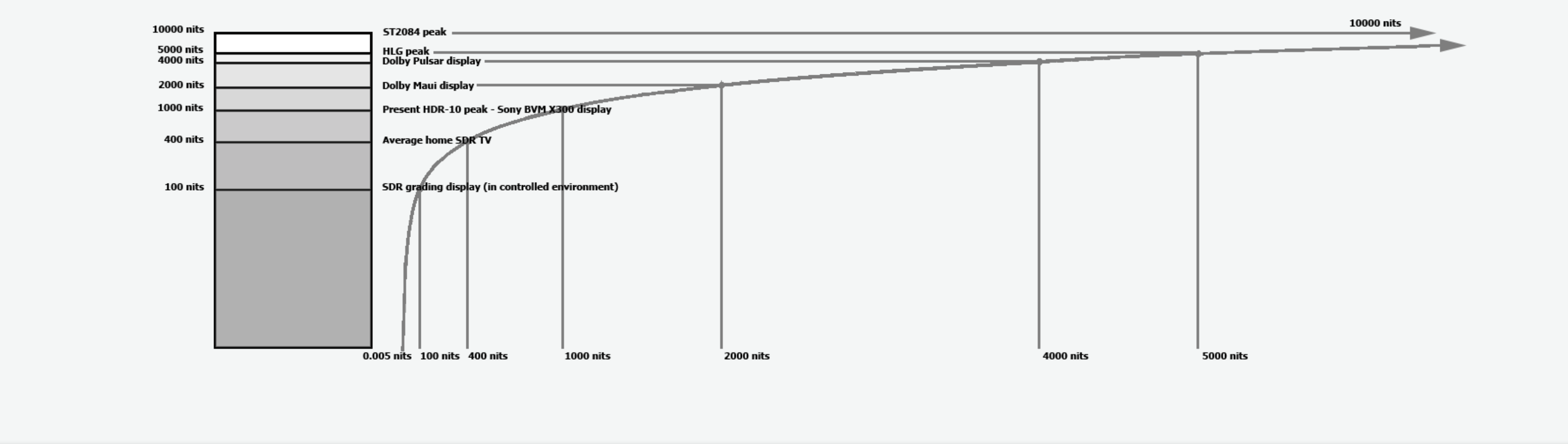
Picture from LightSpace.
700 nits is certainly enough to appreciate the enormous advantage HDR has over SDR, and the real reason most HDR content is not as impressive as it should be is not because consumer TVs can’t reach 10,000 nits, but because the overwhelming majority of shows continue to be lit in an SDR environment, they’re monitored in SDR, and the very first time someone sees the footage on an HDR display is in the grading suite.
And it doesn’t end there. While colorists do have access to the tools to see HDR, that alone is no guarantee that the master file will end up preserving all the dynamic range, tonality and color envisioned by the director and the DP. For example, the decision in post-production to constrain the levels in the HDR pass to maintain consistency with the SDR version (for reasons both technical and aesthetic) can prevent HDR from taking wing. This is super common in the industry.
Not infrequently, a project gets the green light for an HDR master after the fact; both the post-production house and producer preemptively rule out a version that dramatically departs from the SDR version; the result being that HDR turns out to be little more than a marketing gimmick.
Another seldom discussed issue is that colorists are resorting to compromising their HDR grades in order to avoid judder artifacts.
HDR means not only lighting differently, but also (1) moving the camera differently, (2) framing differently, (3) exposing differently and (4) cutting differently. Panning more slowly for HDR to avoid judder artifacts. The 7-second rule no longer applies. Framing differently to either include or exclude intense light in the frame. Exposing to take the most advantage of the sensor’s dynamic range. Cutting differently, because juxtaposing bright and dark scenes in HDR is much different from SDR, where the overall brightness differences are insignificant. The editing suite is one place where a consumer OLED TV can actually do some good.
It’s been five years since Peter Doyle challenged filmmakers to begin creating films expressly for HDR, but the industry still lags behind.
Keep in mind though, that with PQ HDR, anything above 100-200 nits is reserved for spectral highlight detail only – like reflections off the chrome of an automobile, fire, lightbulb filaments, backlighted clouds, etc. After all, HDR is not about increasing the brightness of the entire picture, but increased luminance range. Which is why it shouldn’t be necessary to reach for the remote to adjust brightness when switching between SDR and HDR content on TVs.
The average picture level (APL) of HDR PQ content should not depart radically from that of SDR content for the most part – and in fact, much HDR content actually has lower APL than the SDR version. The sample iPhone Dolby Vision video I posted yesterday is in fact a good example of how not to expose HDR – if watched in a darkened room, you can feel your pupils contract when viewed on an iPhone 12 Pro Max because it is too intense – which is fine for very bright scenes that call for it, but not so cool for an entire clip, let alone an entire film.
Interestingly, when it comes to SDR monitors, grade 3 displays are actually required to be brighter than grade 1 monitors:
Grade 1 Monitor:
70 to at least 100 cd/m2.
Grade 2 Monitor:
70 to at least 200 cd/m2.
Grade 3 Monitor:
70 to 250 cd/m2 or to 400 cd/m2 in adverse conditions.
Fun fact: 100 nits is already 50% of the 10,000 nit PQ HDR peak level and to the human visual system (HVS), the jump from 5,000 nits to 10,000 nits is much smaller than the leap from SDR 100 nits to HDR 1,000 nits.
Picture from LightSpace.
“Technical details aside, the most important thing to understand about HDR is that it doesn’t represent an enhancement as much as the removal of an artificial limitation. In the realm of human vision and physical light, high dynamic range is a default condition, not an added gimmick”. – Cullen Kelly
700 nits is certainly enough to appreciate the enormous advantage HDR has over SDR, and the real reason most HDR content is not as impressive as it should be is not because consumer TVs can’t reach 10,000 nits, but because the overwhelming majority of shows continue to be lit in an SDR environment, they’re monitored in SDR, and the very first time someone sees the footage on an HDR display is in the grading suite.
“To date, most HDR content has been an emulation of the existing SDR experience. This is a new aesthetic and I’m intrigued when filmmakers will embrace that aesthetic rather than try to just reproduce the existing low-con films onto the HDR format.” – Peter Doyle, Supervising Colorist at Technicolor (2016)
And it doesn’t end there. While colorists do have access to the tools to see HDR, that alone is no guarantee that the master file will end up preserving all the dynamic range, tonality and color envisioned by the director and the DP. For example, the decision in post-production to constrain the levels in the HDR pass to maintain consistency with the SDR version (for reasons both technical and aesthetic) can prevent HDR from taking wing. This is super common in the industry.
Not infrequently, a project gets the green light for an HDR master after the fact; both the post-production house and producer preemptively rule out a version that dramatically departs from the SDR version; the result being that HDR turns out to be little more than a marketing gimmick.
Another seldom discussed issue is that colorists are resorting to compromising their HDR grades in order to avoid judder artifacts.
HDR means not only lighting differently, but also (1) moving the camera differently, (2) framing differently, (3) exposing differently and (4) cutting differently. Panning more slowly for HDR to avoid judder artifacts. The 7-second rule no longer applies. Framing differently to either include or exclude intense light in the frame. Exposing to take the most advantage of the sensor’s dynamic range. Cutting differently, because juxtaposing bright and dark scenes in HDR is much different from SDR, where the overall brightness differences are insignificant. The editing suite is one place where a consumer OLED TV can actually do some good.
It’s been five years since Peter Doyle challenged filmmakers to begin creating films expressly for HDR, but the industry still lags behind.
Last edited: