FS7: FS7M2 - Sony 128GB G series XQD card fail

mrmo

Member
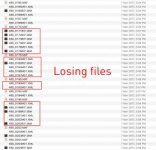
I just shoot an event with the fs7m2. While put all footage to editing I found some of them are missing.
Then I put the card to the camera and I saw they are all fail!!!!!!! OMG!!! I'm very worry it is FS7m2 issue but I found some thread talk about the Sony 128GB G series XQD card can't recognise with FS7.
I've already email to SONY to find out what happen. Luckily the most important parts have no problem. Only lost some B-roll.
Anyone got this problem? I think it is a new issue of the FS7M2 which not same as FS7. Any card you preferred to use. What a shame sony is one of the card not reliable.

I've shoot with Sony XQD 256GB G series in 4K with no problem.
Then 2nd time 128GB G series in HD XAVC-I got fail on some footage.
And the third time using Lexar 128GB 2933X in 4K still fine.

Originally, I change FS7M2 to replace my FS700 which I think it is a reliable in-camera recording. BUT NOW, I'm a bit worry if I take it for a serious shooting. OMG....
IMG_9910.JPG
Screen Shot 2017-03-11 at 12.06.32 AM.jpg
 
This is very disconcerting, but if you want help with the issue you would need to list in EXTREME DETAIL exactly what procedures you followed and what happened. Perhaps its possible to to still find those files. Perhaps you are doing something incorrect in your downloading procedures.
One thing to try if you still have that card and have not erased it is to simply record another shot on it. Sometimes that will finalize the end of the shot and the rest of the files will appear. I've had that happen and always try to shoot and extra brief shot before ending a card. Though I often forget.
 
Just try what you advise but nothing change. I think it is not file crushed. It is nothing write to the card. Only the .XML file or .BIM
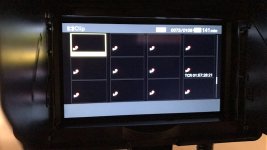
It is a bit strange when I playback in camera now. This card is very slow. The thumbnail repeat the same image. I need to re-start then it is fine.
In Premiere, the fist two clips are crushed. can't play or edit. I think it is no reason. Seems the card issue.

For the EXTREME DETAIL, I format the card before I shoot. Only put the 128GB in Slot A. Then shoot some interview and B-rolls.
The first part I'm hand-held shooting B-rolls. Using handgrip rec button. The first 2 clips crushed. Other clips no problem.
2nd, long record for around 30 mins. Luckily no problem at all.
3rd, Interview and B-roll on tripod. Using cam body rec button. No problem.
4th, Hand held B-roll shooting. using handgrip rec button. Most of this part are missing!!! just few last shot left.
5th, interview and B-roll. Using cam-body rec and handgrip rec. No problem.

first I'm thinking the handgrip cause the issue. But after extremely test of double/triple click, or losing the plug. It is no problem.
I think....the problem of card got the greatest chance. and I hope it is.
 
You haven't told us how you downloaded the clip to your computer. That's the most important part. Though from what you said it seems like your problem was only while you were handheld? That's very odd.
What do you mean by "crushed" ? I've never heard that expression in this context.
 
Thank you so much you reply here.
I put it into sony xqd reader. Plug into my Mac Pro. Copy XDROOT and paste everything to new folder.
It is very odd if so easy got file damage by this procedures. I think not the operation issue. This kind of camera should be very reliable. And it need to be.
Sorry for my English, crashed I mean the file which can't read but I can see the .MXF here and a picture of thumbnail.
 
I think this thumbnail view is normal when you change recording mode in the camera after you've shot something, for example you shoot in 23.98 and then switch to 24p. I definitely remember seeing the stop sign over thumbnails, can't recall if they are displayed all black like in the screenshot and don't have my camera near me to confirm.
 
Do you have time to shoot a load of footage using a few different cards and see how that goes.. some hand held ..some grip rec,, if they are all fine after a full day shooting then it would seem like the card .. or at least point more towards that than a camera problem..
You could also try down loading your card with the corrupt files.. with Shotput Pro software.. it cost money.. but its the best way to do it anyway.. and then you will get a detailed report for ext clip..
Did you keep the same frame rate for all clips.. ?
 
Do you have time to shoot a load of footage using a few different cards and see how that goes.. some hand held ..some grip rec,, if they are all fine after a full day shooting then it would seem like the card .. or at least point more towards that than a camera problem..
You could also try down loading your card with the corrupt files.. with Shotput Pro software.. it cost money.. but its the best way to do it anyway.. and then you will get a detailed report for ext clip..
Did you keep the same frame rate for all clips.. ?

Of course I did a test using different card. Try full record and handgrip etc...
There are no corrupt files. It doesn't exist and record to the card. I try using recovery software which I purchase and lexar file rescue also can't search anything. The .MXF doesn't record. Only .XML or .BIM exist in card so I can see the blank thumbnails with nothing.

There are not all card blank that other footage in the card are all good. At least the interview not dead.
I know the missing files are gone. Just need to check seriously on next shooting.
Now I've try Lexar 128GB 2999x XQD card seems everything OK.
The 256GB sony xqd also work very well at the first time.
 
Then I would send the card to Sony to check .. and get a new one from them if possible.. but I would recommend you to use Shotput pro.. as it checksums and makes a report for each file.. rather than copy/paste..
 
Thanks Donny,
I've email Sony and wait them reply on next week. BTW, I haven't use shotput pro before. Just try the transfer tools like convergent design. It is use for transfer file safe?
 
I don't know anything about convergent design, but dragging and dropping ( i.e. just copying the XDROOT folder on the desktop) is not considered a safe method of downloading. Far better to use Hedge for Mac, Shotput pro or Catalyst Browse because a checksum is involved. Its possible that some kind of corruption happened when you copied the card. I wish those cards had a "write protection " switch on them.

Lenny
 
I don't know anything about convergent design, but dragging and dropping ( i.e. just copying the XDROOT folder on the desktop) is not considered a safe method of downloading. Far better to use Hedge for Mac, Shotput pro or Catalyst Browse because a checksum is involved. Its possible that some kind of corruption happened when you copied the card. I wish those cards had a "write protection " switch on them.

Lenny

But then the card should replay in the camera ok should it not.. or at least give a restore media message.. ? also never heard of Convergent design down load software..
 
But then the card should replay in the camera ok should it not.. or at least give a restore media message.. ? also never heard of Convergent design down load software..

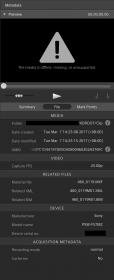
I tried the Catalyst Browser. Like I said before nothing inside. The crashed file metadata like attached. I think it can restore but just only one shot.
I won't use that card anymore......I just honestly tell my client what happen. Luckily they seems like the video which editing with remain footage. The FS7M2 is a new model which I should test it more and more. very strange issue happening on me...bad luck.

Screen Shot 2017-03-11 at 6.40.50 PM.jpg
 
Screen shot pretty small - couldn't read Catalyst details...
Sounds to me like a faulty XQD card. Experienced one on a shoot about a year ago...Producer's camera & card (not a new card - he had been using it for a couple of months with no problems... On that day - An operator had gone out to shoot b-roll - then camera came back and was being used for 2nd cam on an interview. As I recall, camera stopped rolling by itself during interview. Went to xfer and Shots didn't show up properly on a Mac / when we put card back in camera some (but not all) of thumbnails showed up and played -- Set card aside (we were in middle of multi-cam shoot). Did quick camera check, and camera seemed fine... Everything else shot with that camera (obviously onto other cards) later in day was fine. Next day nothing showed up as readable on card. Bad card sent in to have sony attempt to recover data - unsuccessful. Producer was sent new replaceement card...
 
I've had 2 problems with my XQD cards. First time I lost a whole card after my client transferred the card drag and drop on a PC. It was strange as we just don't know what happened and I wasn't there but he swears he didn't do anything wrong. We sent it to Sony and they couldn't salvage it but did not offer to replace the card. that card has worked fine since and I now always drag and drop. Fortunately the client never even asked for that footage - pure luck.
Second time I'm not sure what happened , perhaps I pulled a card while it was playing back without hitting stop , but not sure. Anyway the final shot didn't show up in Catalyst browse . I put it back in the camera and it said "restore media" but that process didn't help. The footage was clearly on the card though and we did a drag and drop transfer and it worked fine in premiere! Later at home I experimented and found that if I placed another shot on the card, suddenly everything was fine. Then everything showed up on Catalyst Browse. So accordingly now I try to remember to shoot an extra shot at the end of a card. I worked with a tech the other day who said that was a good idea on all card systems and he always did it to make sure the right info was on all the shots that were needed.

I have no idea what happened with memo though . Losing shots in the middle of the card is disconcerting.
 
But how does shooting another last "safety " shot on a card .. be any different from the last shot you did on the card anyway.. not trying to pick a fight .. really just interested as to how there is any difference ..

Thanks
 
I don't know frankly except. When I had that problem it was only the last shot that wasn't being seen by Catalyst browse. If my last shot was always a dummy, then who cares?
 
It sounds like DSLR camera ,if not stop rec it will not create the files.
I was shock so many of u experienced this kind of camera fault! This level of camera should be more reliable. I'm a bit disappointed. But still need to use it on my next project......
Now I'm using Lexar 2999x card until sony response the issue.
 
Back
Top