FS700 RAW dynamic range (calibrating Sekonic L-758 light meter)

jshbckr

Veteran
So is there a definitive answer as to what the FS700's dynamic range is, using Slog2? I've heard ranges of 12 up to 14 (seems a little sensationalist to me... kind of like all the "GH4 is sharper than RED!!" when the first tests came out).

I was just calibrating my Sekonic L-758 meter, using Slog2 captured with the ProRes HQ from 4K on the 7Q. I was trying to do RAW but was having some issues (I was bringing them into Resolve and processing them with "BMD Film", maybe that was the wrong process to use). JPEGs from ProRes seemed to work fine in the Sekonic software.

Long story short, the Sekonic software gave me a range of about 9.9EV.
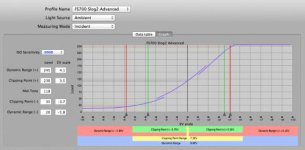
Screenshot on 2014-06-30 at 20_04_07.jpg
Link to higher res pic: http://d.pr/i/ImAx

For what it's worth, I used the X-Rite ColorChecker Passport, not the Sekonic Target II. I justified $100 for the Passport, since it is a great tool on shoots, has chips/white/grey all in a protective case. I can't quite justify a large delicate card for $130 that I will only use to calibrate the meter.

Anyone have experience calibrating this monitor?
 
Last edited:
I know i keep saying i'll write up my findings and i almost have finished, but still not had enough time.

I've tested extensively, using a number of different methods, including the same chart that dpreview use. In practical terms i reckon 11ish. The curves on the output are tweaked a little so that they go non linear, it gives the impression of more but it's not real range. Also because the raw output is linear then 12 bits = 12 stops of capacity with the shadow values being very compromised. That's linear math. End of story.

In some cases using highlight recovery can get you another stop. I do wonder whether a lot of these 12 to 14stop range claims are because of this.

Expose correctly then those stops are lovely.

With RAW if you underexpose then there are methods to maximise your losses, lots of noise reduction and so on, but expose well in the first place!

cheers
Paul
 
I know i keep saying i'll write up my findings and i almost have finished, but still not had enough time.

I've tested extensively, using a number of different methods, including the same chart that dpreview use. In practical terms i reckon 11ish. The curves on the output are tweaked a little so that they go non linear, it gives the impression of more but it's not real range. Also because the raw output is linear then 12 bits = 12 stops of capacity with the shadow values being very compromised. That's linear math. End of story.

In some cases using highlight recovery can get you another stop. I do wonder whether a lot of these 12 to 14stop range claims are because of this.

Expose correctly then those stops are lovely.

With RAW if you underexpose then there are methods to maximise your losses, lots of noise reduction and so on, but expose well in the first place!

cheers
Paul

OK, thanks for this! I kept hearing people repeat these super high dynamic range claims, and while I've certainly experienced a good range in the images I capture, I never knew "technically" what that range was. And like you said, it makes sense that the Slog2 curve is helping retain a certain level of information in the highlights and shadows but that this doesn't actually make the camera have a natively higher dynamic range. For example, if you under or overexpose, you will lose that information. The Alexa, however, will actually retain much more information than the FS700 if you under/overexpose (more akin to film), because it truly has 14 stops of dynamic range, not because it has a custom curve that boosts the shadows and brings down the highlights.

Maybe I'm overly simplifying it, but am I in the right ballpark?
 
As I understand it, the issue comes down to shadows. Highlights are easy: you know exactly where it clips. The problem with shadows is that you drop down to the noise floor. As you go darker, can you really see a difference in the image or not? And is it actually useful? If you are shooting a black camera bag for a client, do you really want to try to differentiate detail that far down on the scale? It becomes a little subjective.
 
I guess it just depends on who you talk to. Renowned camera tester Art Adams' RAW / S-Log charts very clearly show 14 stops. Art was saying about 13 useable with S-Log 2.
 
I guess it just depends on who you talk to. Renowned camera tester Art Adams' RAW / S-Log charts very clearly show 14 stops. Art was saying about 13 useable with S-Log 2.

Maybe it's splitting hairs, but is there a difference between the range of information contained in a single, properly exposed shot (what Art is referring to, which is an effect of the Slog2 curve) vs. the latitude (ability to push/pull) of an image that is over/under-exposed (which is a characteristic of the sensor, right?)?

For example, if you shoot a chart with the FS700 and an Alexa, and they both show a similar range from black to white. Then overexpose a stop with both cameras, then pull it back in post. Would there be a difference between the FS700 and Alexa in this case? Or am I just making things up? I know that in digital, clipped is clipped. So if the highlights clip at the same spot, you wouldn't get that information back from either camera, correct?
 
S-log is recorded in a standards compliant REC709 video codec. The theoretical maximum DR for that is 9.5 stops. Close to you measurement. If you recorded to raw format on a 7Q, you might find a different result. S-log2 is a dynamic range compression scheme to fit wider linear DR within REC709 limits. The meter profile is measuring linear DR. You are seeing the limits of the video codec including the broadcast legal 7 stop clip point range.
 
Last edited:
As I understand it, the issue comes down to shadows. Highlights are easy: you know exactly where it clips. The problem with shadows is that you drop down to the noise floor. As you go darker, can you really see a difference in the image or not? And is it actually useful? If you are shooting a black camera bag for a client, do you really want to try to differentiate detail that far down on the scale? It becomes a little subjective.

The shadows are the difficult area.

In linear RAW we have 4096 values to represent the scene. Black level is at 256, so it's 3840 really (but lets say 4096 because the math is easier)

But remember that light is a doubling of value, so we go, here are 12 stops of RAW:

1 - 2 - 4 - 8 - 16 - 32 - 64 - 128 - 256 - 512 - 1024 - 2048 - 4096,

Those first 5 stops are represented with just 32 code values. Whereas the brightest stop has 2048 values assigned to it.

So if you peg mid grey at 6 stops over black then everything under mid grey is held in just 32 values.

Now that's pure linear RAW, the output of the 700 has a slight curve on the bottom (and top) that gives a little more range but not *that* much.

So depending on your scene it becomes very important to decide where you want to expose for. Do you want detailed rich shadows? Expose higher and rob from your highlights. Are you going to crush the shadows anyway, expose normally. Just get your skin into an area with sufficient tonal detail.

This is different from what the sensor may or may not be able to see, this is the 12 bit limited output from the camera. Of course it could be that the FS700 sensor is so noisy in the blacks that there's no point in having more steps to record just more noise.

Don't forget though, that compared to 8 bit, this is still a lot better.

Also to maximise noise here's a technique that can work. When you develop your RAW, over expose it a couple of stops, this pulls the noise floor higher (assuming your are developing into a movie container than can hold all your top range). Then denoise with the higher noise floor and then take down a couple of stops. This does two things

- The denoisers i've looked at appear to work a little bit better this way (both neat video and antimatter), with stretched noise values
- Intermediate codecs (ProRes, Cineform etc,.) tend to compress shadows more so moving the noise up helps it from being heavily compressed before a denoise (this is assuming you are not denoising at the same time as you develop - i don't like Resolves denoise and SpeedGrade doesn't denoise)

cheers
Paul
 
The shadows are the difficult area.

In linear RAW we have 4096 values to represent the scene. Black level is at 256, so it's 3840 really (but lets say 4096 because the math is easier)

But remember that light is a doubling of value, so we go, here are 12 stops of RAW:

1 - 2 - 4 - 8 - 16 - 32 - 64 - 128 - 256 - 512 - 1024 - 2048 - 4096,

Those first 5 stops are represented with just 32 code values. Whereas the brightest stop has 2048 values assigned to it.

So if you peg mid grey at 6 stops over black then everything under mid grey is held in just 32 values.

Now that's pure linear RAW, the output of the 700 has a slight curve on the bottom (and top) that gives a little more range but not *that* much.

So depending on your scene it becomes very important to decide where you want to expose for. Do you want detailed rich shadows? Expose higher and rob from your highlights. Are you going to crush the shadows anyway, expose normally. Just get your skin into an area with sufficient tonal detail.

This is different from what the sensor may or may not be able to see, this is the 12 bit limited output from the camera. Of course it could be that the FS700 sensor is so noisy in the blacks that there's no point in having more steps to record just more noise.

Don't forget though, that compared to 8 bit, this is still a lot better.

Also to maximise noise here's a technique that can work. When you develop your RAW, over expose it a couple of stops, this pulls the noise floor higher (assuming your are developing into a movie container than can hold all your top range). Then denoise with the higher noise floor and then take down a couple of stops. This does two things

- The denoisers i've looked at appear to work a little bit better this way (both neat video and antimatter), with stretched noise values
- Intermediate codecs (ProRes, Cineform etc,.) tend to compress shadows more so moving the noise up helps it from being heavily compressed before a denoise (this is assuming you are not denoising at the same time as you develop - i don't like Resolves denoise and SpeedGrade doesn't denoise)

cheers
Paul

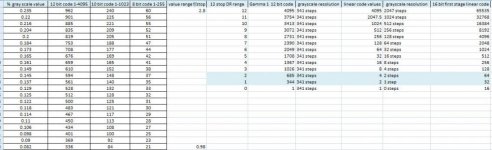
12 bit raw as written to the recorded file is log gamma 1 encoded with equal bit values per f/stop of DR. Log encoding/linear light, 3dB per f/stop analog voltage doubling of the sensor. 341 steps per stop from black clip to white clip for a 12 stop DR input. First stage AD's are typically 16 bit these days and linear encoded, the second stage of the AD process converts that to 12 bit gamma code to preserve detail in the shadows and reduce file size by eliminating code values at the top of the scale that have no visual meaning. 12 bit linear raw does not have the grayscale resolution to adequately represent more than 8 stops. You need at least 26 discrete code values per f/stop to resolve an 8-bit video gray scale, 107 discrete code values per stop to resolve 10 bit REC709 video.

Value table.jpg

The left side of the above table shows actual discrete gray scale values from a 12 bit raw image from the two stop range highlighted in the code table on the right side. One can see that the actual file code values match the 16 bit first stage AD gray scale resolution. Something that wouldn't be possible with 12 bit linear encoding.
The grayscale percentage values were taken from Raw Therapee, the 8-bit equivalent log code values from Capture 1 pro. Other code values were calculated from the percentage table for illustration.
As far as I have been able to test, all raw format files written from still or raw motion cameras are Gamma 1 log encoded. They accurately represent the analog voltage output of the sensor unchanged on a dB scale with equal gray scale steps from the top to the bottom of the encoded range. This is distinct from visual gamma correction applied to display formats or any form of applied log compression curves.
We need to put this old myth to rest. All digital image file formats are log gamma encoded, raw or otherwise. The difference is whether they are encoded to the linear voltage response curve of a sensor (3dB per stop), or the linear power response curve of human vision (6dB per stop, gamma 2) with minor corrections for display technology standards.
 
Last edited:
12 bit raw as written to the recorded file is log gamma 1 encoded with equal bit values per f/stop of DR. Log encoding/linear light, 3dB per f/stop analog voltage doubling of the sensor. 341 steps per stop from black clip to white clip for a 12 stop DR input. First stage AD's are typically 16 bit these days and linear encoded, the second stage of the AD process converts that to 12 bit gamma code to preserve detail in the shadows and reduce file size by eliminating code values at the top of the scale that have no visual meaning. 12 bit linear raw does not have the grayscale resolution to adequately represent more than 8 stops. You need at least 26 discrete code values per f/stop to resolve an 8-bit video gray scale, 107 discrete code values per stop to resolve 10 bit REC709 video.

No it's not.

Open up some RAW files, you can use adobes DNG utility if you have the SDK, or some 3rd party tools that allow you to see the raw data before debayer and matrixing. You will see the true linear distribution of values. Same is true of the bolex camera too (i've spoken to their engineer so know that for sure)

In an ideal world it would be great to have log encoded RAW, it would make sense. The DNG spec does support a per file LUT but only the BMC uses this and that's not a true log encoding either.

Once you start poking around with the raw data in these files you can learn a lot...

cheers
Paul
 
The left side of the above table shows actual discrete gray scale values from a 12 bit raw image from the two stop range highlighted in the code table on the right side. One can see that the actual file code values match the 16 bit first stage AD gray scale resolution. Something that wouldn't be possible with 12 bit linear encoding.
The grayscale percentage values were taken from Raw Therapee, the 8-bit equivalent log code values from Capture 1 pro. Other code values were calculated from the percentage table for illustration.
As far as I have been able to test, all raw format files written from still or raw motion cameras are Gamma 1 log encoded. They accurately represent the analog voltage output of the sensor unchanged on a dB scale with equal gray scale steps from the top to the bottom of the encoded range. This is distinct from visual gamma correction applied to display formats or any form of applied log compression curves.
We need to put this old myth to rest. All digital image file formats are log gamma encoded, raw or otherwise. The difference is whether they are encoded to the linear voltage response curve of a sensor (3dB per stop), or the linear power response curve of human vision (6dB per stop, gamma 2) with minor corrections for display technology standards.

I didn't see this in your original mail, i think you may had edited it after my reply.

I think we/i/you are confusing technical terms.

I talk about linear in a scene linear fashion, this is my vfx background. To me scene linear is a doubling of light. This is how a sensor sees things, how i work and is how the RAW files store the code values. (but i guess linear could also be understood as a straight-line plot)

I've tested a step wedge from clipping down to noise floor and sampled the values, they are simple scene linear (a doubling of light). Sony call the output of the FS700 Linear RAW (not Slog RAW). There's a nice program called RawDigger which will let you sample a RAW file prior to any matrixing but post debayer (post linearisation). I would love what you say to be true but in this case (or in the case of other RAW files i've tested) this doesn't appear to be the case i'm afraid.

I don't know what you mean by Gamma 1 log encoded. I presume you mean a basic log encoding. If you plot the linear sensor values and apply a log to that then you'll get a straight line, which would be an ideal representation. But it doesn't work like that in terms of what is in the files.

The analogue output is not something i'm aware of too much but light in the real world is linear too, so it would make sense that a digital sensor is capturing photons in the same way. I'm sure some sensor tech can perhaps act more log like, more film like but the theoretical digital sensor i think is scene linear too.

cheers
Paul
 
I didn't see this in your original mail, i think you may had edited it after my reply.

I think we/i/you are confusing technical terms.

I talk about linear in a scene linear fashion, this is my vfx background. To me scene linear is a doubling of light. This is how a sensor sees things, how i work and is how the RAW files store the code values. (but i guess linear could also be understood as a straight-line plot)

I've tested a step wedge from clipping down to noise floor and sampled the values, they are simple scene linear (a doubling of light). Sony call the output of the FS700 Linear RAW (not Slog RAW). There's a nice program called RawDigger which will let you sample a RAW file prior to any matrixing but post debayer (post linearisation). I would love what you say to be true but in this case (or in the case of other RAW files i've tested) this doesn't appear to be the case i'm afraid.

I don't know what you mean by Gamma 1 log encoded. I presume you mean a basic log encoding. If you plot the linear sensor values and apply a log to that then you'll get a straight line, which would be an ideal representation. But it doesn't work like that in terms of what is in the files.

The analogue output is not something i'm aware of too much but light in the real world is linear too, so it would make sense that a digital sensor is capturing photons in the same way. I'm sure some sensor tech can perhaps act more log like, more film like but the theoretical digital sensor i think is scene linear too.

cheers
Paul

You have to distinguish between linear light, a doubling of light level is one f/stop change, and linear digital code. Log gamma encoding preserves linear light response with no alteration. It just corrects the digital code so that each 8-bit/10-bit/12-bit word represents an equal change in gray scale value. Digital encoding is just a numeric scale applied to a defined range of analog voltage values in discrete steps. Converting those steps to a 10 log dB scale produces equal increments in light value for each bit increment in word value and equal gray scale resolution for each stop of DR throughout the range.
Linear encoding does not produce a linear light scale of equal step values. It wastes most of the data range in the first stop below white clip, a range where human vision is very insensitive to value changes, and robs deep shadow values of the data resolution necessary to reproduce them. The first stage analog voltage to digital value conversion is linear encoded, usually with enough bit depth to insure adequate shadow detail resolution for the available DR. But second stage digital processing encodes this to a gamma corrected digital file format.
All of our photographic systems employ gamma correction, including gamma encoded digital image file formats. This is what our various processing, grading, and editing programs expect whether raw or video. The camera in the example I posted above processes 16 bit linear first stage code values to a 12 bit gamma encoded output file format, Cinema DNG raw. This preserves more than enough gray scale resolution for visual relevance, but the file size is much smaller.
 
You have to distinguish between linear light, a doubling of light level is one f/stop change, and linear digital code. Log gamma encoding preserves linear light response with no alteration. It just corrects the digital code so that each 8-bit/10-bit/12-bit word represents an equal change in gray scale value. Digital encoding is just a numeric scale applied to a defined range of analog voltage values in discrete steps. Converting those steps to a 10 log dB scale produces equal increments in light value for each bit increment in word value and equal gray scale resolution for each stop of DR throughout the range.
Linear encoding does not produce a linear light scale of equal step values. It wastes most of the data range in the first stop below white clip, a range where human vision is very insensitive to value changes, and robs deep shadow values of the data resolution necessary to reproduce them. The first stage analog voltage to digital value conversion is linear encoded, usually with enough bit depth to insure adequate shadow detail resolution for the available DR. But second stage digital processing encodes this to a gamma corrected digital file format.
All of our photographic systems employ gamma correction, including gamma encoded digital image file formats. This is what our various processing, grading, and editing programs expect whether raw or video. The camera in the example I posted above processes 16 bit linear first stage code values to a 12 bit gamma encoded output file format, Cinema DNG raw. This preserves more than enough gray scale resolution for visual relevance, but the file size is much smaller.

It is a waste yes, and it is how a lot (FS700 included) RAW cameras physically store the data from the sensor. Please just check the original data in the RAW files to see for yourself.

Is it an ideal encoding? No, but that's what we work with.

When Lightroom or aperture work with the data they work with a scene linear space. In the case of DNG that space is linearised (adobes word) from the DNG which is either a simple scale from the source data or in very few cases a per file LUT.

Sony RAW for example is 8 bit AFAIK, but it's a form of delta compression, so it's not strictly 8 bit in terms of range.

What is presented to people afterwards is invariably gamma encoded in some way, shape or form. But please take a look at the basic original raw data in these files to understand what's coming off the camera. I recommend RawDigger as a way of seeing this data or download the Adobe DNG SDK kit and work through the source code if you want something definitive. The dng_validate tool is the only way i'm aware of getting even predebayered images - you can literally dump the raw frame as a bayed 16 bit greyscale tiff file with no adjustments. I do not recommend Resolve because you cannot get to the raw data.

cheers
Paul
 
It is a waste yes, and it is how a lot (FS700 included) RAW cameras physically store the data from the sensor. Please just check the original data in the RAW files to see for yourself.

Is it an ideal encoding? No, but that's what we work with.

When Lightroom or aperture work with the data they work with a scene linear space. In the case of DNG that space is linearised (adobes word) from the DNG which is either a simple scale from the source data or in very few cases a per file LUT.

Sony RAW for example is 8 bit AFAIK, but it's a form of delta compression, so it's not strictly 8 bit in terms of range.

What is presented to people afterwards is invariably gamma encoded in some way, shape or form. But please take a look at the basic original raw data in these files to understand what's coming off the camera. I recommend RawDigger as a way of seeing this data or download the Adobe DNG SDK kit and work through the source code if you want something definitive. The dng_validate tool is the only way i'm aware of getting even predebayered images - you can literally dump the raw frame as a bayed 16 bit greyscale tiff file with no adjustments. I do not recommend Resolve because you cannot get to the raw data.

cheers
Paul

The table posted above with percentage grayscale values are actual values for individual pixels over the two stop range highlighted in the code table from a neutral uncorrected linear light DNG raw file from a Digital Bolex. The DNG raw file is a 12 bit file storing gamma 1 encoded linear light sensor analog voltage values unaltered. Linear code and linear light are not the same thing. At the top end of the range instead of seeing 2048 discrete code values for the brightest stop, you will see a maximum of 341 code values, but the linear light range covered by the 341 gamma encoded steps is exactly the same as the range covered by the 2048 linear code steps. The excess linear code values are truncated by the gamma scale conversion.
At the low end of the range where the pixel values were recorded, it is impossible for a 12 stop linear file to produce that range of values since there are only 6 discrete code values available. The gamma encoded file fully resolves the 16 bit first stage linear shadow data with plenty of room to spare. The 16 bit linear code if stored as the file would be 4.8MB per 2k frame. The 12 bit raw frame size is 3.5MB. In both cases they represent exactly the same 12 bit analog linear light range with a minimum code value of 1 and a maximum of 4095, only the code distribution over scale is different.
Gamma code is exactly the same thing as having a one meter ruler with each decimeter equal to one stop of light value change and each decimeter divided into even millimeters in between. A "linear code" metric ruler would cram 500 millimeters into the highest decimeter and only 4 into the lowest. Not a very useful scale for measurement, but the length of the stick is still the same.
Digital encoding is a numeric scale applied to a range of analog values. How that scale is structured for equal or unequal single step value increments is strictly a matter of mathematical definition. Gamma encoding structures the scale so that each discrete code word represents an equal perceived change in grayscale light value to the human eye. This requires logarithmic scaling functions in the image files and in the way we process them for display when correcting and grading them.
Sensor and signal chain voltage values are encoded as a 10log(v1/v2) change in voltage values, defined as Gamma 1 or 3dB per f/stop light change.
Display light output values are corrected to the human visual power density response curve, 20log(v1/v2) or Gamma 2 +/- adjustment for reference display standards, 6dB per f/stop. This is a simple straight mathematical conversion from the original gamma 1 coding in digital systems.
 
Last edited:
The table posted above with percentage grayscale values are actual values for individual pixels over the two stop range highlighted in the code table from a neutral uncorrected linear light DNG raw file from a Digital Bolex.

How did you record these values? Can you PM me and perhaps show me the file that you used? I can send you a raw data grey scale bayered 16 bit tif of the file, decoded through the DNG SDK to compare with.

Because i'm sure the actual engineers that developed the Bolex would love to know how you're doing this too and i can forward it on.

Seriously though, your theory is fine, but your quantative starting point appears dubious.

I'd love to be wrong but i'd spent months going through all this, multiple times, in multiple ways...

That's exactly why Sony uses 16 bit linear RAW for the F5 and F55, that's the primary differentiator between the FS700 and F5. If we were dealing with files as you suggest we wouldn't require anything like that.

cheers
Paul
 
Back
Top