FS7: FS7 Metadata Question

Joshua Milligan

Well-known member
Hey fellas, I shot a project nearly three years ago and I was going through the raw footage today and was really impressed with the color I got on it. I usually shoot everything in CINE EI mode with Slog3, S-Gamut3.Cine, but if I remember correctly, this project was shot in Slog2, S-Gamut. I'm wanting to find the metadata that will confirm this and I'm also wanting to find out if this project was shot in CINE EI or Custom mode. The problem is, I can't seem to find that exact information in either Catalyst Browse or Premiere.

Where can I find out whether or not I was in CINE EI or Custom mode and where can I confirm that it was Slog2, S-Gamut?

Also, I am trying to verify that my A7SII shots from this project were in Cine 4, Cinema color, but I can't find that info either. Any help finding the color info for these two cameras would be much appreciated!
 
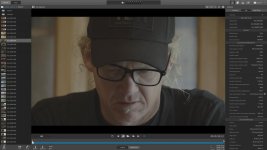
In CB, when you click on a file, there should be a right pane with info on the clip. Make sure you have selected FILE(you have a choice of SUMMARY, FILE and MARK POINTS at the top of the pane). Scroll down to ACQUISITION METADATA and look for the line labeled Capture Gamma Equation. If you go into ADJUST COLOR, it will also tell you what the source material is. You can at least see if it was a form of S-log or 709. These are also F55 files that I'm referring to, but I would imagine it should be similar for Fs7 files.
 
Last edited:
Wouldn't it be nice if that sidecar data went through to Premiere? I've only been asking them for 3 years...
 
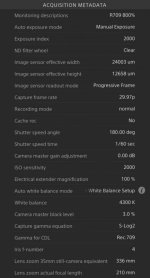
Ok, so I went back to Catalyst Browse as Run&Gun recommended (thanks for the comments by the way), but I'm still having trouble figuring out if it was in CINE EI or Custom mode. I've attached a screenshot of the Acquisition Metadata here in case someone recognizes whether or not it was in CINE EI or Custom. Thanks in advance for any help!

Screen-Shot.jpg

Screen-Shot-2.jpg
 
Last edited:
Thanks Doug. I thought you might would recognize that. That's good to know. If I ever needed (for doc purposes) to shoot in Custom mode with Slog2, S-Gamut, would I get a similar match to the CINE EI Slog2, S-Gamut, or are they different looking for some reason?
 
Totally different looks because there are about a dozen other paint menus and other factors in play when Custom is being used. Keep in mind that S-LOG2 isn't just S-LOG2 (that is only the gamma component) it is really S-LOG2/S-Gamut. Also, you shouldn't apply the same LUT in Resolve to both of them, so that is yet another variable.
 
I was afraid of that. I don't venture into Custom very often, but every now and again I have to for ISO reasons. I will try to find paint settings that will be as close a match as possible, but I can't help but feel that will be a long, not very fun process.
 
Back
Top