FS5: FS5 Cyan Sky

Surp

New member
Hi! When over exposing blue sky on my new FS5, blue things turn a crazy cyan color before blowing out to white. I've tried every built-in picture profile and they all do the same thing to varying degrees. Is this a problem with my camera? Do I have a defective sensor? Or is this normal? And if it's normal, how do you deal with it? I'm looking to use the FS5 ENG style with as little color correction in post as possible.
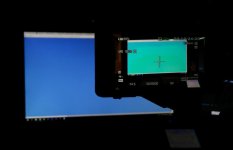
FS5_Cyan_Sky.jpg
 
I have not observed that myself.

However most cameras will clip one channel earlier than others. Have you ever noticed how over exposed footage often turns yellow, especially on skin tones.

It sounds silly but the fix is to expose properly, possible use a graduated filter or reframe.

Your demo is of a computer screen and that may have pretty strange balance of color channels, show us a frame of actual sky. I am not saying you may not have a bad camera, I just can't tell from that one frame.

Shoot some outside footage that shows this effect in the sky and post what PP settings and WB were used, then we can tell better if something is wrong.
 
Surp, I had the same thing happen the first outdoor shoot I did. I was shooting a machine cutting limbs and the sky was over exposed it didn't really matter to the shot except when I got it back in FC the sky was a crazy cyan color and it was a pain to get out. It would even band at a certain exposure and go from semi bad blue to totally bad cyan. I have since changed a couple PP to use the cini4 and have done some testing and that seems to help alot. This is my first Sony camera, I still use Canons as well and believe me the sony color approach is different. I still haven't found a LUT to go from slog2 or 3 back to a simple neutral picture that I like. If anyone could share that piece of knowledge I would appreciate it. I have tried a dozen different luts that say slog2-709 for example but none of them are good.
thanks
 
In my experience with sony cameras, they all have this issue if you use anything other than SLOG with a 3D LUT. I believe I read this is partly because gamma curves are all 1D LUTs that cannot shift or desaturate color in highlights. You will also see REDs turn yellow before blowing out which is an even more common problem across most manufacturers. Cine4 will appear to help because it places midtone exposure a bit lower and has the most DR placed above middle grey so it causes you to essentially underexpose a bit and protect highlights compared to other gamma curves. SLOG2 will help immensely. Sony's 709TypeA LUT is much much nicer than any cinegamma/hypergamma or standard gamma, and if you want to go even further you can make your own LUT that desaturates highlights properly or use a film emulation LUT.
 
Thanks for the responses. It looks like I can rule out a defect in my FS5 which is good.

Olof, I'll take some example shots the next time I have a sunny day here, but since there are so many variables it's probably best to replicate with your own camera: Point it at something blue (ie, #0000FF) exposing properly. Then start increasing gain / reducing ND / opening aperture. The output gets lighter and lighter blue as you'd expect, then at a certain point it goes purple-ish, then proceeds to that cyan colour before blowing out to white.

If you take the same original shot, load it into Premiere Pro and gradually increase brightness, it follows what I'd consider a more logical progression from blue to white.

nyvz, thanks for the pointer on 3d vs 1d luts, very helpful to understand the issue.

Hepler, yes this is also my first Sony camera after switching from Canon. I'd often have to blow out a nice blue sky out with my 70D, but it would progress through paler shades of blue until turning completely white. Never cyan. I guess that's what people mean when they say they prefer Canon's color, they've basically baked in the same color processing you'd get using a 3d lut. Less flexible but works better straight out of the box.
 
Do you think it might be the knee kicking in? If you set your knee to manual and turn the slope close to off do you get the color shifting?
 
Back
Top