fs100 skin tone PP

allupons

Active member
I have been working for a long time on a picture profile that focuses on getting two things right.

1. Render as close to perfectly neutral skin tones as possible
2. Get the nicest rolloff to overexposed highlights as possible

After a bunch of experimentation, I think I have it about where I like it.

Here are my settings:

BL = 0 (set to taste, but I have found 0 in camera and manipulation in post gets the most detail without banding in the shadows due to compression)
Gamma = Cinematone1
Black Gamma = High, +7
Knee = Manual, 95%, slope = 0
Color Mode = Pro, level = 8
Color Level = -3
Color Phase = 0
Color Depth = R -2, G 0, B +2, C +1, M -1, Y 0
WB Shift = Type LB-CC, LB -1, CC -1, R Gain -2, B Gain 0
Detail = Level -3

This profile is intended for color correction and tries to squeeze in the dynamic range in camera, without going overboard and introducing compression issues. Also (and possibly the biggest mistake I see in most fs100 footage), you MUST fix the luma as the first step when editing. The fs100 records full luma range including 100-109, and this clips harshly when viewing clips straight off the camera due to NLEs and media players clipping at 100. Make sure to shift the high end 255 to 235 first thing and your highlights will look as they appeared on the fs100 when monitoring.

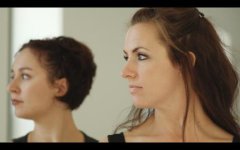
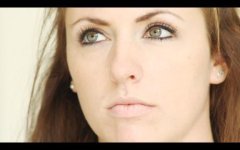
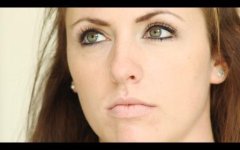
Here are a few stills from a shoot last night with this profile, displaying both skin tones and a blown out window in the background during mid-day.
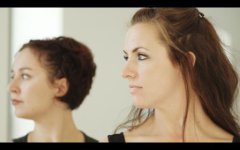
one.jpgtwo.jpg

Let me know what you guys think and feel free to post any questions!

*edit - stills appear a bit darker from a strange gamma shift once uploaded, but hopefully they get the idea across
 

Attachments
  • one.jpg
    one.jpg
    13.8 KB · Views: 0
  • two.jpg
    two.jpg
    13.2 KB · Views: 0
Last edited:
:facepalm:

That's all the FS100 users need, another PP with sub optimal knee and slope setting.

It's no wonder the wider camera buying community thinks the FS100 has poor highlight performance.
 
Nirv

You profiles AFAIK are designed to hold hilghights, some people like to blow them

Each method of shooting has its place.

In consideration of that statement would you still feel your statement is correct?

This profile looks as if it works as the OP intended, very nice.

S
 
I could see that one coming. It doesn't take more effort to type nicely. No reason not to respect other peoples work and suggestions. I too would use a higher knee setting, but I still think those stills look very nice. Good work OP.
 
I am actually a fan of all of Nirv's technical contributions. Let me explain my thought process.

In most normal or low contrast situations, I make sure nothing is exposed above 109. Even if the subject is underexposed, the fs100 records so cleanly into the shadows that you can bring things back up in the grade once in the NLE without issues all while suffering no clipping at all. However, there are occasionally times when blown highlights are either unavoidable (without significant added lighting), or sometimes even desirable (a strong rim light blowing out edges of hair, or the sun in frame flaring in between tree leaves, etc). In those situations I have found that the knee setting of a bit below 100, combined with a slope of either 0 or maybe +1 / +2 will clip the highlights in a way that looks natural and smooth rather than harsh, digital, and distracting.

I have pointed the fs100 at intentionally clipped highlights a near ludicrous amount in the past trying to decide what I thought was most visually pleasing regarding knee and slope settings. Thus far in my trials, I have found the knee settings listed above to look the most pleasing or least distracting when I am in a situation where highlights have to clip (go above 109). I will admit that for the past couple months I have been more focused on color performance, so if there is something that could possibly achieve this look even more accurately, I would gladly hear it out.
 
With a slope setting of 0 and knee of 90 you'll never get to 109. I no longer have a camera so I cannot check but I would think you'd get a bunching up of your highlights just over 100 ire with those settings. As you open up your iris watch how the highlights clip just over the 100 line i.e. you'll see an abrupt peak appear and that's highlight detail being lost. When you legalise them the won't have any detail and will be an amorphous lump of white that's just a little less bright.

Sony's standard settings are a complete and utter joke and should be avoided at all costs. Unless you have to shoot legal video then good luck using the Cinetone2 curve.

With better knee and slope settings you can delay that loss of detail until 109 and still retain detail above the knee i.e. you don't back in a hideous look that can't be graded out.

At least you didn't use a -ve value slope with the CineTone curve! ;)

@Sam, No my profiles get the maximum range out of the FS100 and clip elegantly while retaining plenty of white detail right up to the point they are clipped. The theory behind my preset was that is used the 100-109 region to the max (as an extension of the gamma curve not just knee zone) while keeping as much shadow detail out of the bottom of the CineTone2 curve. By exposing to the right into the 100-109 region you kept a lot of dark information that would've been lost. When you legalised the clip the whites would hit 100 and the blacks a smidgeon above 0.
 
Well I did not get to test it :)

My observation is that in general one is designing a profile for no clipping, or for elegant clipping not both - maybe you had that magic bullet.

S
 
With a slope setting of 0 and knee of 90 you'll never get to 109. I no longer have a camera so I cannot check but I would think you'd get a bunching up of your highlights just over 100 ire with those settings. As you open up your iris watch how the highlights clip just over the 100 line i.e. you'll see an abrupt peak appear and that's highlight detail being lost. When you legalise them the won't have any detail and will be an amorphous lump of white that's just a little less bright.

Sony's standard settings are a complete and utter joke and should be avoided at all costs. Unless you have to shoot legal video then good luck using the Cinetone2 curve.

With better knee and slope settings you can delay that loss of detail until 109 and still retain detail above the knee i.e. you don't back in a hideous look that can't be graded out.

At least you didn't use a -ve value slope with the CineTone curve! ;)

@Sam, No my profiles get the maximum range out of the FS100 and clip elegantly while retaining plenty of white detail right up to the point they are clipped. The theory behind my preset was that is used the 100-109 region to the max (as an extension of the gamma curve not just knee zone) while keeping as much shadow detail out of the bottom of the CineTone2 curve. By exposing to the right into the 100-109 region you kept a lot of dark information that would've been lost. When you legalised the clip the whites would hit 100 and the blacks a smidgeon above 0.

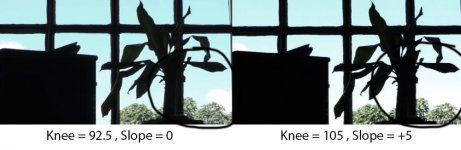
I actually just did a quick test pointed out the window to see how knee and slope effects the highlight detail captured. The video is here: http://www.youtube.com/watch?v=3a3sl1uwU1o&hd=1 . Both had the same profile using cinegamma, with 1 exception. The first was knee = 92.5 slope = 0, and the second was knee = 105 slope +5. When I brought both into the NLE they were obviously completely blown out, but as I pulled back on the highlights the first clip ended up revealing MORE detail than the second. In both cases the sky came back, but only in the case of the first clip (with my sub 100 point no slope) did the lower cloud become revealed from the sky whereas the high slope and knee went completely white for the entire lower part of the window.

I am certainly not saying this is the end all be all of evidence, but it seems to backup what I recalled from my original highlight testing from months past. In addition to that, I have never seen a spike for bright highlights that failed to go above 100 ire due to a knee point below 100. In this last example, both clips were heavily bunched up in the 100-109 ire region, which is why much cloud detail and blue sky came back as I pulled the highlights down in the NLE.

Also, I HATE all negative slope settings with a passion. Sure fire way to turn stuff to awful plastic in a hurry.
 
Also, it is cinegamma1 not 2. cinegamma2 was merely a typo from making the original post far too late at night.
 
BL = 0 (set to taste, but I have found 0 in camera and manipulation in post gets the most detail without banding in the shadows due to compression)
Gamma = Cinematone1
Black Gamma = High, +7
Knee = Manual, 95%, slope = 0
Color Mode = Pro, level = 8
Color Level = -3
Color Phase = 0
Color Depth = R -2, G 0, B +2, C +1, M -1, Y 0
WB Shift = Type LB-CC, LB -1, CC -1, R Gain -2, B Gain 0
Detail = Level -3

This profile is intended for color correction and tries to squeeze in the dynamic range in camera, without going overboard and introducing compression issues. Also (and possibly the biggest mistake I see in most fs100 footage), you MUST fix the luma as the first step when editing. The fs100 records full luma range including 100-109, and this clips harshly when viewing clips straight off the camera due to NLEs and media players clipping at 100. Make sure to shift the high end 255 to 235 first thing and your highlights will look as they appeared on the fs100 when monitoring.

Skin tones look good, I do a lot of interviews so I'm going to try this one out. Thanks for sharing.
 
Can I ask a dumb newbie question about profiles in general? I'm still trying out profiles on my '100 and since I do a lot of interviews, this profile interests me. But here's the dumb question: Is the Profile (this one or ANY Profile) considered the same regardless of the light source? In other words, if I used this profile with my 3200k lights, would it look just as good with diffused daylight (assuming I do the proper WB settings)?
 
The short answer is yes.

The longer answer is that some profles are better with different DRs so if you are lighting you may have better handle on your DR and find a profile that matches the DR in your scene.

S
 
Thanks everyone for sharing
Nirv
With a slope setting of 0 and knee of 90 you'll never get to 109. I no longer have a camera so I cannot check but I would think you'd get a bunching up of your highlights just over 100 ire with those settings. As you open up your iris watch how the highlights clip just over the 100 line i.e. you'll see an abrupt peak appear and that's highlight detail being lost. When you legalise them the won't have any detail and will be an amorphous lump of white that's just a little less bright.

Sony's standard settings are a complete and utter joke and should be avoided at all costs. Unless you have to shoot legal video then good luck using the Cinetone2 curve.

With better knee and slope settings you can delay that loss of detail until 109 and still retain detail above the knee i.e. you don't back in a hideous look that can't be graded out.

At least you didn't use a -ve value slope with the CineTone curve! ;)

@Sam, No my profiles get the maximum range out of the FS100 and clip elegantly while retaining plenty of white detail right up to the point they are clipped. The theory behind my preset was that is used the 100-109 region to the max (as an extension of the gamma curve not just knee zone) while keeping as much shadow detail out of the bottom of the CineTone2 curve. By exposing to the right into the 100-109 region you kept a lot of dark information that would've been lost. When you legalised the clip the whites would hit 100 and the blacks a smidgeon above 0.
Thanks , like always very interesting .
 
What is that test doing?

Showing you can have no sky or a sky that is solid cyan with no texture.

Id opt for no sky myself.

S
 
I apologize for the ridiculous saturations and such in the sky, as I wasn't grading for an overall pleasing image, only for discovering what had greater latitude given 2 different knee settings. What I did do was very drastically pull down the highlights with a curve that crushed and over saturated the rest of the image to reveal absolutely every bit of available detail in the highlights. If you pay attention to the lower right hand part of the window, it does clearly show that the lower knee (92.5) with a slope of 0 reveals more detail in the sky with an additional cloud visible against the sky than the higher knee (105) with +5 slope, which fades to pure white about half way down the window. All I am attempting to show is that in my tests, my knee settings seem to preserve a greater latitude than high knee / slope settings as stated in many other profiles.

range.jpg
 
Sure it has greater overall latitude - thats what its for - no debate

What you are doing is shooting a flatter image.

But if your image is too flat, you will have to add contrast in the grade - which will introduce banding

In your 'scene' you are failing to examine any mid tones or blacks, or what happens to them in a grade

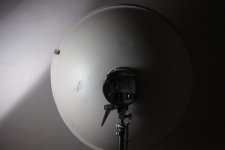
My suggestion is to use a sidelit round thing to test profiles as seen in this image.

Such an image is particularly telling if you grade your results.. Latitude is not king.

PERFEC.jpg

S
 
Back
Top