FS100 - highlights/profiles

morgan_moore

Major Contributor
I know this has been kicked around no end.

Im still trying to grapple with an FS100 conundrum, being..

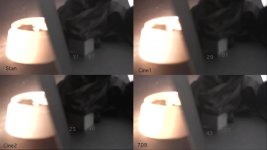
build a profile that enables you to protect your highlights or build a profile that allows them to blow in a civilised manner, here I am testing gammas

all knee 105-3

Basically with high knee we stop the nasty shoulder roll coming in too early, but ideally we want to kick the mids up in a profile which enables stopping down to protect the highs

This fascinating scene I have tried to have my target subject on the right while introducing a 'highlight' on the left of the image many stops brighter

I have bracketed exposure to try and account for shifts in ISO etc between gammas

I think that the cine gammas roll the highs nicer, but crush the blacks more - kind of a double bind

'Enjoy' these images!

Daylight 'highlights
Spaces.jpg

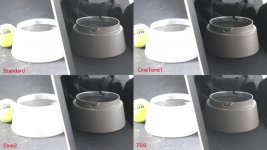
tungsten highlights..

spaces2.jpg
 
It would seem that rec709 is the profile most likely for you to be able to protect the highlights, but the penalty for blowing them is harsh

cinetone1 would apprear to have the least harsh penalty for blowing the highs, in exchange for crushing the blacks more .. which is likely to force you to open up .. and get some blowns bits

S
 
Last edited:
Hmm... Either my monitor is off, or these examples are not representative of the well known highlight roll-off problem (whereby color changes before clipping to white - like e.g. green leaves becoming yellow...). I don't see it in these pictures!
 
Hmm... Either my monitor is off, or these examples are not representative of the well known highlight roll-off problem (whereby color changes before clipping to white - like e.g. green leaves becoming yellow...). I don't see it in these pictures!

I do see it in these grabs, for sure. And I completely agree with Morgan's assessment of the issue. At least with the 709 PP you can back off the exposure and still get some shadow detail. This is so frustrating, it seems like something that could possibly be fixed with firmware, or at least could have been avoided with a little more work on the processing engine. I doubt we'll get any help from Sony at this point though.
 
I dont think there is a colour shift in the grabs becuase the highlight is already yellow.

Anyway im not up for bashing the cam, which is great for the price Im just wondering what other people think.

My conclusion would be..

On an overcast day, or in a situation where you can trap highlights using lighting or suchlike then 709 is the way to go
If however you are in a specular highlight/supersun day then Cine1 will create better looking unavoidable tops.

Do others draw other conclusions?

S
 
Interesting point Morgan.

Personally I prefer to use the Standard over the 709 and lift the black level a bit.

Frank
 
Frank - can you explain 'lift the blacks'

ie with a profile, or in post

also what profile setting

we have black level.. which seems dumb just lifting or clipping the zero point, therefore reducing DR

and black gamma.. which seem pretty innefectual but to actually give the curve a little kick in the toe (a good thing)

Is this your understanding..?

My ideal would be to get that roll off seen in cine1 plus boost the darks..

S
 
I use my G-Log 2.1 most of the time, that doesn't use a fixed black level. I set it a hair above zero for every single scene I shoot.
If I use 709 gamma - that give me a bit of a boost in the darks, but is critical with clipped highlights.
So I use Standard instead, dial in my highlights, whereby I loose a bit in the lower grey and the darks may go below zero.
Than I go to the menu and set my black level a bit over zero again, whereby I also gain a bit in the lower grey.

Best practice I found so far. But I'm open to any better idea.

Unless we get some Hypergammas via new firmware, I doubt you can have the roll-off of the Cinegamma and the boost in the darks, that you are looking for.
Since all my footy goes trough grading, I avoid the Cinegamas - IMHO they are made for burned in looks, straight of the camera, that get no grading and give you less room to play with. I had some nasty posterizing going on when I tried to push Cinegamma material around in post.

Frank
 
Last edited:
Can you be kind enough to go over black level again..

AFAIK and I might be wrong, setting the black level at say +5 would make everything at 5 or below be crushed to 0, setting at minus 5 would make no tone lower then say +10 (out of 100)

I might have the numbers the wrong way round but either approach (as I understand it) is just throwing data away and therefore forcing you to ram your DR into an even smaller space that will need a heavier grade to stretch back out and therefore will collapse under the slightest pressure..

I will quote an email I sent to sony..

"Black Level
Your current description http://www.sony.co.uk/res/attachment/file/62/1237483683462.pdf (P31)
describes black as a colour, that can be made weaker or stronger
To me black refers to a value of 000 - it is neither a colour, nor can be made stronger or weaker as it is an absolute value.
Please explain black level?"

S
 
Last edited:
Sam, it's useful to review where we all got too.

In your cinegamma 1 when you bring it in to a waveform are the blacks truly black in the source? I found the black level for adjusting where the camera recorded black. In some cases with no profiles if you just point it at a scene then black comes in around 16 (on 0 to 255 scale), i would use the black clipping display of the small HD to reduce the black level until i saw black clipping at 0. Then i knew i'd clawed back some black range. So for me the black level seems to be about deciding where you want the black - a legal 16 or a wider range 0. People that push the black level up just seem to be missing range. Perhaps if no post is going on and they want milky that's for them. If you go too far with negative then you crush them

In your cinegamma 1 scenario i'd be interested in trying it with different black levels as you might be clipping at 16 but your NLE is normalising that to 0. It's difficult to tell because as i've mentioned before in some NLE (FCPX for example) what you see on the waveforms is remapped into legal space for image export, messing it all up.

If you want to raise the shadows and mid tones then you're into black gamma territory which offers limited controls but the black gamma does seem to be a curve which is better to work with. One of the problems with the knee is that it seems to be a straight line which i think is why it's a little harsh at the knee point.

This strikes me as the biggest difference with the 700 as we know, the rolls offs are smoother and more controlled (possibly different for RGB)

I think we should petition Sony to change the firmware so we can upload our own 8 bit LUT into the camera. That would change *everything* (and for the 700 too)

cheers
paul
 
Just checked my blacks - they read at about +4 on the FCP7 scopes

I think pushing black gamma up would raise the blacks, (as seen in the PDF) in reality I can see minimal change on my smallHD monitor when fiddling with black gamma

maybe it would make more of a difference than I percieve

thats part of the trouble for me - any testing process is a PITA due to my lack of WFM on camera..

not to mention my homebuild test rigs which are prone to flare etc..

Id love more input to the control or at least more input from sony - I think they are bored of the 100 - which would be OK if they offered an upgrade path (like I used to get from Sinar with my digibacks)

S
 
105/3 on all curves? That's a disaster for saving any highlights on STD/709. I would only use such a setting if there was such a huge dynamic range to the scene that I knew I couldn't save any highlights.

How much highlight do you expect to save between 105 and 109?

STD and 709 gamma curves should use -ve slope values. Max -2 IMHO

CineTone curves are better with +ve slope values up to +3.

The knee setting is chosen on a scene by scene basis and above things like grass and skin exposure points i.e. if you've got a playing field exposed at 70 ire then a knee point of 80 should be fine. You don't want skin entering the non-linear areas of the curves especially the CineTone curves otherwise they look like crap and you bake in a look that can't be graded out with the limitations of 8 bits. You don't want skin going anywhere near a very flat knee and slope.

Sam,

What did you do with the superbrights 100-109 ire information in the images you posted? Did you legalise them?

It would be nice to see a grab of your histogram display, perhaps take a snap with your stills camera then we can see how the scenes are exposed in future examples if you want to continue the discussion. I use the histogram for exposure not the LCD as scenes can look extremely under exposed on the crappy little monitor yet on a calibrated Dreamcolor it looks fantastic. I was guilty of over exposing for a while until I learnt to ignore the LCD and go with the Histogram and Zebra.

BTW, I'd love to see how your stills camera compares to blowing exposure like you've done with those clips.

I have 3 STD gamma curves, 2 for daylight, highlight saving, highlight blowing and one for tungsten. I have a CineTone2 curve for use on one of those rare days of English sunshine. I don't use CineTone1 or 709.
 
Nirv

I want to lose highlights gracefully, not save them, or certainly in some situations thats what I consider to be my best option :)

This test is 'I have a highlight in the background what will it look like when I expose for my subject?

For example you may have a desk lamp in the background in an interview and I dont want a rainbo-halo and may not have enough watts to light up to that level, but I want the out of focus desklamp in the shot to give 'depth'

Every real world scene IMO has a huge DR, especially with my personal fetish for deepening a scenes by showing windows
I dont want anything in the knee slope - I dont want a knee slope - it screams 'digital' to me

I dont mind if that desklapm or windo blow, just I dont want them going purple.. or yellow.. or

--

im still somewhat in the dark about knee slope - +ve means a steep slop right ? thats what I want - no crummy fake roll off - the sony PDF contradicts itself over the +- thing

--

My process..

ClipWrap->ProRes->FCP7->export as jpg, annote in photoshop ->post

My exposure. each profile is carefully bracketed, and then using FCP scopes I select a frame that has my 'subject' at 60

One of the problems IMO is evaluating profiles against each other, because each profile has effectively a different ISO

So if you take a shot at F8 on 709 and then go to Cine1 one at F8 it blatantly crushes/gets dark leading you to prefer 709, but if you open the Cine1 to 5.6 and compare that to the 709 at 8 you get a very different story
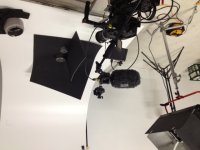
the quad image you see are of course not perfect in matching the mids because im not in a lab

Ill upload a snap of 'the lab' in a mo

Ive just be doing a black gamma test .. Ill post that too..

lab.JPG

S
 
Last edited:
Just checked my blacks - they read at about +4 on the FCP7 scopes

I don't know if they're the same as FCPX but if so then you have all the way to -16 for your blacks, so you're missing out quite a chunk of your 8 bit container, that's what the black level is for AFAIK.

I'm not in front of anything at the moment but black gamma has a range as well, low, med and high? which is how far the curve encroaches on the underlying gamma curve.

I can't speak for your workflow either, i'm very suspicious of all sorts of processes that do things to the source range. In FCP X again as an example if you bring in something with superbrights they will clip at 235 but you can bring them down, recover the highlights like RAW(ish) but if you export a frame to compare frames in photoshop for example, it clips.

I agree in that you don't always want to protect highlights, sometimes they are just highlights and should be clipped. The zacuto tests were a perfect example of why would anyone want to protect the window, it should clip. But how it clips is a valid test.

cheers
paul
 
Im just doing a Black test - see how it goes to h264 and then Vimeo

Iterestingly black level =+15 seems to have nothing below about 10, at -15 it seems to go all the way down to -15

Which would appear to be an interesting stretch of DR..

S
 
The FCP scopes seem to show stuff that I cant actually see on screen, ie anything at 0 or below shows black to me and on the FCP histo.

it seems that Black gamma kicks the 10-20 zone - a very good thing IMO,

Black Level seems to protect to +4 at 0 and hit true 0 at -5 or something

The black level is not however just postioning the foot of the curve, its also to my eye kicking the bottom of the curve down a bit

Conclusion would apprear to maybe set the black level at -5 to fully utilise the 0-255 space, ideally one could take it right down, but reality its kicking the curve too much and would create a grade dependant file..

Interesting (and this is why I like sidelit cylinders) to watch the tonality banding and colour shifts across the surface, a problem, but Id swap em for flrouo highs any day

 
Last edited:
I got my wires crossed.

I go with 105/5 settings when I can't save a highlight. I shot a friend's rental apartment as a favour on one of the few sunny days and had bright sun streaming in through the windows onto white bed linen. Not a chance to save anything worthwhile so no point trying. The audience expects to see bright whites anyway even on film.

White balance is an issue, being absolutely scrupulous is important. Mixed lighting is a nightmare where your subject may be in daylight temp and you've got an incandescent in the background. Maybe worth carrying some daylight temp bulbs with you to swap out as necessary. Avoid mixed lighting as much as possible, I know, easier said than done but you do as much as you can to avoid these situations. That's what I was taught many years ago. Not lighting a subject with 3200K with a bright window in the rear is a given and so is the opposite.

"Every real world scene IMO has a huge DR, especially with my personal fetish for deepening a scenes by showing windows
I dont want anything in the knee slope - I dont want a knee slope - it screams 'digital' to me"

I struggle with that statement because that's not the case and only the case if the camera operator has decided it be so. If you have a "hot" background then you have to equalise the foreground to reduce the DR to fit with the camera (all cameras). I bet you have used flash to illuminate a backlit subject in stills photography at one time or other. The FS100 is digital is it not? Yes you do want a knee slope but you want it in the right place for the scene.

I have been on the roller coaster with the FS100 being delighted and then shooting a load of crud and perhaps thinking the naysayers are right but after hours and hours of mind numbing fiddling with the settings I'm very pleased now. I shot hours of an up turned white china cereal bowl with an orange on top to get a good idea of the knee settings. I have hours of the stuff and I'm thinking of releasing a DVD of the best bits.
 
Im just doing a Black test - see how it goes to h264 and then Vimeo

Iterestingly black level =+15 seems to have nothing below about 10, at -15 it seems to go all the way down to -15

Which would appear to be an interesting stretch of DR..
S

You don't get any less DR with black level value. You just reduce your SNR by lifting it.

Your darkest "black" is set by the black level, US people will be familiar with the term Black Setup level. If you go too negative it becomes a nightmare to expose the shot but all the info is still recorded as you can see when you lift the black back up in post.

Compare -15 and +15 after you've graded them so they match. Ideally you don't want to use +15 as you can introduce some posterisation when you add contrast back into the shot. The same DR is recorded by the camera whatever the black level is. I did get this wrong way back.
 
The black level is not however just postioning the foot of the curve, its also to my eye kicking the bottom of the curve down a bit

Yes, I did experiment with -15 BL and the CineTone2 curve to see if I could stretch out the bottom of this curve. It does a bit but the downsides are that it becomes difficult to judge exposure when the majority of the screen is black!

Also, if you do boost the Black Gamma with the STD gamma curve watch out for the 10-20 zone if you do any grading. I have noticed that those values can fall apart quite quickly. I there for don't use the Black Gamma control anymore. Just leave it at zero if you're grading. The CineTone curves for whatever reason don't suffer this breakup.

It's so difficult to show these subtle characteristics via the medium of stills or via the very compressed medium of Vimeo.
 
Last edited:
You don't get any less DR with black level value. You just reduce your SNR by lifting it.

My thinking is say for example you lit a scene so flat that it was at +30 to + 70 and you then graded it back to 0-100 it would band as you stretched it

Same theory shooting with nothing between 0and5, its not less DR, its less file depth..

Youve shot a 7bit file :)

S
 
Back
Top