Frustrated by Crashes

n8ture

Veteran
So far I have not been able to get the hack working and crashing the camera. I tried the C settings and the camera crashed. Today I tried the B settings and the camera crashed.

Each time I get the Motion Recording was cancelled due to the limitation of the writing speed of the card.

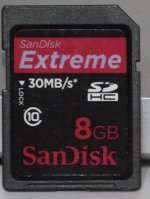
I have two 8GB SanDisk Extreme 30MB/s Class 10 cards and I get this error on both of them.

I freshly formatted in the camera and tried to shoot some prairie scenes but could not get more than six seconds without it crashing.

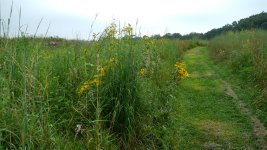
I've uploaded two stills taken right before I flipped over to movie mode in which the camera crashed.

The latest settings I used were in PTool 3.40d in AVCHD I entered all the numbers for the B settings. I also checked Version Increment and Prevent Version Compare.

I also checked remove 30min limit removal and native 24p/25p.

Previously I used the C settings without checking the 24p and it still crashed as well as when I checked the 24p.

Any suggestions? It's frustrating that I'm seeing all this imagery and I'm getting nothing but crashes after a few seconds of recording.
 

Attachments

  • Prairie.jpg
    Prairie.jpg
    288.3 KB · Views: 0
  • Prairie2.jpg
    Prairie2.jpg
    303.1 KB · Views: 0
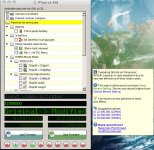
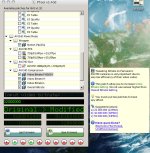
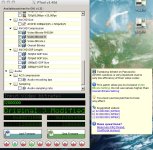
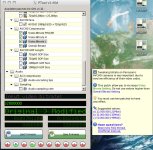
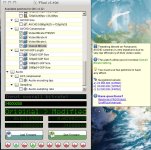
Take a snapshot of your PTools window and post it here, you must have something wrong. Make sure all menu options are visible.

Also check your cards are genuine.
 
I can't get al the settings in one shot so here are several different ones showing my settings that fails on me today after about 6 seconds of filming the shots in the post above.

The above shots were locked off on a tripod and the wind was fairly calm so not a lot of movement.

I picked up the cards at Best Buy so I would guess they would be legit.
 

Attachments

  • Pt1.jpg
    Pt1.jpg
    206.8 KB · Views: 0
  • pt2.jpg
    pt2.jpg
    204.6 KB · Views: 0
  • pt3.jpg
    pt3.jpg
    208.3 KB · Views: 0
  • pt4.jpg
    pt4.jpg
    208.7 KB · Views: 0
  • pt5.jpg
    pt5.jpg
    201.3 KB · Views: 0
yeah post up some pics of your cards too. they may not be genuine? there is a link somewhere that shows the difference between genuine and fakes.
 
Are you resetting camera settings before you load firmware? Not sure if card makes a difference, I've had good luck with C settings and Panasonic Class 10 cards.
 
I also changed the 1080p24 GOP size to 12. It may not make a difference but I've had no problems with the B settings and 1080p24 with that checked in. I had crashes with 720p60 though which I don't use anyway.
 
Are you talking about the Two Resets? Yes, I am, The recording settings and the custom settings. Is there any other reset I'm missing?
 
I saved my settings in PTools so I can make changes to try things out. I can try setting the 1080p24 GOP size to 12 and see if that does anything.

What program are people using to check bitrate on the Mac? I can go run that and see what the clips are recording at.
 
They are the original B settings so should be ok.

Ok locked off on tripod crashes. Try hand held, same shot let run for 2 mins.

Your high detail locked shot will still most likely give errors, most of us have the same issue still with tripod and high detail, especially with sharp lens and deep DOF as in the pics. Try unticking native 24/25p and see how you go with these settings.
 
So what you're saying is that I'm going to have to un-hack the camera if I want shots like this. I was trying to set up a shot and then run around in front to talk about the nature center where I was but before I could get in frame the camera would lock.

So, I really can't do handheld and film myself so I guess I'm SOL on this one. I've filmed with the C settings before with shallow DOF and I can film forever like that but this type of shot, which is what I bought the camera for looks like a no-go. :(
 
The above shots were locked off on a tripod and the wind was fairly calm so not a lot of movement.

Well you're just asking for trouble if you have 24p checked on a shot like that :evil:
Take a short clip, maybe 3 or 4 seconds long, whatever, just as long as the camera doesn't have a chance to freeze, and analyze it to see if you're getting a blank P frame right before a muddy I frame. If you don't have access to either the parser or streameye software you can just go through the clip one frame at a time and look for a repeating/frozen frame followed by mud for the next 2-3 frames

But generally C settings or just below with 24p not checked should be at least somewhat reliable with a fast card. When it crashes does it save what you've recorded up to that point?
 
Yes it does save what I've recorded up to that point So I do have like 6 seconds clips before they crashed.

I tried the C settings without the 24p checked and it still crashed at the same location. Maybe I should try the B settings without the 24p checked?
 
I saved my settings in PTools so I can make changes to try things out. I can try setting the 1080p24 GOP size to 12 and see if that does anything.

No it doesn't unfortunately, not with 24p checked.

What program are people using to check bitrate on the Mac? I can go run that and see what the clips are recording at.

Out of luck there, wine doesn't work for either streameye or the GH13parser. If you unwrap the mts into plain mp4 quicktime will tell you your data bitrate
 
Running the Nature Center sign clip in VLC it says the bitrate is 32399 kb/s for the stream bitrate and 36692 for the input bitrate if that helps at all.
 
I would do the lock off shot in L mode if you set it at a proven stable setting, then change to a higher mode like sh or FHD for handheld. That's what i do.

R
 
Here's some test footage btw with the C settings trying out my Nikon 105mm macro.

Not much DOF so no crashes at all.


Maybe I just need to set the settings for L near default or something to do these kinds of shots then crank it up for the shallow DOF stuff?

Course, I compressed this probably way too much cause it doesn't look that sharp but the original is pretty sweet!
 
Well, like I said the original looks awesome. This was 1080 reduced down to 720 and then compressed on top of all that. So, not the best looking stuff when it was all done but the full rez stuff looks really sweet!
 
For what it's worth, I finally got around to trying the new version of ptool (was on 3.36) and I found it much more confusing and buggy. Got some errors I'd never gotten before and there were some menu bugs as well and I was strangely locked out of changing 1/3 iso increments in movie mode.

So I went back to 3.36 and everything is back to normal.
 
Back
Top