Frame rate weird when uploaded to Final Cut X

rstark86

New member
***Update**** Spoke with Panasonic and determined that it was variable frame rate so that is why things look funky. What is the best program on mac to use to fix this. I shot in 1080i/24p, Film Cam, 24 frame rate, Scene B-STR, and when I click on clip properties in play back menu it says 59.94. When uploading to FCPX I can get it in at 23.94 frame rate and the correct length of clip but audio drops out half way through. Also the people look like they are moving in fast motion. I have attached some screen shots and video shots. click youtube link to see video... http://youtu.be/tidlP3LQ1Ok
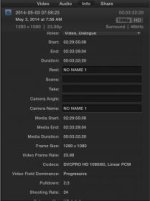
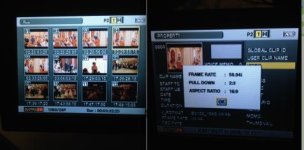
Screen Shot 2014-05-16 at 9.53.47 AM.jpgScreen Shot 2014-05-16 at 10.05.45 AM.jpg

I need to find out if a setting is wrong on my camera or if I'm uploading incorrectly or what... Footage plays back on camera wonderfully and looks perfect its just different when uploaded to Final Cut X.
 
Last edited:
There are no variable frame rates in 1080. Variable frame rates are available only in 720.

The problem here is that you shot 1080i/24p instead of 24pA. Final Cut can only remove pulldown from 24pA; it cannot do so from 24p standard, which is what you shot. If you're going to work with 24p and Final Cut, always shoot 24pA.

If you want to edit in native 24p, which is what you should want to do with 24p footage, you will need to use Compressor (or other software) to remove the 2:3 pulldown and retrieve a native 23.98 stream. Nothing else will work -- not deinterlacing, not resampling, not re-interpreting the footage. You must remove the pulldown.

Otherwise, you can simply edit it in a 1080/60i sequence, but that's not going to give you best results.
 
@David.

Do you know of a tutorial to use for compressor to do this or a web site with step by step. I assume that after I run it through compressor I can input the compressor file into FCPX and it will work with the footage I shot with the DSLRs? I think what I remember about compressor is that I can create an output or something to that effect that when I drop clips into it, compressor processes and spits out the desired result.
 
Back
Top