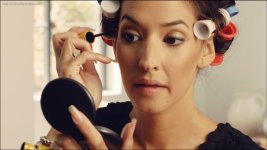
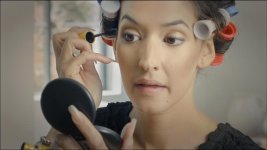
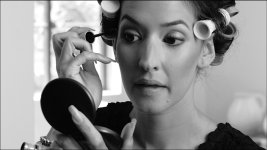
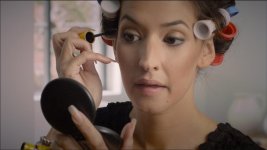
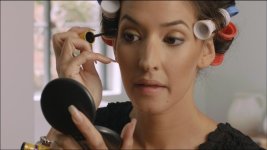
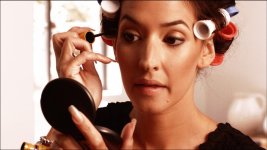
Footage/Frames: Frame Grabs from the makeup clip

My points are that the attempts of the grading of this image are no different than grading a Mk2 image, a gh2 image, in terms of COLOR. A DNG is completely different than a Jpeg from a DNG.

This is how grading software works:
If you load a RAW file, it converts on the fly from the RAW to RGB using the settings you've specified... then it runs all of its grading operations on the RGB image.

If you twiddle a trackball towards blue, it doesn't say "hey let's go back to the RAW file and get more blue info"... it just goes to its RGB decode (or YRGB in DaVinci's case) and boosts the blue.

The camera's color qualities are determined by the sensor plus the decode settings plus the quality of the decode algorithm. If those are set correctly when you make the JPEG, you get the SAME RESULT.

There is no difference between:
1. doing a decent decode of a RAW file, saving that as a RGB file, then adding a power window onto it..
and:
2. loading a RAW file in the color corrector with the same decode settings and adding a power window onto it...

In Lightroom, with stills, yes, you can do split color temp grads, etc. But there is no grading software that does this.

Throwing color corrections and grades at a JPEG of a DNG does nothing to show off what and how you can edit color of a DNG device. Why, because you're editing a JPEG with all that extra info thrown away.

Newsflash: if you don't clip the channels any more than the camera did and use approximately the right white balance and don't quantize valuable tones... you're not losing info.

Bruce Allen
www.boacinema.com
 
This is how grading software works:
If you load a RAW file, it converts on the fly from the RAW to RGB using the settings you've specified... then it runs all of its grading operations on the RGB image.

If you twiddle a trackball towards blue, it doesn't say "hey let's go back to the RAW file and get more blue info"... it just goes to its RGB decode (or YRGB in DaVinci's case) and boosts the blue.

The camera's color qualities are determined by the sensor plus the decode settings plus the quality of the decode algorithm. If those are set correctly when you make the JPEG, you get the SAME RESULT.

There is no difference between:
1. doing a decent decode of a RAW file, saving that as a RGB file, then adding a power window onto it..
and:
2. loading a RAW file in the color corrector with the same decode settings and adding a power window onto it...

In Lightroom, with stills, yes, you can do split color temp grads, etc. But there is no grading software that does this.


Newsflash: if you don't clip the channels any more than the camera did and use approximately the right white balance and don't quantize valuable tones... you're not losing info.

Bruce Allen
www.boacinema.com
I understand every bit of this. I've been color correcting DNG's since DNG was announced.
 
What does that matter? Grading a Jpeg is grading a Jpeg. Look do this. Take any of your RAW capture devices that you might own. Go shoot a RAW image and take it into lightroom or whatever RAW converter program you own. Open the RAW image and without touching a single thing export a Jpeg of the image at full size. Then re-import that Jpeg into say lightroom. TRY, you hardest to color stretch that JPEG against the actual RAW image. Bump up the exposure +3 stops and see what happens. Lift the shadows, control the highlights. You will see two very different images
In this thread there are people color correcting a JPEG! Period! NONE of the benefits of the BMDC DNG raw captures ability are being displayed here, AT ALL.

Vladszp. Let me help you. H.264 is a finishing codec, ya know, the deliverable. So canon's mk3 codec is starting with the deliverable. That is what separates it with RAW.

Oh boy. I think we're going to need to make some kind of guide or something...

Your first step towards confusion is "Open the RAW image and without touching a single thing export a Jpeg of the image at full size."

Yes: if you leave the dials at neutral, most camera systems will export a too-punchy image with clipping or lost precision in highlights and shadows. So your RAW->RGB conversion will of course lose info.

But that doesn't mean that all RAW->RGB conversions lose info.

Here's what sane people do: export a RGB file that's nice and flat, that contains pretty much all the info you need unless you want to severely re-white-balance.

People who say "stay RAW right until the end" are forgetting about VFX.
Do you know what VFX can't do? Write RAW camera files.

Do you know when the movie is graded? Near the end of the post process.
Do you know when VFX needs footage? Before the end of the post process.

Sooo... of course they use a very flat intermediate RGB format that DOESN'T LOSE ANY MEANINGFUL INFO. EG log DPX files.

When you're watching Underworld or Dragon Tattoo or District 9... you don't suddenly see the highlights lose detail every time an alien or zombie enters the shot.

This is because the RGB files with aliens composited in... have the same approx image data as the RAW originals.

So back to the frame grab in hand: it looks like the maximum of what the cam captured in terms of shadows and highlights are approximately contained within the file's range. What makes you think there are like another few stops of shadow and highlight detail waiting to be unlocked?

Bruce Allen
www.boacinema.com
 
Actually it's not. I pushed this as I would edit a still image in Photoshop. It fell apart quite quickly. QUITE QUICKY!

I think he means a jpeg of the video, which I'd have to agree, because the BMC starts off with higher dynamic range.
 
I think he means a jpeg of the video, which I'd have to agree, because the BMC starts off with higher dynamic range.

How much higher?

And what if you just record really flat and there is no clipping? How much higher then?

I would think the answer would be "none higher".

It all depends on how many tonal values you decide to allocate to a stop.

I mean, if you wanted to... you could store each 8-bit value as a stop. So a JPEG could store 256 stops of range.

Although the banding would be horrible. Unless you added sufficient dithering. In which case it would be noisy.

But the point remains: there is nothing about RAW that means it inherently stores more stops than RGB.

I think we really are in need of a FAQ or sticky on this.

Bruce Allen
www.boacinema.com
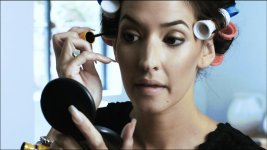
 
Does anyone know if the video originated from CinemaDNG or ProRes?

All of the clips I've posted were shot Cinema DNG

Graded (by me cough cough) in Resolve.

---And i'd add....i looked at the Parade, did a basic balance where the white was starting to clip, blacks sitting just above xero and pushed some saturation...thats all...no sharpening...no NR)

Rendered to 4:2:2 ProRes.

Imported into FCPx

Cut (and only cuts)

then transcoded to h.264 and bumped to vimeo

jb
 
All of the clips I've posted were shot Cinema DNG

Graded (by me cough cough) in Resolve

Rendered to 4:2:2 ProRes.

Imported into FCPx

Cut (and only cuts)

then transcoded to h.264 and bumped to vimeo

jb

Good deal, just wanted to make sure.
 
My Takes:
leah1202new.jpg

leah1202copysrgb2.jpg

leah1202copy8srgb3.jpg

leah1202copy7srgb.jpg

leah1202copy6srgb.jpg

leah1202copy5srgb.jpg

leah1202copy4srgb.jpg

leah1202copy3srgb.jpg

leah1202copy2srgb2.jpg
 
Back
Top