I set manual focus on my brand new (month old) 100B by zooming in to Z99, manually focusing and then zooming back out to frame the shot. When zooming back in close, I've had a little bit of a problem with soft focus on close shots, and I sent the camera in to be checked. The repair guy did find a slight misalignment in the focus which he said he corrected.
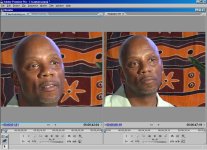
Just got the camera back and I'm still noticing a very slight soft focus when close in, so I'm wondering if it's me or the camera. I'm paranoid that I may have a defective camera, and I want to replace it if that's the case, but the soft focus is so slight, and I'm so new to the camera, that I can't tell if it's me or the cam. Just don't want to keep the camera if it's going to continue being a problem, even slight. Any test I can do that will help me figure this out?
I was doing studio lighting with a manual exposure of between 5.6 and 6.8, so I don't think it's an exposure issue.
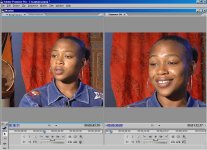
I'm also noticing that across shoots, even when the face is totally in focus, the person's jewelry (true on three different shoots/people) is not. For example hoop earrings or necklaces are blurry while the face and neck are in focus.
I know shiny things can be a problem for auto focus, but I'm in manual. Any thoughts on why this might be occurring, and if this is an indication that wd confirm something's wrong with the camera? Or is it me?
I've attached screenshots showing the soft focus when more zoomed in (the man), and the blurry earrings, focused face thing.
All thoughts appreciated on whether it's me or the cam.
thanks-
Ruby
Just got the camera back and I'm still noticing a very slight soft focus when close in, so I'm wondering if it's me or the camera. I'm paranoid that I may have a defective camera, and I want to replace it if that's the case, but the soft focus is so slight, and I'm so new to the camera, that I can't tell if it's me or the cam. Just don't want to keep the camera if it's going to continue being a problem, even slight. Any test I can do that will help me figure this out?
I was doing studio lighting with a manual exposure of between 5.6 and 6.8, so I don't think it's an exposure issue.
I'm also noticing that across shoots, even when the face is totally in focus, the person's jewelry (true on three different shoots/people) is not. For example hoop earrings or necklaces are blurry while the face and neck are in focus.
I know shiny things can be a problem for auto focus, but I'm in manual. Any thoughts on why this might be occurring, and if this is an indication that wd confirm something's wrong with the camera? Or is it me?
I've attached screenshots showing the soft focus when more zoomed in (the man), and the blurry earrings, focused face thing.
All thoughts appreciated on whether it's me or the cam.
thanks-
Ruby