GH2 Flow Motion v1.1 Patch updated with HBR 25p support

Lpowell

Veteran
Flow Motion v1.1 Patch updated with HBR 25p support


  • 100Mbps AVCHD in 24H 1080p24 and SH 720p50/60 at 8-10 keyframes/sec.
  • 75Mbps AVCHD in HBR 1080p25/30 and FSH 1080i50/60 at 8-10 keyframes/sec.
  • 50Mbps AVCHD in 24L 1080p24, FH 1080i50/60, and H 720p50/60 video modes
  • 100Mbps MJPEG 1080p Patch maintains high bitrates regardless of light levels.
  • Full support for all NTSC and PAL video modes.
  • In-camera playback of all AVCHD video files. (MJPEG HD videos not playable in-camera.)
  • 4GB AVCHD file-spanning in all video modes with 95MB/sec UHS-1 SD cards.
  • File-spanning in 24L, FH, and H modes supported on all Class 10 SD cards.
  • ETC zoom mode supported in 24H, 24L, FH, and H modes.
  • 80% Slo-mo 24H video mode with ETC and file spanning in 24L mode.
  • Combines optimal I-frame size with compact, 3-frame GOP file size (GOP-6 in 720p modes).
  • Customized Scaling Tables produce P and B-frames that match I-frame quality.

See this thread for more info and downloadable INI file:

GH2 100Mbps Flow Motion Patch v1.1 with HBR 25p support
 
Oooh. That looks very nice.
As a long time user of your GH1 patches I'm really looking forward to this one.
I can now finally make the move to high bitrate 25p on the GH2!

Shooting next week so it's all come just in time.

Updating now....
 
Last edited:
Hey Mr. Powell,
Big fan of your GH1 settings so I just had to give your latest a go! I loaded your latest and tested with a 14-140mm and a SanDisk 32GB 30mb/sec card. Using the "Crunchy Chart" I got instant hard crashes (had to pull battery) in SH, H, and FSH. Not in FH and I didn't test any other settings.
Using a non electric legacy lens may solve this, but since I don't have one .... :)

Tim
 
Brief bit of testing so far and its pretty reliable. Shooting in the garden in coped with everything - including crazy moves over very details trees and grass - even with just a class 6 (it's a pretty fast samsung class 6 though, almost as fast as a transcend class 10).

Shooting some death charts on the monitor my sandisk 30mb/s 16gb coped fine recording - though it wasn't happy playing it back (froze a few times).
The bitrate hits over 150mbps on the death chart.

The class 6 was fine on the death chart in 24L and HBR modes but did freeze 24H.

Just early results so far.
 
Shooting some death charts on the monitor my sandisk 30mb/s 16gb coped fine recording - though it wasn't happy playing it back (froze a few times). The bitrate hits over 150mbps on the death chart.
What tool are you using to measure the bitrate? A bitrate of 150Mbps should not be possible with Flow Motion v1.1, as it is internally limited to about 100Mbps. I'd recommend downloading and reinstalling the Flow Motion INI file to be sure everything is working as intended.
 
I loaded your latest and tested with a 14-140mm and a SanDisk 32GB 30mb/sec card. Using the "Crunchy Chart" I got instant hard crashes (had to pull battery) in SH, H, and FSH. Not in FH and I didn't test any other settings.
Panasonic Lumix distortion-correction lenses may produce over-sharpened edge detail, which demands significantly increased bitrate from the AVCHD encoder. If you use these lenses at high ISO and/or in ETC mode, I recommend using the 24L, FH, or H video modes. If you can send me a link to the test chart you used, I will test it and try to reproduce your results.
 
Here it is LPowell. It's the true death chart IMHO. I shoot 99% in 720p at 60fps and I have to have 100% stability as do-overs are way too expensive for what I shoot.

I realize the new settings are experimantal but I just want to give you some feedback.

Thanks so much for all you do!

Tim
 

Attachments

So just to make it clear, this patch will not span 4gb files in 25p with sandisk class 10 16/32 gb cards?
 
...this patch will not span 4gb files in 25p with sandisk class 10 16/32 gb cards?
If you need to make long takes in 25p with 4GB file-spanning, your best option is to use a 95GB/sec UHS-1 SD card. Unfortunately, since Panasonic did not see fit to implement a "25L" version of HBR mode, there isn't a way to assure file-spanning at 25p with Class 10 SD cards. File spanning will work at 1080i50 in FH mode with all Class 10 cards and above.
 
Thanks for the answer! I guess that the recording simply stops when it hits the 4gb file size?
 
Here it is, it's the true death chart IMHO. I shoot 99% in 720p at 60fps and I have to have 100% stability...
Thanks for the chart, it's designed to produce maximum-contrast aliasing artifacts and moire patterns. Shot with the digital sharpness enhancement of the Lumix 14-140mm zoom, it will subject the AVCHD encoder to extremely harsh abuse. I debated whether to tune Flow Motion for absolute reliability with this type of test chart, as it requires a reduction in quantizer quality and it's extremely rare to find comparable examples in real-life scenes. However, there is a simple adjustment you can make to the patch that will enable it to record this chart without error.

In PTool v3.64d, open the following patch option folders: Patches for testers - AVCHD Movie Mode - Quantizer. Then set "Quantizer for 720 modes" to 20, and save a new copy of the patched firmware. With this modification, I was able to shoot a 30-second clip of this test chart at ISO 3200, f8, 1/60 shutter, in 720p60 SH mode without error. If you'd prefer an even greater safety margin, you can set the 720 mode quantizer as high as 22.
 
Thanks for the chart, it's designed to produce maximum-contrast aliasing artifacts and moire patterns. Shot with the digital sharpness enhancement of the Lumix 14-140mm zoom, it will subject the AVCHD encoder to extremely harsh abuse. I debated whether to tune Flow Motion for absolute reliability with this type of test chart, as it requires a reduction in quantizer quality and it's extremely rare to find comparable examples in real-life scenes. However, there is a simple adjustment you can make to the patch that will enable it to record this chart without error.

In PTool v3.64d, open the following patch option folders: Patches for testers - AVCHD Movie Mode - Quantizer. Then set "Quantizer for 720 modes" to 20, and save a new copy of the patched firmware. With this modification, I was able to shoot a 30-second clip of this test chart at ISO 3200, f8, 1/60 shutter, in 720p60 SH mode without error. If you'd prefer an even greater safety margin, you can set the 720 mode quantizer as high as 22.

Thanks for writing back Mr. Powell

Loaded it and changed the Quantizer to 20
14-140mm, 32GB 30mb/sec SanDisk card, shutter priority at 1/125, AWB and auto ISO ......

With the Crunchy Chart:
got hard crashes in FSH and SH (battery pull)
FH is stable
write errors in H mode

Outside with my Shrubbery of Death:
Write errors in SH and FSH
FH and H seem stable

I think a lot of hacked GH1/2 users go with better legacy type glass then I can use so there may not be the need to tweak the setting for a minority like myself using Panasonic OIS AF glass

Tim
 
I got those bitrates from Splashplayer.

I've also run it through Streamparser and it says
Average Video Bitrate = 122,315,237
Though it also says TS Max Speed = 105,526,700 bps
Max GOP Size = 3,204,480 Bytes (25,635,840 bits)

I didn't touch the .ini file at all so I can't imagine there's anything wrong with it.
I'm not really worried since this was an extreme case - so far real life seems very stable even with class 6 cards.

Thanks for the amazing (and fast!) work.
 
The latest Ptool V3.64d is 200212. I am wondering if it could use with no effect for GH1 hack. I use both Gh1,Gh2. Which patch or setting should be using to match both camera in shooting 1280x720p
 
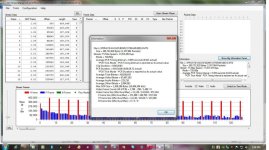
Here's a screen grab of a failed recording of the Crunchy Chart in "H". It does a write error, not a hard crash. I tested with another SanDisk 32GB 30mb/sec card and had the same result.
 

Attachments

  • grab.jpg
    grab.jpg
    96.9 KB · Views: 0
The latest Ptool V3.64d is 200212. I am wondering if it could use with no effect for GH1 hack. I use both Gh1,Gh2. Which patch or setting should be using to match both camera in shooting 1280x720p
Shouldn't this be a new topic instead of doing this here?
 
Here's a screen grab of a failed recording of the Crunchy Chart in "H".
What type of write error does Stream Parser report in this case? The second I-frame (in red) is extremely large for H mode - 460K is near the peak level seen in SH mode. In H mode, you should be seeing I-frame peaks less than 325K. If possible, I'd like to examine a copy of the original MTS file.
 
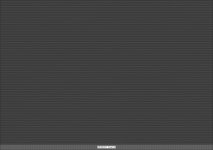
Here is gif file of Crunchy Chart 2:

http://www.mypicx.com/02212012/crunchy_chart_2b/

Click on the picture in order to open larger window and then save it by right clicking at that larger picture and select option "save image as".
Then open it in e.g. IrfanView and select option "View - Original size". Don't use full screen options!!

Picture below is not useful, since DVXUser automatically resized the original gif file.
 

Attachments

  • Crunchy_Chart02b2.jpg
    Crunchy_Chart02b2.jpg
    156.2 KB · Views: 0
Last edited:
Back
Top