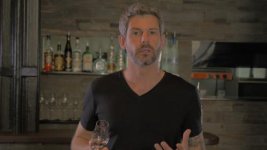
GH4 First promo shot on GH4 - 4K downsampled to 1080p - heavily graded

duel90

Member
Hi guys, really excited to get my GH4 and started working with it straight away.

I shot this short event promo with the GH4 in 4K, then downsampled in Premiere for uploading to YouTube

The grade is pretty strong (in fact in retrospect skin tones may be a little too orange) but it was great to work with

Here's a still of the RAW footage compared with the final grade
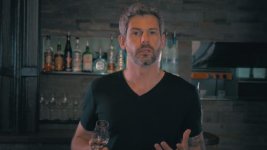
Gin Promo 5.Still004.jpgGin Promo 5.Still005.jpg

Link to full res images on imgur


Lenses used; mostly Panny 12-35 f2.8, some Panny 25 f1.4

Three daylight balanced LEDs where used to light the subject

Any criticism, questions, analysis or general observation would be great
 
Last edited:
Did you use a rig? Some interesting camera movements in there. How are you finding the GH4 to work with, easy, fun?
 
Did you use a rig? Some interesting camera movements in there. How are you finding the GH4 to work with, easy, fun?

Yes... I too found the camera movement "interesting"... I'm not sure if it was intended, but the movements made me feel like I was actually there in the bar drinking the gin.. Not sure if that was a good thing.
 
I used a basic shoulder mount for this shoot. Monitored of the LCD.

"interesting camera movements in there" - I'll take this as polite code for "my god man, steady your camera before I'm sick!" which would be a fair point, I think definitely could have kept my movements a little more in-check.


The GH4 should be perfectly familiar for users of the GH3. I certainly had no time adapting at all - I spent 10 minutes changing my settings on first start-up and then was immediately using it for client work.

It's even easier to use than the GH3 IMO, higher res LCD and EVF make critical focus easier. That coupled with the new peaking function means that I'm more inclined to manual focus again after a year or so of relying on GH3 autofocus (I found m43 lenses fiddly to manual focus, fly-by-wire and small LCD made this difficult).
 
Nice, I've never used any of the GH models - I might rent one and see how it goes. Yeah, you'll have better camera movement next time and it will be a better video :) I'm sure the client still loved it - that's the main thing!
 
I liked the camera movement. Did you shoot in CineD? I feel like skin tones turn too orange when shooting in that mode...
 
The work looks good, I enjoyed the promo, it felt natural and unobtrusive, he was also a good sale. The issue I have is the overly detailed image, this camera would be great for some things, just not close ups of a face. It's extremely unflattering to see every pore and wrinkle, It would be great for macro or landscape or maybe some diffuson to knock down the sharpness. I just can't fall in love with the image as I did with the gh2 or g6. It's very digital and harsh to my eyes.
 
yeah cinemaD hasn't won me over yet either. not liking the skin tones that much in that mode. Good clip, just not a fan of the skin tone in it.
 
I did shoot in Cine D! Perhaps this is the culprit.

In addition to my lighting there was also some tungsten overhead that may have been adding to this.

Would be keen to learn best settings for natural skin tones in the GH4...
 
On a related note, how do you guys like to gauge skin tone? Garbage + check skin tone line on Vectorscope?
 
Last edited:
Yeah, there's something...off about the look of the shot. Apart from the host looking downright jaundiced (a common Panny problem), the shadows in the background off to his sides are muddy (and not in a nice, film-like way). Might just be the Youtube compression, though.
 
I thought the skin tone was a bit too orange... but I only noticed it after it was pointed out. I think the camera moves were a bit (seriously, only a bit) much, but not necessarily objectionable. It didn't seem like amateur, shaky cam stuff.

I'm also being a bit nit-picky. Overall, it was a pretty good spot. Well done.
 
Not bad.

The wandering focus got problematic for me.
Skin tones were definitely too orange, he looks like an oompaloompa.
Dialogue audio could have been better too, imo.
 
I have to say I agree with the skin tones comments. I took delivery of a GH4 yesterday as a bcam to the BMCC, which has pretty world class skin tones out of the box and I can see from 95% of the footage that I'll have some playing to do ti get the right balance. I feel like the camera is pushing reds a bit tough.

As for the spot itself I liked it quite a bit. My only crit besides the camera being more steady is the focus hunting. But it was an effective message and if this was happening in NYC, I'd sign up.
 
I did shoot in Cine D! Perhaps this is the culprit.

In addition to my lighting there was also some tungsten overhead that may have been adding to this.

Would be keen to learn best settings for natural skin tones in the GH4...


Did you balance to the tungsten overhead? If not, and you balanced to your backlights, then the key light had the wrong temperature. That would cast it orange.

Ideally in this setup, it would probably be best to throw some diffusion over that tungsten to soften it up, then balance to it. Use the daylight side/backlights as a moonlight effect and it would look fairly decent. Not sure what you balanced at, it could just be rough color science in camera. Odds are, its a color temp issue.

That said, it has a vintage look to it. I would throw it in AE and see if you can tweak that orange a bit and do a bit of balancing there.


EDIT: Your background colors look fairly decent. Looks like its an issue with that tungsten overhead. My guess is it is a fixed ambient light. Best remedy there would be to bring some gel with you and throw some 1/2 CTB on that and knock down its output and try to get it closer inline with your other lights. If anything...turn it off.
 
Yes... I too found the camera movement "interesting"... I'm not sure if it was intended, but the movements made me feel like I was actually there in the bar drinking the gin.. Not sure if that was a good thing.

More like what I see after I have had too many gins…..
 
Back
Top