"First" attempt :-)

This was my first attempt using my GH1 "naked" on a real (but no-budget) video production. It was an opportunity which presented itself, perfectly suited to see if I could succeed or fail when I used the cam this way.

By "naked" I mean I used my GH1 all hand-held and with minimal external add-ons. No tripod, no shoulder rig, no matte box, only used an ND filter on a couple of shots, all the audio was recorded in-cam (an old Sennheiser EV100 wireless mic receiver was plugged into the cam), and no crew. Hence my use of higher-than "ideal" 180-degree shutter and no use of wide-open f-stop settings. Of course, I was limited to checking the sound _after_ each take by connecting my over-the-ear headphones to the GH1's audio line out jack via inexpensive plug adapters.

I used the GH1's eyepiece/viewfinder exclusively while shooting this piece (the GH1's relatively hi-res VF has always been one of its strongest features). During playback (audio checks) I'd flip open the LCD for easier UI navigation. While shooting, pressing the VF firmly against my eye, keeping my elbows against my chest, and breathing as little as possible (!) helps me keep shots relatively steady. I also steadied myself by leaning against lamp & sign posts, walls, tables, whatever was nearby & stationary. To save time rendering in post (and to preserve image quality) I only applied FCP's SmoothCam plugin to the relatively short cutaways instead of the longer interview clips.

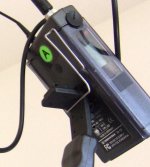
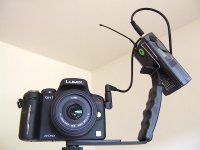
Shot in 720p60 because the primary delivery target was SD DVD. Film mode: Smooth -1, -1, 0, -2. (Although in hindsight, now that I've also seen the HD version of video via Blu-ray on a 42" 1080p HDTV I wish I had set the Sharpness to -2 instead). WB: Daylight preset. Most shots using the Lumix 20mm pancake lens; a few using the 14-140mm kit zoom lens. I used an inexpensive "flash" handle/bracket from Adorama to hold the wireless receiver (see pic below). The handheld mic was a Sennheiser ME64 with a EV100 plug-on wireless transmitter. Edited in Final Cut 7.0.2. Minimally color-corrected (adjusted to FC's "range check"). FC's SmoothCam plug-in was only applied to the cutaways.

I don't recommend this bare-bones approach for most shoots, but it is what is is, and I found it to be a helpful exercise. Meanwhile, my "clients" (members of my local neighborhood association, who are not video professionals) are ecstatic with the results.

Of course, other folks who are more talented than me accomplish more with less, but this at least gives me an idea of what _my_ personal "baseline" is when using a GH1. Plus it was fun production. Thank goodness for the GH1!

P.S.: Apologies for the SD video on Vimeo. I'll get around to upgrading to Vimeo Plus & HD sometime soon. Also, the hiss you hear in the background is mostly genuine Portland, Oregon rain. :smile:


DSCF8995 wireless mic.jpg
 

Attachments
  • DSCF8995 wireless mic.jpg
    DSCF8995 wireless mic.jpg
    129.6 KB · Views: 0
Last edited:
Too many apologies!

I watched full-screen on my 20" iMac and it looked good. Vibrant, pleasing colors and composition.

I'm further impressed with how you did this without a tripod - and you're holding the interview mic?

Food market seems interesting, but oh my, how many times did those young girls say "like..."?
 
Thanks, SIAP. Glad you enjoyed the video.

The interview mic was held by, and the interviews were conducted by, my "client" (one of my neighbors), Rick Seifert. He did a great job, but he's not a techie. He knows how to put people at ease and ask good questions -- which is HUGE. There're links to more info about Rick on the Vimeo page:
http://www.vimeo.com/12000889

My favorite thing about this video -- the thing which for me was a pleasant surprise -- is that the audio sounds as good as it does. I think it sounds great, and other people have mentioned this without being prompted. It's inherently risky to record sound in camera with a DSLR (because there's no live external monitoring during recording). But if a production schedule lends itself to carefully checking sound playback immediately after each & every take (which I did here) -- and allows for re-takes if needed -- the results can be well worth it. And no syncing in post!

I sooooo hope the "GH2" includes live audio & video external monitoring. In the meantime, the GH1 _as it is_ continues to amaze.
 
Nice job, Peter! I, too, am amazed by how good the audio is. I've seen a couple videos on this board that use the camera input, which I have always thought of as a no-no due to the AGC. But I don't hear it "pumping" at all in these interviews. Were there any instances where the AGC made your audio unusable?

I really like the hi-contrast natural light on the guy in the cafe'.
 
My favorite thing about this video -- the thing which for me was a pleasant surprise -- is that the audio sounds as good as it does. I think it sounds great, and other people have mentioned this without being prompted. It's inherently risky to record sound in camera with a DSLR (because there's no live external monitoring during recording). But if a production schedule lends itself to carefully checking sound playback immediately after each & every take (which I did here) -- and allows for re-takes if needed -- the results can be well worth it. And no syncing in post!

Was that a Sennheiser ME64 mic being used? One thing I noticed, since I did a bunch of tests with the GH1 audio which actually included using the ME64 which has a very high output signal, is that sounds like it's hitting the limiter in the GH1 pretty hard which adds its own unique sound to it.

An advantage to this is that all your sound is going to be very level between all the different people speaking on mic but may raise the background noise level up some. It can also make the sound of the people speaking sound less natural. By attenuating the input level to the GH1 in my tests, I was able to get a much more natural sound.

I just ordered another type of attenuator that is 3.5mm in size to use with my wireless system (All of my tests were with XLR attenuators) and it lowers the signal 10dB which may be enough to make a noticeable difference and give it a more natural sound quality. I haven't received it yet to test it with my wireless system but here is a link if you are interested in it:

http://www.m-audio.com/products/en_us/MicroTrack10dBPad.html

Here is a link to the thread about my audio tests also if you haven't read it here yet:

http://www.dvxuser.com/V6/showthread.php?t=208746

Randy
 
Yes, the Sennheiser ME64 mic does output a fairly strong signal. Of course, in this particular setup, its audio was passed through to the GH1 via an old Sennheiser EV100 wireless transmitter & receiver. Point being, there's a fair amount of processing going on solely due to the wireless system, for better or worse.

The footage I recorded using this setup exhibited little or no AGC/limiter/whatever sound level pumping artifacts.

I haven't tested it scientifically, but I suspect this might partly be because I kept the wireless receiver's output level knob turned down much lower than when I use it with pro cams with XLR mic-level inputs or with pro mixers. With most pro cams & mixers (and their studly input circuits) I'd typically have the wireless' output level knob at about its half-way point. With the GH1 I had it set at about 25% -- any higher and the GH1 would tend to clip loud sounds.

However, it might just be that the wireless system's normal internal processing may play a role, too. Perhaps the wireless is doing its own auto-magic limiting/gain control stuff and that's presenting a relatively "even" source to the GH1. Whatever the cause, it works.

For those of you with this same/similar setup: The ME64's low freq. roll-off switch was disabled (to retain natural, full sound). The EV100 wireless plug-on transmitter settings were: Sensit -20db, Att Off. The wireless receiver settings were: Squelch 20db, and the rotary output level knob at the approx. 25% point.

BTW, this setup sounds noticeably better when used with my GH1 than when I used it with the $18,000 Sony DSR-450WSL broadcast DVCAM camcorder I sold last December. Go figure.

YMMV.

P.S.: Randy: I own 3 Shure inline XLR switchable attenuators/pads, but I haven't tried them with my GH1 yet. However, it "sounds" worth trying (especially when using a hot mic such as the ME64 plugged directly into the GH1). I have XLR-to-3.5mm & 3.5mm-to-2.5mm adapters, so I'll give it a go sometime soon. But of course, the usual caveats apply: Using a tangle of cables & plugs to input sound into a DSLR, especially without benefit of live headphone monitoring, is a disaster waiting to happen -- unless, and only unless, the production is OK with immediate playback checks and the possible need for retakes. I also always try to carry a spare set of adapters for when one inevitably craps out. Aside: Is it true that girls prefer guys who live on the edge of sonic disaster? :-)
 
Last edited:
One spot that this is noticeable because the background level raises up when the person stops speaking for a second is starting at 1:05 she starts speaking and a car/truck engine noise begins in the background at 1:07 she stops speaking for second at 1:09 and the noise gains up a good amount then she starts speaking again at 1:10 and the noise goes back down again after her first couple words.

There are other places it does this, maybe not as drastic as that example but that's what hitting a limiter too hard is going to do. Basically it ends up acting like an AGC which is why so many people think the GH1 has that instead of a limiter. In my tests, I had to attenuating the input level by at least 25dB (which is a significant amount of reduction) to to get it to not hit the limiter and "color" the sound quality of the voice being recorded. That was using a Electro-Voice RE50 mic and not the much stronger output of the ME64.

Randy
 
OT: Just to document this somewhere, since I mentioned having 3 XLR switchable inline attenuators & a plug-on wireless transmitter ...

The most fun use for them I've stumbled upon: Plug-on wireless transmitters utilize the metal body of the mic they're attached to as the antenna for the transmitter. On more than one occasion I've needed to get a live feed from a house or band mixing board to a camcorder, but needed to do it wirelessly.

The Shure XLR attenuators have metal shells, so I connect 3 attenuators end-to-end, switch two of them to -15db & the third to -25db, plug the transmitter onto one end, and connect the other end to a line-level output coming out of the mixer via an XLR cable. The transmitter/attenuator assembly fits securely into a standard mic clip on a mic stand, so you can easily raise it up in the air a bit for good range.

I've also configured 2 similar setups for stereo, with each transmitter/receiver pair using diff. freq. channels of course. Worked really well.
 
Last edited:
I've actually used 2 of those Shure adjustable attenuators as a gain control to raise and lower audio levels at public meetings where people are speaking at different levels due to their voice and how well their mic is positioned. Works pretty transparently going up or down 5dB at time with them and you have a range from 50dB which is basically a line to mic level attenuator used to tap into their mixing board, to 30dB in 5dB increments. So this basically gives you 20dB of adjustable gain to work with. The two attenuators are attached to my tripod so it's easy to adjust them while shooting.

Randy
 
That's a very nice job, Peter. Simple and to the point. Shows how just having backgrounds a tad more de-focussed than a traditional camcorder can achieve makes the image look more pleasing. Only thing I didn't like is the font, it's feels like a quick slap-on but that's just the graphic designer snob in me.

And yes, the sound recording in GH1 has one of the most benign AGC/Limiter I've ever encountered. Lately I've been handed 5DmkII footage from various photogs with the AGC disabled and they all have either distorted or next-to-not audible sound, whereas the GH1 sound has always been useable. Manual sound level is nice but it really requires operator attention, which is kinda hard when being occupied with framing and focusing as a solo run-n-gunner.
 
Thanks, Martti.

It's been years since I've edited anything, so this little project was a nice opportunity for me to re-learn some FCP basics again. And also to be reminded what a vast universe "editing" is these days. (Motion? Color? SoundTrack Pro? Yikes! So much to learn ... nah, where's that razor blade icon?)

I appreciate your comment about the title font. I'll have to talk with the graphic design consultant for this project ... oh wait, that' was me. ;-)

For what it's worth, I did go back & forth about whether I should use curly quotes or straight quotes ...

Pfft. Manual audio control is for sissies, you know, people such as Barry Green. Real men crank it up to 11 and just roll with it! :-)

Meanwhile, I think it's about time for Ozpeter to pipe in here with some audio attenuator/pad anecdotes of his own (I bet he has at least one) ...
 
I want your rig. Was it expensive, and where did you get it? The video was great! Good stuff to see when thinking about documentaries!
 
I want your rig. Was it expensive, and where did you get it? The video was great! Good stuff to see when thinking about documentaries!

The handle/bracket is only $12 from Adorama, although it's currently out of stock. You might be able to get something similar from B&H or elsewhere:
http://www.adorama.com/Als/ProductPage/FABT.html
http://www.bhphotovideo.com/c/search?N=4294540373&Ns=p_PRICE_2|0

The Sennheiser ME64 mic system (power module, mic capsule & windscreen) is considerably more expensive, but still a great value. Available from Adorama, B&H and elsewhere:
http://www.adorama.com/Als/ProductPage/SEME64K6.html
http://www.adorama.com/Als/ProductPage/SEMZW64PRO.html

My old Sennheiser Evolution 100 series wireless systems have been replaced with new, improved versions. Much less expensive than their higher-end wireless systems, but the 100 series work really well & are great investments. Available from various sources including B&H:
http://www.bhphotovideo.com/c/search?Ns=p_PRICE_2|0&Ntt=sennheiser+wireless+100&N=0

There are plenty of very good mics available, including a few which are surprisingly inexpensive. For example, watch this interview with Dan Brockett who always has very wise things to say:
http://www.macvideo.tv/camera-technology/features/index.cfm?articleId=3222985

And don't forget that much of this gear or similar is also available for rent in many metropolitan areas. Renting gear can be very cost effective depending on the circumstances of your production(s).
 
Last edited:
The handle/bracket is only $12 from Adorama, although it's currently out of stock. You might be able to get something similar from B&H or elsewhere

I have the same handle bracket and broke off the top shoe mount in a manner of minutes after attaching a mic mount on it holding a Sennheiser ME64. The 2 shoe mounts on it are glued and not screwed on. I did super-glue it back on and it's holding so far. Maybe I should tack weld it on.

Randy
 
I have the same handle bracket and broke off the top shoe mount in a manner of minutes after attaching a mic mount on it holding a Sennheiser ME64. The 2 shoe mounts on it are glued and not screwed on. I did super-glue it back on and it's holding so far. Maybe I should tack weld it on. Randy

Hi Randy: Hey, big thanks for the heads-up about the potential weakness of the "cold shoe" clips on the Adorama flash bracket handle. I may add some super-glue to the outside edges of the shoes, and I'll keep an eye on it.

I don't use the shoes when I use this bracket to hold my wireless receiver. Instead I slip the receiver's belt-clip spring over the relatively thick, sturdy metal bar of the handle itself. This results in a very stable configuration not likely to ever break or fall off.

In future if I use the shoes for something like a mic I may add a safety tether of some sort (zip-tie or velcro strap, etc.). Again, thanks for the heads-up.

jpg.gif
 

Attachments

  • DSCF8995 wireless CU.jpg
    DSCF8995 wireless CU.jpg
    176.5 KB · Views: 0
Your town is lucky to have you around! You managed to make something that's really a little dull, unless you live there , seem interesting. Please don't take that the wrong way. I thought that you did a great job with minimal kit and it proves that you don't always need to be fully kitted up in order to get good looking material.
 
Thanks for your kind words, Adrian.

You're correct about my Portland neighborhood. :-)

[Soap box on] As the folks in the video say, many of our neighbors are wonderful. But some folks here are firmly stuck in the past. They don't understand -- yet -- the importance of transforming a neighborhood like Hillsdale into an environmentally & economically sustainable town center -- and it wouldn't hurt to make it a bit more aesthetically-pleasing, too. I really think this is the single most important challenge facing neighborhoods all across the US, and probably many other places around the world, too. Think globally & act locally & all that. [Soap box off]

But here's a funny thing: I actually find video streams from outdoor web cams (such as security cams, etc.) fascinating because you see the world (primarily urban locations) as it really is, not as Hollywood wants us to see it. I find how other places look different & similar -- warts & all -- compared to where I live to be very interesting, both visually and also because I enjoy imagining what it must be like for the people who live there. And it's cheaper than airfare!

YMMV.
 
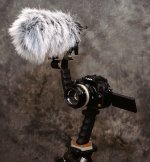
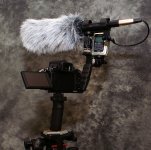
Here's one way I'm using that bracket with my GH1 for simple handheld use. It's only mounted on the tripod so I could take the pics.

Randy
 

Attachments

  • PICT9646_fixed_sm.jpg
    PICT9646_fixed_sm.jpg
    375.5 KB · Views: 0
  • PICT9660_fixed_sm.jpg
    PICT9660_fixed_sm.jpg
    362.3 KB · Views: 0
Last edited:
Nice use of the 2 shoes on the flash bracket handle! I hope the shoes continue to "hold" for you.

I've thought about getting a 2nd one of those brackets and screwing them together to make a poor-man's 2-handle rig. As you can see in the photos in this thread, the knurled knob at the bottom of the cam has both a male & female 1/4"-20 threads.

Two of these brackets could be screwed-together & configured with the handles pointing up or down, since the knob can be pulled out of the bracket & reversed. You could also have one handle toward the front side of the cam & the other in back ... a poor-man's version of the rig shown at the top of the Shane Hurlbut, ASC blog:
http://hurlbutvisuals.com/blog/
 
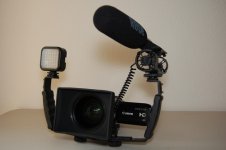
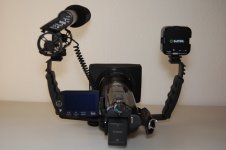
Here are a couple pics that someone posted on Amazon when this bracket was listed for sale on there. I'm not sure how they connected the two brackets together since you can see that the knobs are to either side of the camera. This is what was written about their setup:

"Canon HF-S100, Canon WD-H58, Hoya UV Filter, Canon BP-827, Rode VideoMic, Sima Ultra Bright Video Light, Sima Quick Release Adapter, 2 Adorama L-Brackets."

I also thought about getting two of the brackets but went with a more substantial grip directly under the GH1 that I could hold with my right or left hand alone if needed.

Randy
 

Attachments

  • L_Bracket_1.jpg
    L_Bracket_1.jpg
    95 KB · Views: 0
  • L_Bracket_2.jpg
    L_Bracket_2.jpg
    99 KB · Views: 0
Back
Top