stefanhuberfilms
Veteran
FIRST OFF: Why can’t new threads which get „auto saved“ (whatever that means) be stored somewhere? just when i was almost done with writing this, (Resolve i think) decided to lock up my machine. RESULT: ALL GONE GRRRRRR
OK, Once again:
Hi folks!
This week, i finally got my 7Q, so i thought i’d share some pics of it plus a LUT i made...
The RIG:
I won’t go into detail on the Camtree rig, we discussed it already here.
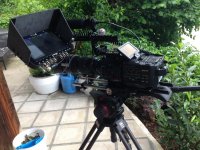
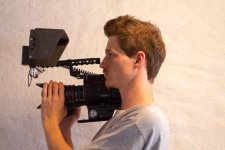
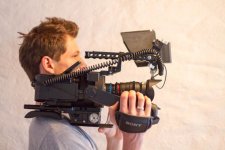
The HOOD:
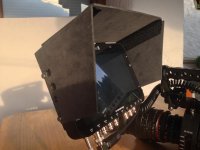
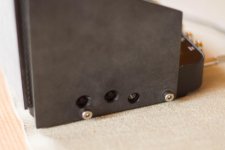
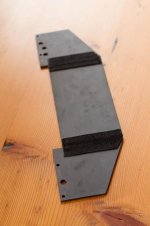
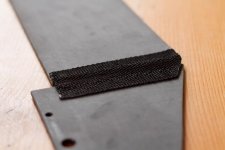
This is the hood i made from 3mm thick, black POM (Delrin) plates. POM usually comes with a glossy finish, so i decided to sand it with a rotary sander and afterwards polish it to get a nice matte finish. I also drilled holes in it to have the connectors and buttons accessible. First i had some hand knobs to mount the Hood to the Odyssey, but these were kinda bulky, so i decided to just go with hand tightened M4 allen screws. The Hood is easily foldable, since i included „hinges“ made from the carrying belt of an old tripod bag. Currently i just glued the fabric to the plates, i will soon rivet it together, to provide a more rugged finish for on set use.
The MONITOR MOUNT:
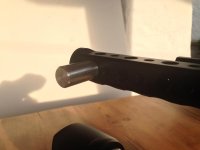
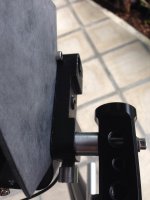
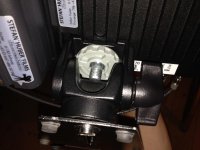
I made this mount from a rod clamp i had left (thanks to Frank Glencairn ) and a 15mm Shaft which i screwed through one of the 3/8“ holes on the handle of my rig. This is more flexible than i thought first, since it allows me to angle the 7Q up and down without loosening any of the screws/knobs. The clamp is screwed to the Odyssey with one 1/4“ allen screw.
The FS7QQ on a Steady-cam:
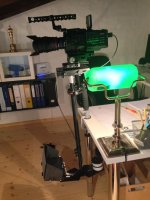
Not much to say about this one, the only thing i had to do is cutting of an 3x1cm area of Olofs battery plate to have enough space for my monitor mount on the bottom of the steadycam. I went with an CD 48" cable from the bottom to the top. I will have to get some 90° BNC connectors though.
That’s it from the production side, now on to the post process:
The LUT:
I read that some people asked for a LUT that somehow gets cdng RAW files in the ballpark of 4K2HD. So i had my first try making my own LUT.
DISCLAIMER: I didn’t have any experience in making LUT’s before, just fooled around with curves a bit to get the black levels match.
What i did while shooting: exposed the shot, so that the black levels were around 10 IRE. Changed recording mode and shot the same in 4K2HD, without altering the exposure.
What you should do:
1. Shoot something in RAW/4K2HD if you haven’t done that already
2. Download the LUT, unzip it and drag it to the LUT folder of Resolve
3. import your files into resolve as usual, no ACES, just simple DaVinci YRGB
4. in the Media tab, right click on the ProRes clip —> clip attributes —> set Levels to Data Levels instead of Auto (or Video). This can make a huge difference, because Auto or Video Range often cuts of the last bits which are located in the headroom between 100%-109%.
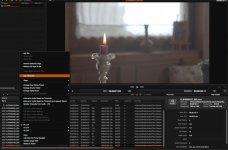
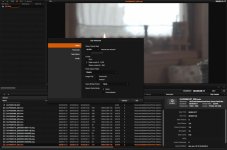
Auto Levels before:
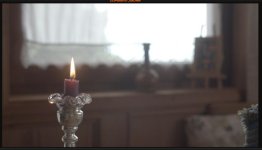
Data Levels:
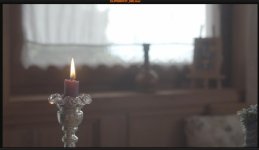
Side Note: to all the Premiere editors out there, this could be useful, regarding Full Range in Premiere.
5. in the Edit tab, drag the Footage into your Timeline - i had a 4K RAW file and a 4K2HD File side by side.
6. Leave the ProRes file as is, for the RAW file, adjust the following in the Camera Raw tab:
+ Decode Quality: Full Res or Use Project Setting
+ Decode Using: Clip
+ White Balance: As shot (or choose what you want if you screwed WB up while shooting )
+ Color Space: BMD Film
+ Gamma: BMD Film
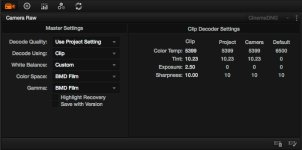
+ do NOT tick the Highlight Recovery box, you could get different results. in a production scenario i would of course tick it, why not having some extra room in the highlights - although i don't know how much there is left to recover when the exposure was pushed by 2.5 already...
+ Exposure: +2.50
+ Everything else: Standard
7. Apply the LUT (right click onto the RAW clip, 3D-LUT....)
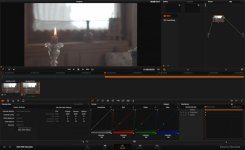
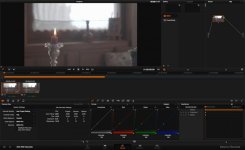
8. take a look on the Scopes and be amazed how close it is (i could have done better, and tweak the greens and reds a bit more to get closer, will do if some people are interrested)
EDIT: don't be confused about that orange point in the curves, made it by accident.
4KRAW after the process:
4K2HD after the process:
9. export the files and start editing, make sure to tick the "Full Range" box in the Delivery tab.
10. leave Feedback here, and let us improve that LUT
cheers!
OK, Once again:
Hi folks!
This week, i finally got my 7Q, so i thought i’d share some pics of it plus a LUT i made...
The RIG:
I won’t go into detail on the Camtree rig, we discussed it already here.
The HOOD:
This is the hood i made from 3mm thick, black POM (Delrin) plates. POM usually comes with a glossy finish, so i decided to sand it with a rotary sander and afterwards polish it to get a nice matte finish. I also drilled holes in it to have the connectors and buttons accessible. First i had some hand knobs to mount the Hood to the Odyssey, but these were kinda bulky, so i decided to just go with hand tightened M4 allen screws. The Hood is easily foldable, since i included „hinges“ made from the carrying belt of an old tripod bag. Currently i just glued the fabric to the plates, i will soon rivet it together, to provide a more rugged finish for on set use.
The MONITOR MOUNT:
I made this mount from a rod clamp i had left (thanks to Frank Glencairn
) and a 15mm Shaft which i screwed through one of the 3/8“ holes on the handle of my rig. This is more flexible than i thought first, since it allows me to angle the 7Q up and down without loosening any of the screws/knobs. The clamp is screwed to the Odyssey with one 1/4“ allen screw.The FS7QQ on a Steady-cam:
Not much to say about this one, the only thing i had to do is cutting of an 3x1cm area of Olofs battery plate to have enough space for my monitor mount on the bottom of the steadycam. I went with an CD 48" cable from the bottom to the top. I will have to get some 90° BNC connectors though.
That’s it from the production side, now on to the post process:
The LUT:
I read that some people asked for a LUT that somehow gets cdng RAW files in the ballpark of 4K2HD. So i had my first try making my own LUT.
DISCLAIMER: I didn’t have any experience in making LUT’s before, just fooled around with curves a bit to get the black levels match.
What i did while shooting: exposed the shot, so that the black levels were around 10 IRE. Changed recording mode and shot the same in 4K2HD, without altering the exposure.
What you should do:
1. Shoot something in RAW/4K2HD if you haven’t done that already
2. Download the LUT, unzip it and drag it to the LUT folder of Resolve
3. import your files into resolve as usual, no ACES, just simple DaVinci YRGB
4. in the Media tab, right click on the ProRes clip —> clip attributes —> set Levels to Data Levels instead of Auto (or Video). This can make a huge difference, because Auto or Video Range often cuts of the last bits which are located in the headroom between 100%-109%.
Auto Levels before:
Data Levels:
Side Note: to all the Premiere editors out there, this could be useful, regarding Full Range in Premiere.
5. in the Edit tab, drag the Footage into your Timeline - i had a 4K RAW file and a 4K2HD File side by side.
6. Leave the ProRes file as is, for the RAW file, adjust the following in the Camera Raw tab:
+ Decode Quality: Full Res or Use Project Setting
+ Decode Using: Clip
+ White Balance: As shot (or choose what you want if you screwed WB up while shooting
)+ Color Space: BMD Film
+ Gamma: BMD Film
+ do NOT tick the Highlight Recovery box, you could get different results. in a production scenario i would of course tick it, why not having some extra room in the highlights
- although i don't know how much there is left to recover when the exposure was pushed by 2.5 already...+ Exposure: +2.50
+ Everything else: Standard
7. Apply the LUT (right click onto the RAW clip, 3D-LUT....)
8. take a look on the Scopes and be amazed how close it is
(i could have done better, and tweak the greens and reds a bit more to get closer, will do if some people are interrested)EDIT: don't be confused about that orange point in the curves, made it by accident
.4KRAW after the process:
4K2HD after the process:
9. export the files and start editing, make sure to tick the "Full Range" box in the Delivery tab.
10. leave Feedback here, and let us improve that LUT
cheers!
Last edited: