Final Cut Pro's Log and Transfer not working!

tall_sided

Active member
Hey everyone,
I'm trying to capture my first footage from the GH1 and for what ever reason, the log and transfer in my final cut isn't detecting it. Here's the steps I took:
- Copied entire folder to Hard Drive.
- Went to audio video settings in FCP.
- switched sequence preset to Prores 422 (1280x720 60p 48khz)
- switched capture preset to HDV-Apple ProRes 422
- clicked okay in audio / video settings.
- Then went to Log and Transfer.
- I then clicked on the button with the (folder) and the (+) sign.
- It opened up a window and I selected the "Private" Folder and said okay.
- Nothing happens. Nothing loads into the log and transfer window.

Am I doing anything wrong?

- Curtis
 
Yep, haven't deleted or neglected anything. I opened the footage in iMovie and it sees it and is able to convert it, but when it finishes converting, the video looks sped up. I tried the same footage in Toast 10 and there's the exact same problem. The footage converts, but it looks sped up.

I shot everything at 60p; 720p.
 
Change capture preset off of the HDV thing? Just Pro Res?

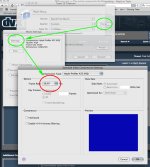
Anyway does this screen grab help at all? Sorry for bluriness. This is what I do in my log and transfer window.....Do you see that is has the AVCHD plugin?

picture6i.png
 
What's also weird is that you said that Toast outputs a speeded clip. Unless it handles NTSC differently that's not my experience but I'm on PAL and I don't have any 720/60p .mts files to test with.
I couldn't get File & Transfer to work first before finding the info I needed to get 6.0.5 but that didn't help either until I ran also that vague 'Pro Apps' improvement update that came at the same time. 6.0.6 seems only related to improving Xserve connections.
 
Some more developments:
- Anything shot 60p at a shutter of 30 converts and plays back fine in iMovie as well as Toast.
- Anything shot at 60p with a shutter of 60 plays back faster than it should. The higher the shutter, the more sped up and chaotic the footage looks.

I also tried downloading Voltaic HD and Neo Scene. Voltaic HD actually turns all the footage into slow motion whereas Neo Scene converts the media into a CF 422 format that won't play in quicktime or vlc player.

I tried switching the output format to Apple Prores 422, but it's greyed out. I'm using the trial version of Neo Scene...could that be part of the problem?
 
I've now got Voltaic converting 720/50 footage correctly, without the slow motion, by enabling the faster conversion ( experimental ) tab in preferences. It now outputs correctly in Pro Res, providing you select the framerate that you want in the codec tab.
I don't know if this works for 720/60 but I imagine it would.
 
I just tried manually converting to both 29.97 and 59.94 as you suggested Martti. It seems to have worked.

When I convert down to 29.97, the footage looks fine. When I convert to 59.94, the footage runs at twice the speed.

I'm very confused about all this.

I'm still a little disappointed with this camera, haven't noticed the footage some muckiness to the video (especially under low light) with lots of vertical lines and stuff through it. I'm starting to see that other people have encountered similar problems with the camera.
 
Last edited:
Hi Curtis,
I had the same problem with FCP. Maybe you have installed Perian. Deinstalling it helped me with that.

best
Juergen
 
Oh ClipWrap 2.2 doesn't require FCP 7 installation, but it doesn't support GH1 as it can't remove pulldown.
 
Back
Top