
Erik Naso
Veteran

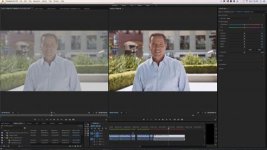
If you have FilmConvert download the profile now! It's very good and worlds better than the Panasonic VariCam LUT. Nail your white balance you are are set.

Follow along with the video below to see how to install our site as a web app on your home screen.
Note: This feature may not be available in some browsers.

This profile does work nicely. Whatever magenta/green blocking is still visible becomes a non-issue once grain is applied. Still, I can't shake the vague perception that my images are lacking in detail when working with V-log in 8-bit, compared to other profiles.
Can't say for the GH4, but on the DVX200, using VLOG-L bypasses pretty much all in-camera processing -- including sharpening. You may need to add a bit of post sharpening to your footage to get it comparable to what the other profiles deliver.This profile does work nicely. Whatever magenta/green blocking is still visible becomes a non-issue once grain is applied. Still, I can't shake the vague perception that my images are lacking in detail when working with V-log in 8-bit, compared to other profiles.
View attachment 106338
View attachment 106339
If you have FilmConvert download the profile now! It's very good and worlds better than the Panasonic VariCam LUT. Nail your white balance you are are set.

Can't say for the GH4, but on the DVX200, using VLOG-L bypasses pretty much all in-camera processing -- including sharpening. You may need to add a bit of post sharpening to your footage to get it comparable to what the other profiles deliver.
Can't say for the GH4, but on the DVX200, using VLOG-L bypasses pretty much all in-camera processing -- including sharpening. You may need to add a bit of post sharpening to your footage to get it comparable to what the other profiles deliver.

Filmconvert def takes down the green. I always felt it sucked the life out of nature. Greens go brown yellow, good if you want a gritty desert look but not for lush outdoor actionsport in Hawaii. still does a great job on skins.FilmConvert takes the green down a lot but that also makes the skin tone look better. It's a very useful plug in and has plenty of control to tweak the image to your liking.
View attachment 106338
View attachment 106339
If you have FilmConvert download the profile now! It's very good and worlds better than the Panasonic VariCam LUT. Nail your white balance you are are set.