Feature Requests

Any one else what to add something,
1- Hey can we some How request they change the picture profiles to have the option they can be re named., or allow the font to be smaller and let us have the ability to add a name.
2- LCD/ zoom magnafaction for focus works when in REC.
 
I want a way to copy a single picture profile from one scene file to another, so I can build a working library of commonly used profiles from different sources, rather than always having to work with them in groups of six.

Also, a way to dump profiles to a human readable text format rather than the cryptic codes used now. Items should display the same range of possible values that are used by the camera's own menus. This would make it much easier to exchange, discuss and edit profiles.

I'm not too optimistic, since all the Panasonic cameras I've used have shared this current clumsy format in one form or another.

- Greg
 
I second the High Sens assign button.
Ability to control automatic noise reduction in which you can adjust the level of NR applied, also when applying gain.
When applying either a custom white balance via the WB button or when using and locking auto, the WB temperature is shown on the screen. Not so crazy important but it'd be nice to know exactly what the cam is doing.
Perhaps the ability to turn the volume up a bit more than 32 when monitoring?

This one's more of a question - I'm currently shooting UHD for HD in dual codec mode when I have to give the client HD straight from the card. I wonder if there's a way that the current HD mode (pixel mixing) can be replaced with a similar method of UHD downsampling? The main HD modes are horrible quality but downsampled UHD looks great.
 
For the focus peaking (in the main LCD at normal view - ie. not FOCU ASSIST view) to be a color OTHER THAN WHITE. Just like the GH4. Even though white is the traditional color, I find it highly frustrating that it's white (especially when subject is backlit). So much easier when it's cyan or red, ESPECIALLY when there's no other on-screen indication of whether it's on or off.
 
I'm fully with Jonny Gross.
Especially the main HD modes...
Hopefully Panasonic have a look here and we se some of the requests realized in the next FW-upgrade!
 
Add ability (in menu) to exchange the way of monitoring audio via headphones: CHAN1 or CHAN2 in both L&R headphones or CHAN1 in L (or R) and CHAN2 in R (or L). Sometimes when I use camera mounted shotgun on CHAN1 and wireless Sennheiser receiver on CHAN2 I want to hear in both headphones audio chosen from CHAN1, CHAN2 or both in stereo manner. The solution mentioned above was in AG-AF101.
 
After having a weekend of running and gunning, Inside to outside , I think the white Balance Setting should be display on the screen, or have a option to turn it on/off A or B really is no help, It would be way better to just glance and see what setting you are on. Agree ?
 
It would be way better to just glance and see what setting you are on. Agree ?

There are three settings for White balance, A, B or PRSET (VAR). When the White Balance is on variable, with VAR showing on screen, if you push the sel/push button to make it active, the K setting is shown on the screen in orange and can be changed by turning the sel/push button. It will stay on the screen until you push the sel/push button to de-select it. So if you are not using the Sel/Push button for anything else, you can always have it on the screen, or at least come back to it.

Further to this, the positioning of the K value is SHOCKING, an orange value is extremely hard to see sometimes in the main area of the screen. (See attached image).

The Recording info is also TERRIBLE!

The RELAY and record information on the left of screen also "invades" the main area of the screen far more than it should, with first a 1 in a white blob, double space, R, triple space?, the recording time, 6 spaces?, then RELAY WITH A WHITE BORDER which is almost dead centre of the screen.

I've had heaps of cameras over 28 years, but this is the first one that hinders you getting a good view of what's going on.

Love all the info , but can we PLEASE have it around the edge of the screen not orange and in the centre! Also, I'm sure you can shorten it a lot. Card info could be 1. 3h05m( recording available time.. no need for preceeding R, because if it's available, you can record on it) then R (for Relay, S for Simultaneous or B for Background). Like this, starting FROM EDGE OF SCREEN .... 1 3h05m R

That's all it needs. Also the K setting could be underneath the VAR showing on the right, which would clear the view entirely. Easy! Or give us the firmware option to move things where we want them....or maybe not! (LOL).

IMAG0569.jpg

Cheers,

Vaughan
 
Last edited:
I agree Vaughan !! , But there is no reason they can't add (VAR / Ach or Bch and have 5600 in a smaller font under it ) or what ever the Buttons are set to display.
And what about moving the Gear Icon Down to the left side of the Volume meter.
 
And what about moving the Gear Icon Down to the left side of the Volume meter.

I like that!

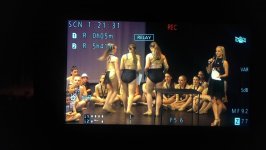
And why is the SCN font so large? The Largest Writing On The Screen is screaming at me that I have already been standing up and still for 1:21:31!

Can we have it the same size as everything else please!

There you are Robert, we've fixed the whole layout.

I wonder if Panasonic will pay us?????

Cheers,

Vaughan
 
Yeah, it's a damn crowded screen. When you stick the leveler up there as well, right dead in the middle of the screen, and the histogram...
The Sony cams I've worked with are so much neater and manage to fit on smaller LCD's. The leveler for example, is at the bottom of the screen and consists of a vertical and horizontal line which turns green when you hit the correct x and y axis. It doesn't need to cover up what I'm shooting. Also, volume levels are more fluid and show where you are in a more real time fashion. If they'd nix the unnecessary things like the clunky wipe on animation between menus, they could achieve all of this. I find myself having to switch off the display regularly just to see what I'm doing. Sometimes, I need to not hear the switch and/or jog the camera in order to do that!
 
just to add a few more issues i have as often recording events where i cant stop. Would be great to access the menu functions while recording to change unexpected things without having to stop recording. (which i could do on the sony z5)
The ability to assign hi sensitivity to a button. change the top zoom rocker speed from a scfeen or menu button. also something on screen that tells me when i am zooming in which would make it easier to judge when zooming very slowly.
 
Hers a Idea, I am not sure if it has the Hardware capabilities, but it would be interesting to see if the Video Out Port could be set up so we could get SDI OUT also, so it could then do UHD OR 4K over Dual SDI. Just an Idea.
 
change the top zoom rocker speed from a scfeen or menu button. also something on screen that tells me when i am zooming in which would make it easier to judge when zooming very slowly.
You can change the top zoom rocker's speed in the menus already; is that what you meant?

And if you turn on the lens info and set it to display mm/feet, you can watch the lens focal length change as you zoom in. Seems like it would suffice for what you're asking.
 
WAVEFORM MONITORING
For those that use this feature along with an external "camera top" monitor, would I think, appreciate a mode of operation similar to that previously provided for the Panasonic HMC151 series ie:-
1 An additional size setting for the WFM which is much larger and placed centrally on the camera LCD.
2 Remove suppression of camera display data when using WFM function on both camera LCD and OSD output to external monitors via HDMI, etc.
Thus when WFM is selected the camera LCD still shows the essential camera data, etc. plus a reasonably sized WFM display and the external monitor feed carries the OSD, if desired.
Does anybody agree?
 
Can we have a disable eyepiece sensor option in a new firmware release please ? Also an ability to leave both screen and eyepiece on would be great.

Won't happen. Has been discussed extensively. If you want to disable the eyepiece sensor, you have to disable the EVF entirely, by setting the LCD/EVF OUTPUT menu item to LCD. That will stop the switching and disable the sensor (at, of course, the expense of not being able to use the EVF).

Both may be able to be on at the same time but not fullscreen. For an example look at the LCD when it is rotated forward: it is on, but shrunk down (probably to match the EVF output). I suspect this is a hardware limitation. Other cameras in the past have had the ability to have both active, so for this one not to do it points to hardware limitations.
 
WAVEFORM MONITORING
For those that use this feature along with an external "camera top" monitor, would I think, appreciate a mode of operation similar to that previously provided for the Panasonic HMC151 series ie:-
1 An additional size setting for the WFM which is much larger and placed centrally on the camera LCD.
2 Remove suppression of camera display data when using WFM function on both camera LCD and OSD output to external monitors via HDMI, etc.
Thus when WFM is selected the camera LCD still shows the essential camera data, etc. plus a reasonably sized WFM display and the external monitor feed carries the OSD, if desired.
Does anybody agree?
I do it the other way around. Put the wfm on the external monitor, you have a big gorgeous wfm while the camera still shows the image and OSD.
 
To Panasonic (should they be listening), the missing feature holding me back: the same 3 year warranty you offer on your $1000 AG-AC8. Forgive me for sounding like a smarty pants- but it looks like you're more confident in the reliability of your much cheaper offerings. I can buy 4 of those cameras for the price of the DVX200. I was much more confident in paying this much money with your old warranty.
 
Back
Top