FCP setup for GH2 files

bgpixelman

Active member
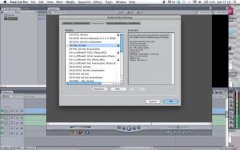
I have FCP 6.06 and am having trouble with the Easy Setup.
Any help would be much appreciated!

Format: All Formats ok?
Use: which pulldown menu? Cinema Tools-23.98 fps from DV NTSC?
Rate: 23.98? I shot GH2 in Cinema 24 Smooth

Anything else I need to know for setup?

Thanks so much. I tried a search and was unable to find specific for GH2.
 
Upon further inspection, I need help with the Audi0/Video settings. I have a LaCie 2TB 7200rpm external hd. Thanks.
 
Log and Transfer the footage from the PRIVATE folder to ProRes (there is a setting for that on the gear shaped icon on the top of the log and transfer window.)

Then simply drag the created movie files to a new sequence and say YES when it asks you to match settings.

I believe they're HDTV 1080i, Square Pixel, 23.98 editing timebase, Apple ProRes 422. (That's for 1080/24p footage.)
 
Thank you!
However, my FCP does not like the .mts files and says they are unrecognized. I checked on this before I bought the camera.
Does FCP 6.06 recognize mts files? Do I need to convert them to another file type?
 
You need the entire PRIVATE folder directory structure from the camera. Don't copy just the .mts files, copy the entire PRIVATE folder and select the folder when you hit log and transfer. It also can do it straight from the card.
 
That's why I switched from FCP to Adobe Premiere CS5. FCP user since 2002.
 
Last edited:
FCP does handle the .MTS files but only if they are in the proper directory structure--as Ben_B said. In the log and transfer window you must select the PRIVATE folder. Don't try to go in and pick the .MTS files. I like the FCP workflow personally.
 
That's the sad part to this but I've been holding out for the new version. They had a bunch of bigtime editors check out the new version which is running on the new 64 bit version of quicktime and the response was amazing.....

FCP has been lagging behind but I like the interface and with the new promises I'm sure it'll be back to kicking the pants off Premiere... Apparantly Quicktime has been the stumbling block and now that it's all about to debut... around the time of NAB, I'm all about waiting for it... I don't like giving Adobe my money.
 
I forgot to add that I am running on a Mac. My brother is in Las Vegas and warned me that NAB will have a big, redesigned FCP. In the meantime, I have purchased ClipWrap and am going to be working on my files in iMovie 11 until I decide what to do long term. Thanks for your suggestions. I really appreciate it.
 
I forgot to add that I am running on a Mac. My brother is in Las Vegas and warned me that NAB will have a big, redesigned FCP. In the meantime, I have purchased ClipWrap and am going to be working on my files in iMovie 11 until I decide what to do long term. Thanks for your suggestions. I really appreciate it.

If you use ClipWrap to convert them to ProRes instead of just rewrapping them you should be able to edit in FCP no problem.
 
I have the same setup(FCP 6.06) and realized after dragging and dropping numerous mts files that they were no longer acceptable to FCP log an transfer. Clipwrap was an easy solution and looking at the files (prores) created, they seem the same quality as produced by log and transfer. A great little program
 

Hahahaha!!! I'm laughing so hard. Doesn't it feel good unstuck from FCP or a Mac!? (My personal feelings only) I regretted wasting so much money on Mac equipment and programs because I was so fearful of "viruses" the term the Genius guys used to promote their mac! I also got exhausted having to frequent upgrade the OS from a cute little cheetah back in 2001 to snow leopard OSX. What's next a Hippo? Few weeks ago I only spent under $2,500 (hardware) for 2 monitors editing station with those beautiful Yamaha hs50m speakers. Whatever I could dream off. Whatever works best, fastest, and cheapest, and quality. I used to drive Benz and BMW's but now I drive a Toyota Camry. And it seems like Toyota rides smoother than those bad boys. You know what I mean.
 
I recently shot a music video on the hacked GH2 (aquamotion driftwood hack)

had issues with canvas size when my editor got it into FCP 7.

FCP didnt ask to conform the the sequence settings to the clips native settings, so when the footage got into the edit it was doing all sorts of stupid things with the aspect ratio and size of the canvas. Even when we selected the correct settings from the 3rd post of this thread we still wernt able to have the canvas and video size syncing.

The way we solved this was from creating a new project/sequence and log and transferring a single clip.

We then added this to the timeline, FCP then asked the question about conforming to clips settings which we clicked YES to. We then had a sequence optimised for the GH2 footage.

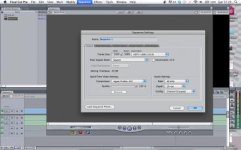
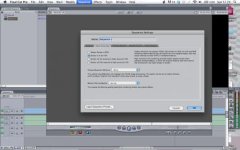
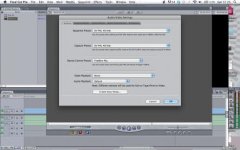
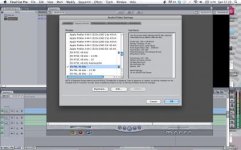
Here is some screen shots of all the settings that will probably have been changed when we clicked yes (some may not be applicable)

Screen shot 2012-02-19 at 12.29.10.jpgScreen shot 2012-02-19 at 12.29.17.jpgScreen shot 2012-02-19 at 12.29.39.jpgScreen shot 2012-02-19 at 12.29.46.jpgScreen shot 2012-02-19 at 12.29.52.jpgScreen shot 2012-02-19 at 12.30.55.jpg

Hope this helps if anyone finds themselves in a similar sort of issue.

Sam
Paragon Pictures
www.paragonpictures.co.uk
 
I thought the development for FCP is now FCPX ... I don't believe apple will redesign FCP 7 ... (or they have as FCPX) ... which is not what most of us wanted...
 
Back
Top