
Hi all,
Since this forum is pretty extensive, I decided to make sticky post with the headline stuff that is needed to be known. I’ll start off stealing “starcentrals” recorder option post because I think it is pretty important. I have adjusted some prices though for recent eBay post
12-bit 444 and 10-bit 444 up to 50p support
Codex-M
- 12-bit 444 DPX up to 30p
- From 31fps to 50 fps 10 bit 444 DPX uncompressed is possible
- Uses proprietary 512 mags
- Needs Data Transfer Unit for offloading
- Software is ONLY made for Intel Macs. M1 processors are, and will not, be supported
12-bit 444 and 10-bit 422 up to 50p support
Odyssey 7Q ~ $1200
- wide range of codecs (some require licensing costs)
- supports dual link (required to get 12-bit 444 or 10-bit 422 HD 50p)
- Only recorder that can do true slow motion (set project rate to 24p, and shoot 50p)
- 7.7" 1280x800 OLED touchscreen
- Uses proprietary drives
- Waveform, histogram, vectorscope, false color, zebras, 3D LUTs
Pix E5/E7 ~ $900/1000
- ProRes Proxy all the way up to Apple ProRes 4444 (the 3GM does NOT send out a LOG-encoded image to the PIX)
- no dual link but with SDI multiplexer (AJA 3GM/LUT box for $400 USD) you can get 12-bit 444 ProRes or 10-bit 422 HD 50p
- 5"/7" 1920x1080 IPS touchscreen
- Uses SpeedDrive or mSATA drives
- Waveform, histogram, vectorscope, false color, zebras, peaking, 3D LUTs
- 2x or 4x tapZoom
Gemini ~ $495-$800 dependant on seller, since unit is EOL you can't buy it new
- Uncompressed RGB 12, and 10-Bit 444 Recording into DPX file format up to 29.97p
- Uses Convergent Design SSD media drives
- 5" 800 x 400 screen
- 1:1 pixel viewing
- Can do 12-bit 444 Uncompressed with AJA 3GM or LUT Box (see Film Scientist blog)
Pix240i ~ No accurate price currently
- 10-bit 422 ProRes / DNxHD *Up to 30p only on F35
- no dual link but with SDI multiplexer (AJA 3GM for $800 USD) you can get 12-bit 444 ProRes or 10-bit 422 HD 50p
- 5" 800x480 IPS screen
- Supports 1:1 pixel viewing
- Uses Approved SSD drives
- False Color, 2-level zebras
Codex-S
- Limited to dual-link recording.
10-bit 422 up to 50p support
Blackmagic Video Assist ~ $495-$1000 depending on model
- 10-bit 422 ProRes / DNxHD *Up to 30p
- *Up to 50p with SDI multiplexer
- 5" 1920 x 1080 135 degree angle colour touch screen
- 6G-SDI
- Histogram, Zebra stripes, focus peaking
- Uses SD Card Media
Atomos Shogun 4K HDMI/12G-SDI Recorder ~ $1095
- 10-bit 422 ProRes / DNxHD *Up to 30p
- *Up to 50p with SDI multiplexer
- 7" 1920 x 1200 colour touch screen
- 12G-SDI
- Waveform monitor, RGB parade display, Luma overlay, Vectorscope with zoom, focus peaking
- Uses HHD or SSD
10-bit 422 up to 30p support
AJA mini ki pro ~ $700
- 10-bit 422 ProRes *Up to 30p only
- Single Link 4:2:2
- Uses Compact Flash Cards
Atomos Samurai Blade ~ $500
- 10-bit 422 ProRes / DNxHD *Up to 30p only
- 5" 1280 x 720 IPS screen
- Single Link 4:2:2
- Uses standard HHD/SSD drives
- NO support for 1:1 pixel viewing
- Waveform, vectorscope, luma parade, RGB, false color, zebra, focus peaking.
Hyperdeck Shuttle V2 ~ $300
- 10-bit 422 ProRes / DNxHD / Uncompressed *Up to 30p only on F35
- Single Link 4:2:2
- Uses SSD Drives
Other
Sony SR-R1
- 10-bit 422 220Mb/s
- 10-bit 444 400Mb/s
- 12-bit 444 880Mb
- Uses SRMemory Cards
Sony SRW-1
- 422 1080p 60p
- 444 RGB
- Uses HDCAM-SR Video Cassettes
Teathered or wireless solutions
Blackmagic design ultrastudio mini recorder ~ $137
- F35 teathered via SDI for computer capture via thunderbolt
- 10-bit 422 up to 30p
Blackmagic Intensity Extreme ~ $280
- F35 teathered via SDI for computer capture via thunderbolt
- Will convert SDI to HDMI at device for extra monitoring if desired
- 10-bit 422 up to 30p
Teradek Bolt Pro 300 Wireless ~ $2990
- F35 wireless SDI transmitter to receiver with SDI *You still need a recording option
- 10-bit 422 up to 30p
Tear-Down
This is Jo Kaminmuras process of removing the front of the F35. He used this to replace his front for a Nikon mount (you may correct me here Jo), but I feel this can be used for the process of opening the camera for maintenance and cleaning.
EVF Options
Sony HDVF-C35W ~ $1500
- 3.5-inch type large LCD screen
- Accommodates multiple frame rates
- A detachable eye-piece design allows the user to directly view the LCD
- The 3x magnification function simplifies focus operation, especially when prime lenses are used
- Gray scale signals can be generated, allowing camera operators to easily adjust exposure to the appropriate level
- Color or monochrome display switchable
- Two assignable switches for switching to preset adjustment settings and for assigning frequently used functions
- Powered by camera
Sony HDVF-C30W ~ $500
- 2.7-inch type large TFT screen
- Accommodates multiple frame rates
- Gray scale signals can be generated, allowing camera operators to easily adjust exposure to the appropriate level
- Color or monochrome display switchable
- Two assignable switches for switching to preset adjustment settings and for assigning frequently used functions
- Powered by camera
Zacuto Gratical Eye ~ $995-$1995
- 0.61" OLED EVF
- 1280 x 1024 Resolution
- 3G-SDI Input
- Supports Resolutions up to 1080p/60
- Visual tools such as Zebra, Vectorscope, Waveform, Histogram, Peaking, False Color, Test Pattern
- LUT Creation and Import
- 1/4"-20 Rosettes for Mounting
- Powered externally using 2-Pin LEMO Power Input
- Needs external video input (such as the monitor 1/2 input off camera)
Zacuto Kameleon EVF Pro ~ $1595-$2495
- 0.71" OLED EVF, 10,000:1 Contrast
- HDMI & SDI Inputs
- 24-Bit RGB 1920 x 1080 Resolution, Up to DCI 4K HDMI, 1080p60 SDI Input
- Waveform, Vectorscope, Histogram, Peaking, False Color, SMPTE Color Bars
- Auto-Closing Eyecup Prevents Burn-In
- 3D LUT Import via USB Type-C Input
- 2 x 1/4"-20 ARRI Rosette Mounts
- Diopter Adjustment & 4:1 Zoom
- Powered externally through 4-Pin LEMO Power
- Needs external video input (such as the monitor 1/2 input off camera)
LUTs and Gammas
Official Sony
We have now gotten the true updated SLOG1 whitepaper as well, and I do suggest reading into it to understand how different SLOG1 is vs other log formats. In the same folder is also the .LUT files from Sony, and the 32-bit cube files that I personally have converted
User LUTs and Gammas
Current user LUTs have been made by Ryan Shaw, Art Parnitudom's AC, and which he was very nice to share. CSV files are made by Jo Kamimura.
How to access, it is all stored publicly in the folder:
https://drive.google.com/drive/folde...nY?usp=sharing
Hardware upgrades
Noctua NF-A4x10 FLX cooling fans ~ $40
- Cools better than stock
- Almost dead silent even at max RPM
- Use less power
- Make sure to get the 12v version
Thermal Grizzly Minus 8 thermal pad ~ $45
- Cools up to 25% better than stock thermal pad
- Better fitting (stock pads are not well cut)
- Make sure to get 1.5 or 2mm version
GPIO Upgrade ~ $N/A
- Allows for camera to trigger any recording device that has GPIO port
- Makes fan slow down when in record
- Potentially let's use produce timecode
- Requires Wet Dock
Ethernet
This guide is from “The digital parade” and should work for both F35, and F23.
To access the F35's menu system via a computer over an Ethernet cable you first need to define or find out your laptop's IP address. On a Mac, since that's what I use, open up "System Preferences" and click on "Network". Open up your Ethernet preferences and note or write in your IP address.
Then open up the F35's main menu system by holding down the click-wheel and pressing the VF Menu / Display button. Open the "Network" menu and choose "IP Addr Set". You need to enter in your computer's IP address here with an additional numerical step. For example, if your laptop's IP address is 192.168.0.1 you should enter 192.168.0.2 as the F35's IP address.
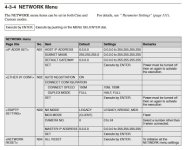
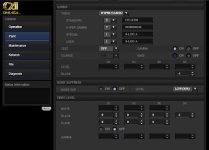
Now comes the fun part. Connect a cross-over Ethernet cable from your computer to the camera and open up your web browser. This will work with Internet explorer 6 or 7, Firefox 3, and Safari 3. In your browser's address bar type in http:// plus the IP address you entered into the camera. In our example above, you would enter http://192.168.0.2 and hit enter. Now, behold, the almighty awesomeness of navigating the menu from your laptop!
Misc Information
Side panel power
The F35 can be powered using the IF box XLR input, or the 8 pin Lemo B input on the body. However the side panel, where you have the 24v Fischer, and the 11-pin lemo 12v, can *ONLY* be powered if you are using the 11-pin lemo for power.
Most existing cable makers does not offer LEMO-B nor 11-pin lemo cables. However several ones that have been working in the film business for +20 years do still stock the needed supplies to make a cable.
Sample footage
C
Since this forum is pretty extensive, I decided to make sticky post with the headline stuff that is needed to be known. I’ll start off stealing “starcentrals” recorder option post because I think it is pretty important. I have adjusted some prices though for recent eBay post
12-bit 444 and 10-bit 444 up to 50p support
Codex-M
- 12-bit 444 DPX up to 30p
- From 31fps to 50 fps 10 bit 444 DPX uncompressed is possible
- Uses proprietary 512 mags
- Needs Data Transfer Unit for offloading
- Software is ONLY made for Intel Macs. M1 processors are, and will not, be supported
12-bit 444 and 10-bit 422 up to 50p support
Odyssey 7Q ~ $1200
- wide range of codecs (some require licensing costs)
- supports dual link (required to get 12-bit 444 or 10-bit 422 HD 50p)
- Only recorder that can do true slow motion (set project rate to 24p, and shoot 50p)
- 7.7" 1280x800 OLED touchscreen
- Uses proprietary drives
- Waveform, histogram, vectorscope, false color, zebras, 3D LUTs
Pix E5/E7 ~ $900/1000
- ProRes Proxy all the way up to Apple ProRes 4444 (the 3GM does NOT send out a LOG-encoded image to the PIX)
- no dual link but with SDI multiplexer (AJA 3GM/LUT box for $400 USD) you can get 12-bit 444 ProRes or 10-bit 422 HD 50p
- 5"/7" 1920x1080 IPS touchscreen
- Uses SpeedDrive or mSATA drives
- Waveform, histogram, vectorscope, false color, zebras, peaking, 3D LUTs
- 2x or 4x tapZoom
Gemini ~ $495-$800 dependant on seller, since unit is EOL you can't buy it new
- Uncompressed RGB 12, and 10-Bit 444 Recording into DPX file format up to 29.97p
- Uses Convergent Design SSD media drives
- 5" 800 x 400 screen
- 1:1 pixel viewing
- Can do 12-bit 444 Uncompressed with AJA 3GM or LUT Box (see Film Scientist blog)
Pix240i ~ No accurate price currently
- 10-bit 422 ProRes / DNxHD *Up to 30p only on F35
- no dual link but with SDI multiplexer (AJA 3GM for $800 USD) you can get 12-bit 444 ProRes or 10-bit 422 HD 50p
- 5" 800x480 IPS screen
- Supports 1:1 pixel viewing
- Uses Approved SSD drives
- False Color, 2-level zebras
Codex-S
- Limited to dual-link recording.
10-bit 422 up to 50p support
Blackmagic Video Assist ~ $495-$1000 depending on model
- 10-bit 422 ProRes / DNxHD *Up to 30p
- *Up to 50p with SDI multiplexer
- 5" 1920 x 1080 135 degree angle colour touch screen
- 6G-SDI
- Histogram, Zebra stripes, focus peaking
- Uses SD Card Media
Atomos Shogun 4K HDMI/12G-SDI Recorder ~ $1095
- 10-bit 422 ProRes / DNxHD *Up to 30p
- *Up to 50p with SDI multiplexer
- 7" 1920 x 1200 colour touch screen
- 12G-SDI
- Waveform monitor, RGB parade display, Luma overlay, Vectorscope with zoom, focus peaking
- Uses HHD or SSD
10-bit 422 up to 30p support
AJA mini ki pro ~ $700
- 10-bit 422 ProRes *Up to 30p only
- Single Link 4:2:2
- Uses Compact Flash Cards
Atomos Samurai Blade ~ $500
- 10-bit 422 ProRes / DNxHD *Up to 30p only
- 5" 1280 x 720 IPS screen
- Single Link 4:2:2
- Uses standard HHD/SSD drives
- NO support for 1:1 pixel viewing
- Waveform, vectorscope, luma parade, RGB, false color, zebra, focus peaking.
Hyperdeck Shuttle V2 ~ $300
- 10-bit 422 ProRes / DNxHD / Uncompressed *Up to 30p only on F35
- Single Link 4:2:2
- Uses SSD Drives
Other
Sony SR-R1
- 10-bit 422 220Mb/s
- 10-bit 444 400Mb/s
- 12-bit 444 880Mb
- Uses SRMemory Cards
Sony SRW-1
- 422 1080p 60p
- 444 RGB
- Uses HDCAM-SR Video Cassettes
Teathered or wireless solutions
Blackmagic design ultrastudio mini recorder ~ $137
- F35 teathered via SDI for computer capture via thunderbolt
- 10-bit 422 up to 30p
Blackmagic Intensity Extreme ~ $280
- F35 teathered via SDI for computer capture via thunderbolt
- Will convert SDI to HDMI at device for extra monitoring if desired
- 10-bit 422 up to 30p
Teradek Bolt Pro 300 Wireless ~ $2990
- F35 wireless SDI transmitter to receiver with SDI *You still need a recording option
- 10-bit 422 up to 30p
Tear-Down
This is Jo Kaminmuras process of removing the front of the F35. He used this to replace his front for a Nikon mount (you may correct me here Jo), but I feel this can be used for the process of opening the camera for maintenance and cleaning.
EVF Options
Sony HDVF-C35W ~ $1500
- 3.5-inch type large LCD screen
- Accommodates multiple frame rates
- A detachable eye-piece design allows the user to directly view the LCD
- The 3x magnification function simplifies focus operation, especially when prime lenses are used
- Gray scale signals can be generated, allowing camera operators to easily adjust exposure to the appropriate level
- Color or monochrome display switchable
- Two assignable switches for switching to preset adjustment settings and for assigning frequently used functions
- Powered by camera
Sony HDVF-C30W ~ $500
- 2.7-inch type large TFT screen
- Accommodates multiple frame rates
- Gray scale signals can be generated, allowing camera operators to easily adjust exposure to the appropriate level
- Color or monochrome display switchable
- Two assignable switches for switching to preset adjustment settings and for assigning frequently used functions
- Powered by camera
Zacuto Gratical Eye ~ $995-$1995
- 0.61" OLED EVF
- 1280 x 1024 Resolution
- 3G-SDI Input
- Supports Resolutions up to 1080p/60
- Visual tools such as Zebra, Vectorscope, Waveform, Histogram, Peaking, False Color, Test Pattern
- LUT Creation and Import
- 1/4"-20 Rosettes for Mounting
- Powered externally using 2-Pin LEMO Power Input
- Needs external video input (such as the monitor 1/2 input off camera)
Zacuto Kameleon EVF Pro ~ $1595-$2495
- 0.71" OLED EVF, 10,000:1 Contrast
- HDMI & SDI Inputs
- 24-Bit RGB 1920 x 1080 Resolution, Up to DCI 4K HDMI, 1080p60 SDI Input
- Waveform, Vectorscope, Histogram, Peaking, False Color, SMPTE Color Bars
- Auto-Closing Eyecup Prevents Burn-In
- 3D LUT Import via USB Type-C Input
- 2 x 1/4"-20 ARRI Rosette Mounts
- Diopter Adjustment & 4:1 Zoom
- Powered externally through 4-Pin LEMO Power
- Needs external video input (such as the monitor 1/2 input off camera)
LUTs and Gammas
Official Sony
We have now gotten the true updated SLOG1 whitepaper as well, and I do suggest reading into it to understand how different SLOG1 is vs other log formats. In the same folder is also the .LUT files from Sony, and the 32-bit cube files that I personally have converted
User LUTs and Gammas
Current user LUTs have been made by Ryan Shaw, Art Parnitudom's AC, and which he was very nice to share. CSV files are made by Jo Kamimura.
How to access, it is all stored publicly in the folder:
https://drive.google.com/drive/folde...nY?usp=sharing
Hardware upgrades
Noctua NF-A4x10 FLX cooling fans ~ $40
- Cools better than stock
- Almost dead silent even at max RPM
- Use less power
- Make sure to get the 12v version
Thermal Grizzly Minus 8 thermal pad ~ $45
- Cools up to 25% better than stock thermal pad
- Better fitting (stock pads are not well cut)
- Make sure to get 1.5 or 2mm version
GPIO Upgrade ~ $N/A
- Allows for camera to trigger any recording device that has GPIO port
- Makes fan slow down when in record
- Potentially let's use produce timecode
- Requires Wet Dock
Ethernet
This guide is from “The digital parade” and should work for both F35, and F23.
To access the F35's menu system via a computer over an Ethernet cable you first need to define or find out your laptop's IP address. On a Mac, since that's what I use, open up "System Preferences" and click on "Network". Open up your Ethernet preferences and note or write in your IP address.
Then open up the F35's main menu system by holding down the click-wheel and pressing the VF Menu / Display button. Open the "Network" menu and choose "IP Addr Set". You need to enter in your computer's IP address here with an additional numerical step. For example, if your laptop's IP address is 192.168.0.1 you should enter 192.168.0.2 as the F35's IP address.
Now comes the fun part. Connect a cross-over Ethernet cable from your computer to the camera and open up your web browser. This will work with Internet explorer 6 or 7, Firefox 3, and Safari 3. In your browser's address bar type in http:// plus the IP address you entered into the camera. In our example above, you would enter http://192.168.0.2 and hit enter. Now, behold, the almighty awesomeness of navigating the menu from your laptop!
Misc Information
Side panel power
The F35 can be powered using the IF box XLR input, or the 8 pin Lemo B input on the body. However the side panel, where you have the 24v Fischer, and the 11-pin lemo 12v, can *ONLY* be powered if you are using the 11-pin lemo for power.
Most existing cable makers does not offer LEMO-B nor 11-pin lemo cables. However several ones that have been working in the film business for +20 years do still stock the needed supplies to make a cable.
Sample footage
C
Last edited: