
Navigation
Install the app
How to install the app on iOS
Follow along with the video below to see how to install our site as a web app on your home screen.
Note: This feature may not be available in some browsers.
More options
You are using an out of date browser. It may not display this or other websites correctly.
You should upgrade or use an alternative browser.
You should upgrade or use an alternative browser.
F35: Fan speed stuck at max
- Thread starter vlodeck
- Start date

Grug
Veteran
I had that issue at one point, it was one of the internal cable connections that had come loose (I forget if it was under the front/sensor body panel or the side panel) when I gave the camera a clean.
I'd start with that. Open up the front and side panels and check that everything is securely plugged into where it needs to be.
I'd start with that. Open up the front and side panels and check that everything is securely plugged into where it needs to be.
There are some mentions of it in the main just got a new camera thread. Seems like Yachacha and Jo Kami both had this issue. Yachacha was also a loose cable on the side panel and Jo Kami never posted what the actual problem was but it from what was posted it appeared to be a loose cable as well. So it seems likely that a loose cable is the culprit.
G
Guest
Guest
I have had this issue too.
After cleaning the and putting the camera back together the “fan max” error went away, but as soon as i started using the IF box to feed a recorder the issue popped up again.
A while back i was going to try and fix this issue, but in the process, i tore the sensor to AD card connector and the camera was down for a couple weeks until i could afford the part. Sony shipped the part rather quickly. I was able to then put the camera back together, and initially the fan max error was not there, but eventually showed up. I did a test to see if it was just over time, and heating up, but i will have to do more testing to be sure what is the cause.
I’ll try to do a firmware refresh, check loose cables, and possibly replace the fans. The thing is, the fans seem to be working fine.
Has anyone had further success with a reoccuring fan max issue?
After cleaning the and putting the camera back together the “fan max” error went away, but as soon as i started using the IF box to feed a recorder the issue popped up again.
A while back i was going to try and fix this issue, but in the process, i tore the sensor to AD card connector and the camera was down for a couple weeks until i could afford the part. Sony shipped the part rather quickly. I was able to then put the camera back together, and initially the fan max error was not there, but eventually showed up. I did a test to see if it was just over time, and heating up, but i will have to do more testing to be sure what is the cause.
I’ll try to do a firmware refresh, check loose cables, and possibly replace the fans. The thing is, the fans seem to be working fine.
Has anyone had further success with a reoccuring fan max issue?
Last edited:

rbirnbaum
Well-known member
Fan issues in PC’s are usually related to Motherboard firmware... maybe there is a clue there. Are you up to date on all the different aspects of the firmware... I always see 3 different ones but don’t really know what each means... I would also do a hard factory reset. Try different batteries? Maybe your camera is overheating trying to function with a low amperage battery. That could be the reason why the issue “pops up”... try with AC power supply. If you don’t have one I can send you mine for testing. I also try to strip the camera just to the body, fire it up, connect recorder, fire it up... maybe the camera is sensing your recorder getting hot and it’s triggering the cameras sensors... dunno... just some ideas...
G
Guest
Guest
I’ll try as many of those as possible tonight.
Are you blocking the front intake for any reason? This is where all the cooling for the CPU is pulled in.
If you have cine-ei mode on your camera you have the newest firmware. There was only one update.
Each fan has a small controller board which is what I would think is actually giving the error. The fans are $3 online. The fan isn't $1500, but fan with this little controller board is.
I can fix this issue but I would need the camera sent to me. Would need to figure out which fan is giving the error and replace that board. Hopefully it's not the main motherboard which all the fan controllers attach to.
I would be a little nervous running the camera with this error, I think the CCD unit could melt down pretty quick if it overheats.
If you have cine-ei mode on your camera you have the newest firmware. There was only one update.
Each fan has a small controller board which is what I would think is actually giving the error. The fans are $3 online. The fan isn't $1500, but fan with this little controller board is.
I can fix this issue but I would need the camera sent to me. Would need to figure out which fan is giving the error and replace that board. Hopefully it's not the main motherboard which all the fan controllers attach to.
I would be a little nervous running the camera with this error, I think the CCD unit could melt down pretty quick if it overheats.
Disconnecting the power to the ccd unit causes all the fans to run at full but if your ccd unit is giving image, it’s not a loose cable.
Are all fans running?
It is true that running camera off 12v will cause power supply to work harder than 24v, but who has 24v batteries these days.
My guess is temp sensor on fan board is reading wrong. Replacing temp sensor will fix but we need to know which one it is.
Inside the ccd unit are massive capacitors, these caps will one day pop and leak, it will most likely be the issue that kills all our f35’s. Could be 30 years from now but with heat you could pop them in minutes. Mac covering the vents to prevent dust in the desert was a very dangerous idea IMO.
I have a f35 with melted caps, I can post the crazy errors it gives but I can tell you it’s not pretty. Hopefully I will replace and get working again.
If temp sensor is bad but fans are running you are safe to keep using. If any of the fans are dead, don’t run thout camera too long.
Are all fans running?
It is true that running camera off 12v will cause power supply to work harder than 24v, but who has 24v batteries these days.
My guess is temp sensor on fan board is reading wrong. Replacing temp sensor will fix but we need to know which one it is.
Inside the ccd unit are massive capacitors, these caps will one day pop and leak, it will most likely be the issue that kills all our f35’s. Could be 30 years from now but with heat you could pop them in minutes. Mac covering the vents to prevent dust in the desert was a very dangerous idea IMO.
I have a f35 with melted caps, I can post the crazy errors it gives but I can tell you it’s not pretty. Hopefully I will replace and get working again.
If temp sensor is bad but fans are running you are safe to keep using. If any of the fans are dead, don’t run thout camera too long.
Fear, not Yachaca. There are people out in world wherever you may live that can fix the leaky capacitors on a component level! I saved an old Sony BVW50 repairing myself once. ( very time consuming) I also had a camera tech work on an old Sony 400 (Betacam) The boards inside these older analog cameras and decks were full of these capacitors. I think the caps started leaking around 12 years into their life on the used Betacam product. Sony also carries a lot of replacement boards, but how old are those? You can identify a leaky cap with your bare eye, or if the caps are tiny with a magnifying glass, you’ll see a brown leaky mess at the top or bottom of the capacitor when it leaks, when you remove the old capacitor make sure no damage was done to the board where the cap sits, sometimes you need to repair that as well, the leaky capacitor is very corrosive.
G
Guest
Guest
Very helpful, thank you all!
This is where I am at right now:
1. all fans are spinning and pumping air.
2. no vents are covered
3. dust build up on fan blades has been removed
4. camera has cine ei mode - there is a sticker on the back of the camera that reads: V1.46
5. running via the 4pin xlr off of Anton Bauer Cine batteries. Camera reads 14.8 volts.
6. when camera is first on, I can still run auto 1 and 2 "quiet" fan modes
7. all other functions seem normal.
8. image is good, and clean from what I can tell.
It would be great to meetup and problem solve together.
This is where I am at right now:
1. all fans are spinning and pumping air.
2. no vents are covered
3. dust build up on fan blades has been removed
4. camera has cine ei mode - there is a sticker on the back of the camera that reads: V1.46
5. running via the 4pin xlr off of Anton Bauer Cine batteries. Camera reads 14.8 volts.
6. when camera is first on, I can still run auto 1 and 2 "quiet" fan modes
7. all other functions seem normal.
8. image is good, and clean from what I can tell.
It would be great to meetup and problem solve together.
G
Guest
Guest
Ok, I am realizing, I have not done as much reading as I should have.
I am realizing, now, and this may seem ridiculous, but I am just now realizing that there is a Cine mode and a Cine EI mode. My camera only has the Cine mode. Maybe I knew it at one time, but the camera was sitting on the shelf with the broken cboard and the fan max issue so long, that I have forgotten most of what I read from this forum and the bits of manual (which I believe I was reading an old version from manulslib, rather than the most current one on the official Sony site.)
The manual fan setting of "MIN" can only be activated for a split fraction of a second, then the camera overrides that and near instantly reverts to MAX.
Looking at the version history on the camera, this thing hasn't been updated since 2009. Nearly a decade. Haha.
I took some screenshots of where I was at.
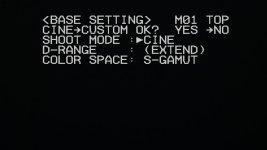
(Cine mode and CUSTOM yes or no. No Cine EI option?)
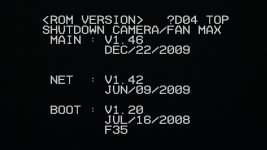
(ROM version page)
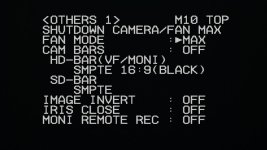
(Fan settings)
I am realizing, now, and this may seem ridiculous, but I am just now realizing that there is a Cine mode and a Cine EI mode. My camera only has the Cine mode. Maybe I knew it at one time, but the camera was sitting on the shelf with the broken cboard and the fan max issue so long, that I have forgotten most of what I read from this forum and the bits of manual (which I believe I was reading an old version from manulslib, rather than the most current one on the official Sony site.)
The manual fan setting of "MIN" can only be activated for a split fraction of a second, then the camera overrides that and near instantly reverts to MAX.
Looking at the version history on the camera, this thing hasn't been updated since 2009. Nearly a decade. Haha.
I took some screenshots of where I was at.
(Cine mode and CUSTOM yes or no. No Cine EI option?)
(ROM version page)
(Fan settings)
Last edited:
G
Guest
Guest
For those that are not signed, the "ROM version" page on my camera reads:
MAIN : V1.46 DEC/22/2009
NET : V1.42 JUN/09/2009
BOOT : V1.20 JUL/16/2008 F35
MAIN : V1.46 DEC/22/2009
NET : V1.42 JUN/09/2009
BOOT : V1.20 JUL/16/2008 F35
G
Guest
Guest
According to eddavid's post there is at least a V2.12 out there somewhere. My camera would then be outdated. So, I am seeing getting it updated will be my next step. Looks like finding another downloadable firmware file will be more than a simple google search. And perhaps finding a bigger Memory stick card.
This thread used to have the latest firmware, but the link no longer works to the download:
http://www.dvxuser.com/V6/showthread.php?337156-Sony-F35-firmware-v2-12
This thread used to have the latest firmware, but the link no longer works to the download:
http://www.dvxuser.com/V6/showthread.php?337156-Sony-F35-firmware-v2-12
rbirnbaum
Well-known member
Here it is James:
Latest Firmware
Documentation
Latest Manual Rev. 7
Download all from the link, because yep you are OLD firmware bro. Last one was 2.12... so go figure... Hopefully it resets your fan issues. And read the manual again. Lots of clues in there. But you knew that already, Ha!
https://www.dropbox.com/sh/z5rnu0u5wtv7f5f/AACBoCswPxiYwJRrpmbGvCFea?dl=0
Latest Firmware
Documentation
Latest Manual Rev. 7
Download all from the link, because yep you are OLD firmware bro. Last one was 2.12... so go figure... Hopefully it resets your fan issues. And read the manual again. Lots of clues in there. But you knew that already, Ha!
https://www.dropbox.com/sh/z5rnu0u5wtv7f5f/AACBoCswPxiYwJRrpmbGvCFea?dl=0
G
Guest
Guest
Here it is James:
Latest Firmware
Documentation
Latest Manual Rev. 7
Download all from the link, because yep you are OLD firmware bro. Last one was 2.12... so go figure... Hopefully it resets your fan issues. And read the manual again. Lots of clues in there. But you knew that already, Ha!
https://www.dropbox.com/sh/z5rnu0u5wtv7f5f/AACBoCswPxiYwJRrpmbGvCFea?dl=0
Thank you so much!
Any advice in the process? Anything that might trip someone up?
( I may start a new thread after doing the update, explaining the process as I saw it)
Last edited:
G
Guest
Guest
Firmware update complete. It was surprisingly easy, but not straight forward, in the least. So, thank you @rbirnbaum for the download links, and a big thanks to @yachacha for loaning me an Memory Stick!
However, the firmware didn't fix the issue. So, I have Cine EI and 12bit but still running fans on max.
Generally takes a couple minutes before the fan error shows up, and in that first couple minutes I can manually change fan speeds. But after a little while, the fan revs up and an error message "SHUTDOWN/FAN MAX" overlays the top of the menu and the sub display.
I may be building a custom case, but it will end up being a sound blimp case for these fans! lol.
Anyway, on ward with the tinkering and may have to level up my cursory knowledge.
However, the firmware didn't fix the issue. So, I have Cine EI and 12bit but still running fans on max.
Generally takes a couple minutes before the fan error shows up, and in that first couple minutes I can manually change fan speeds. But after a little while, the fan revs up and an error message "SHUTDOWN/FAN MAX" overlays the top of the menu and the sub display.
I may be building a custom case, but it will end up being a sound blimp case for these fans! lol.
Anyway, on ward with the tinkering and may have to level up my cursory knowledge.
Last edited: