

starcentral
Veteran
There have been lots of questions about using LUTs for either monitoring or baking in footage with the F7S (maybe even the F5/F55) so I wanted to start a simple thread to cover the basics.
Some people HATE LUTs, but LUTs serve a variety of purposes and mainly work by doing color transformations and are also capable of very complex and advanced color manipulations. Simple 1D LUTs can only adjust curves on independent RGB channels, much like many of us do in post on a NLE timeline to tweak the look or match shots. The Sony F3 was capable of loading 1D LUTs for in-camera use. 3D LUTs however are much more sophisticated by also having the ability to control hue, saturation, and essentially perform trilinear calculations which I won't get into explaining. Thankfully the F5/F7/F55 can load 3D LUTs with up to 33 lattices (this is quite good) and for those interested in the full history and evolution of 3D LUT's & LOOKS being added to the F5/F55 it can be found in this article I published earlier this year: http://cinetiny.com/frAskhM2
I'd say mostly that LUTs exist primarily for the purpose of monitoring, hence on the Sony cameras they are in fact called MLUTs. The 'M' is for monitoring! ARRI has the best explanation and description of the various uses for LUTs in the video/film production environment: http://www.arri.com/camera/alexa/tools/lut_generator.html
If anyone here has worked on any network show with Alexa's the output signal of the ARRI always has some LUT applied to it. It could be ARRI's REC709 but some shows will chose to apply a custom LUT (made in grading) as a type of "creative look" to get a better idea of what it might look like after the footage has gone through the grading process.
This workflow is pretty industry standard. Here on DVX I'd say most of us (including myself) have been shooting in slog and looking at slog on a monitor without much worry about a flat looking image or use of any LUTs. But with the advent of having 3D LUT in-camera capability, combined with the fact you can actually BAKE / BURN them in directly to the footage as you record is quite an amazing prospect for many many reasons. (think buh-bye Sony look, or Juan Malera's Kodak & Fuji print emulations LUTs, Impulz LUTs, and more...)
Before 3D LUTs I was shooting in HG7 for fast turn around jobs which was "okay" but it still looked like Sony plastic / wood video to me. The LC709-A LUT (Sony's clone of the Alexa - sounds like movie title?) was quite a godsend and once I got over the fact I was using a LUT as a "look" and baking it in I never looked back. Today if I'm turning around footage fast it makes absolutely no sense to shoot it in slog2, bring slog2 footage into post, then apply the LUT and reincoding into new footage, transfer files, etc.. Once ProRes is available on the Sony cams our footage may never need to hit our computers again for the purpose of transcoding, etc.. and can go straight to the editor. I've made a tweak to the LC709-A LUT and that's what I mostly use now sometimes burning it in, other times not depending if I want to fiddle more in post with the footage..
CineEI mode will disable many processing functions within the camera like noise reduction, matrix and details settings. CineEI mode is intended for projects that will have post production work done to the footage. This could include VFX, grading, color correction, etc.. and is intended for those who want to preserve as much original sensor information as possible whether shooting RAW or not. The CineEI mode works by LOCKING the native ISO of the camera and any adjustment of the ISO will only affect the gain on the monitoring output including waveform and other exposure tools. This tool makes it easy to work with the camera if you decide to rate the camera ISO differently than it's native ISO. It is similarly done with film stock. ie. shoot 800 ISO film but treat it as 400 ISO so it is overexposed by one stop. Overexposing by one stop by the way is handy for green screen work or in any case where you want to improve upon the camera's native signal-to-noise ratio.
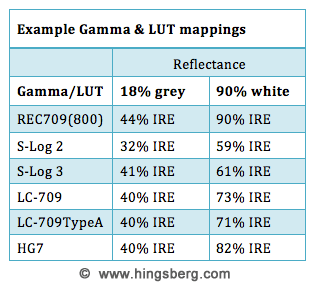
Exposure with LUTs is where it can be tricky business. If you apply a REC709 LUT while recording in slog then your waveform monitors and exposure values can be normal. ie. 45% for middle grey, 90% for a white card with 90% white reflectance. The only caveat of course would be if you are using any creative LUTs because each one will have varying mappings for both grey and white from LUT to LUT to LUT. If you plan to leave a LUT on while shooting and exposing for it you need to know the underlying values and can easily map these out for yourself by toggling the LUT on and off on a grey card and white card. I highly recommend you do this, its a great exercise. For example with LC-709A I found that 61% in slog3 was actually 73% when the LC709A LUT was turned on. So if you are "exposing for white" in this particular case and assumed to use 90% with LC709A LUT turned on, you would be overexposing your underlying signal by 17% IRE. For most LUTs grey is typically in the 40's range but its the 90% white reflectance value that are all over the place. I encourage doing your own tests.
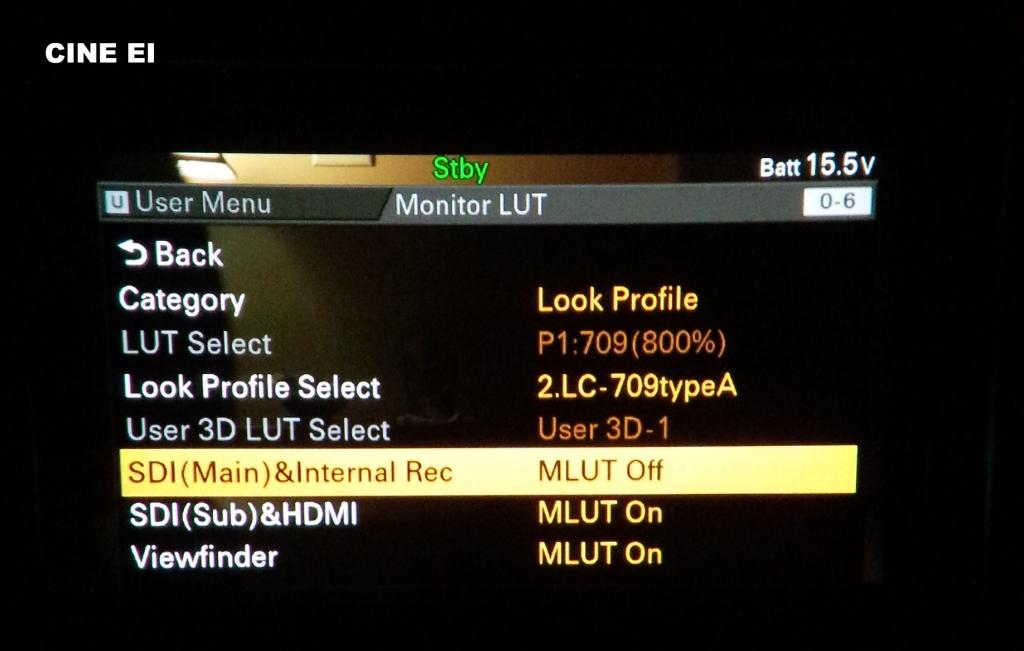
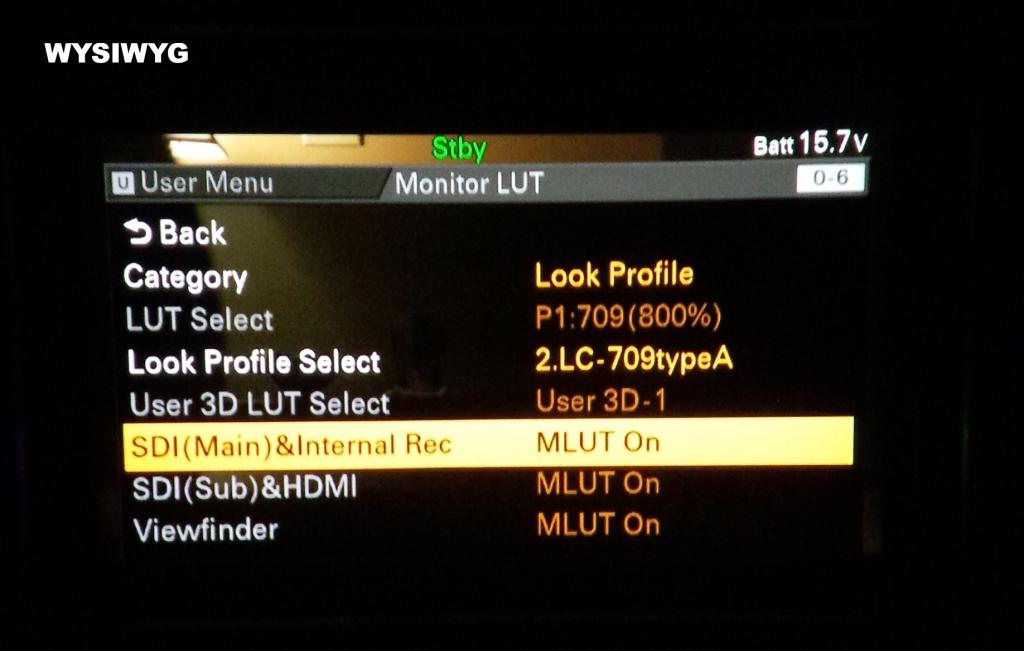
Working on a project or production can be stressful or chaotic and hence lack of time to carefully think through the myriad of rubix-cube-like options on these complex and sophisticated Sony beasts so when it comes to having the ability to "baking" in a LUT I made these very simple screenshots labelled with their function which I can conveniently save to my smart phone and consult with whenever I need to double check:
Using these options you are NOT baking in any LUT, you are using the CineEI mode "as intended" if its fair to call it that:
With these menu option settings however, you are in WYSIWYG mode. What you see on your monitor is what is going to burn into your footage. You'd use this to BAKE in any LUT you select from the menu:
Some people HATE LUTs, but LUTs serve a variety of purposes and mainly work by doing color transformations and are also capable of very complex and advanced color manipulations. Simple 1D LUTs can only adjust curves on independent RGB channels, much like many of us do in post on a NLE timeline to tweak the look or match shots. The Sony F3 was capable of loading 1D LUTs for in-camera use. 3D LUTs however are much more sophisticated by also having the ability to control hue, saturation, and essentially perform trilinear calculations which I won't get into explaining. Thankfully the F5/F7/F55 can load 3D LUTs with up to 33 lattices (this is quite good) and for those interested in the full history and evolution of 3D LUT's & LOOKS being added to the F5/F55 it can be found in this article I published earlier this year: http://cinetiny.com/frAskhM2
I'd say mostly that LUTs exist primarily for the purpose of monitoring, hence on the Sony cameras they are in fact called MLUTs. The 'M' is for monitoring! ARRI has the best explanation and description of the various uses for LUTs in the video/film production environment: http://www.arri.com/camera/alexa/tools/lut_generator.html
If anyone here has worked on any network show with Alexa's the output signal of the ARRI always has some LUT applied to it. It could be ARRI's REC709 but some shows will chose to apply a custom LUT (made in grading) as a type of "creative look" to get a better idea of what it might look like after the footage has gone through the grading process.
This workflow is pretty industry standard. Here on DVX I'd say most of us (including myself) have been shooting in slog and looking at slog on a monitor without much worry about a flat looking image or use of any LUTs. But with the advent of having 3D LUT in-camera capability, combined with the fact you can actually BAKE / BURN them in directly to the footage as you record is quite an amazing prospect for many many reasons. (think buh-bye Sony look, or Juan Malera's Kodak & Fuji print emulations LUTs, Impulz LUTs, and more...)
Before 3D LUTs I was shooting in HG7 for fast turn around jobs which was "okay" but it still looked like Sony plastic / wood video to me. The LC709-A LUT (Sony's clone of the Alexa - sounds like movie title?) was quite a godsend and once I got over the fact I was using a LUT as a "look" and baking it in I never looked back. Today if I'm turning around footage fast it makes absolutely no sense to shoot it in slog2, bring slog2 footage into post, then apply the LUT and reincoding into new footage, transfer files, etc.. Once ProRes is available on the Sony cams our footage may never need to hit our computers again for the purpose of transcoding, etc.. and can go straight to the editor. I've made a tweak to the LC709-A LUT and that's what I mostly use now sometimes burning it in, other times not depending if I want to fiddle more in post with the footage..
CineEI mode will disable many processing functions within the camera like noise reduction, matrix and details settings. CineEI mode is intended for projects that will have post production work done to the footage. This could include VFX, grading, color correction, etc.. and is intended for those who want to preserve as much original sensor information as possible whether shooting RAW or not. The CineEI mode works by LOCKING the native ISO of the camera and any adjustment of the ISO will only affect the gain on the monitoring output including waveform and other exposure tools. This tool makes it easy to work with the camera if you decide to rate the camera ISO differently than it's native ISO. It is similarly done with film stock. ie. shoot 800 ISO film but treat it as 400 ISO so it is overexposed by one stop. Overexposing by one stop by the way is handy for green screen work or in any case where you want to improve upon the camera's native signal-to-noise ratio.
Exposure with LUTs is where it can be tricky business. If you apply a REC709 LUT while recording in slog then your waveform monitors and exposure values can be normal. ie. 45% for middle grey, 90% for a white card with 90% white reflectance. The only caveat of course would be if you are using any creative LUTs because each one will have varying mappings for both grey and white from LUT to LUT to LUT. If you plan to leave a LUT on while shooting and exposing for it you need to know the underlying values and can easily map these out for yourself by toggling the LUT on and off on a grey card and white card. I highly recommend you do this, its a great exercise. For example with LC-709A I found that 61% in slog3 was actually 73% when the LC709A LUT was turned on. So if you are "exposing for white" in this particular case and assumed to use 90% with LC709A LUT turned on, you would be overexposing your underlying signal by 17% IRE. For most LUTs grey is typically in the 40's range but its the 90% white reflectance value that are all over the place. I encourage doing your own tests.
Working on a project or production can be stressful or chaotic and hence lack of time to carefully think through the myriad of rubix-cube-like options on these complex and sophisticated Sony beasts so when it comes to having the ability to "baking" in a LUT I made these very simple screenshots labelled with their function which I can conveniently save to my smart phone and consult with whenever I need to double check:
Using these options you are NOT baking in any LUT, you are using the CineEI mode "as intended" if its fair to call it that:
With these menu option settings however, you are in WYSIWYG mode. What you see on your monitor is what is going to burn into your footage. You'd use this to BAKE in any LUT you select from the menu:
Last edited:

