F35 Project - Feature Teaser - MOVE ME

rbirnbaum

Well-known member
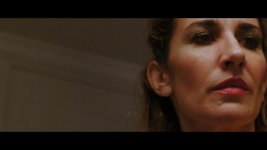
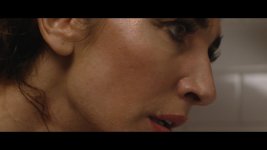
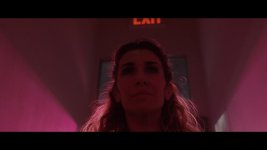
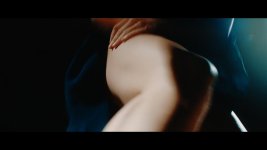
Just wanted to share some stills. Project still in the editing room. It's a teaser for pitching a feature about a dancer who develops MS. 6 light setups in 4 hours. Madness but the F35 was solid.

Shot in Custom Mode - F900 Color - Slog - Extended
NR - Low
Detail (-80%)
Crisp (40%)
ISO - 450
Lenses: Sony Primes shot at T 2.8
Black Pro Mist - 1/8 on all the time
24FPS
to BlackMagic Video Assist - ProRes HQ - 422 10bit


Some LUTS thrown on the footage to get color ideas. Nothing settled yet.



VTrailer _1.2.1.jpgVTrailer _1.3.1.jpgVTrailer _1.4.1.jpgVTrailer _1.5.1.jpgVTrailer _1.6.1.jpgVTrailer _1.7.1.jpgVTrailer _1.9.2.jpgVTrailer _1.10.1.jpg
 
Thanks for your insight and comment SJK

You prefer sgamut in general?

I have a solid pipeline for S-Gamut when outputing to Rec709, but I am still learning the camera. I do feel the skin tones are more pleasing in F900 out of the box and didn't want to spend too long CC this project.
I used F900 color profile because I didn't know how to enable F900R which I now do.
I will give the F900R a test too. I have to do a side by side video...

IMO S-Gamut contributes to the unique F35 look, but I really am talking from limited experience. Need to do better tests to have concrete evidence... we all know what feelings can be like... ;)
 
Davinci Resolve Color Space Transform is giving me the best results with the greatest control instead of LUTS.
Shooting Slog Sgamut. Have you used CST in Resolve?
 
I have been using the Resolve Color Managment to put everything in an adaptable color space. But i must say, it is no silver bullet. It almost requires me to do more work up front, because i have to adjust more to get a final image. I use it because it allows export options to be easier.

Not sure what CST is.
 
C.S.T is colorspace transform, it is a plug-in for resolve. I have used it bit it seemed to blow out my footage. I personally use ACES, it has given me the best slog conversation of any method so far.
 
Last edited:
Hi guys, just did a quick video on how I use CST. Blown out highlights happen because they require Luminance Mapping Adjustment. Saturation Mapping also helps to tone down the rec709 look. Put it on the timeline node and you are good to go.

 
I have. It’s great too, but not having an ACES IDT (reliable) for slog sgamut has consolidated my workflow via CST. I can always convert to ACES instead of rec709 if I need to. Share your workflow on ACES... we may all learn something new.
 
I don't use ACES. I keep it simple. Film, try some luts, keep what I like. I tried ACES posted here once I think by film scientist. Long ago. I remember it was a bit complicated. Just curious if you also tried and what you thought.
 
The current version of resolve has a slog idt for aces built in, as for me aces has been the best workflow I have foundso far.
 
Do you use film scientist's workflow posted?


I assume he doesn’t. The problem with Film Scientist workflow was that it used a LUT instead of IDT. IDT is the industry standard for a solid ACES workflow.
 
Do you use film scientist's workflow posted?

I used to but now that there is a provided IDT I no longer do. The workflow is very similar though you just use the IDT rather than the lut. It is really pretty simple to set up I just do the following.

Project Settings -> Color Management -> Color science: Change DaVinci YRGB to ACEScc
Project Settings -> Color Management -> ACES Output Device Transform: Change to sRGB or Rec709

If all of my footage is in SLOG
Project Settings -> Color Management -> ACES Input Device Transform: Change to Sony SLog1

This will automatically apply the IDT to all footage added into the Media Pool, if I have mixed footage and want to apply the IDT at the clip level
Right click on the footage in the Media Pool -> ACES Input Transform -> Sony SLog1

Thats it.
 
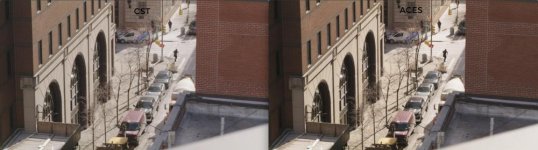
Here is my personal test using dhessel workflow and CST.

I find that CST gives more accurate color reproduction - more neutral and more difference in brick walls as they are in reality (possibly because it gives me control over color input sgamut) and it also seems more controlled in the highlights out of the box. I used SIMPLE luminance mapping in CST.

For me, I am sticking with CST for now.

CST-vs-ACES.jpg
 
Here is my personal test using dhessel workflow and CST.

I find that CST gives more accurate color reproduction - more neutral and more difference in brick walls as they are in reality (possibly because it gives me control over color input sgamut) and it also seems more controlled in the highlights out of the box. I used SIMPLE luminance mapping in CST.

For me, I am sticking with CST for now.

View attachment 134848

Interesting!

All things being subjective, I prefer the ACES image. I do agree that CST may be more accurate. ACES was not designed to be accurate, but more towards an aesthetic interpretation... if I remember correctly from the initial promotional videos and talks many years ago.

In any case, between ACES and CST we are in such a great place, color-wise!
 
From Wiki: The Academy Color Encoding System (ACES) is a color image encoding system created by hundreds of industry professionals under the auspices of the Academy of Motion Picture Arts and Sciences. ACES allows for a fully encompassing color accurate workflow, with "seamless interchange of high quality motion picture images regardless of source".[1]

ACES has no asthetic interpretation. All it does is it grabs different cameras 0-1 and match them so they look the same on the ACES color space. The advantage is that you get color consistency between different acquisition formats and more than that it allows you to do a very accurate conversion to any format for different media. Online, analog screen, digital screening. It also supports HDR and wide Ganut. It’s the future for sure, and it’s still evolving. brilliant stuff! At the end of the day someone is matching those 0-1’s and it’s shocking that within the same platform I am getting visible differences.

Having said that, I personally want a camera that lays its mojo on top of what’s I am seeing. I don’t want it to mess up my colors. And the F35 with its RGB sensor is the KING. Accurate colors and skin tones. And I am shooting 10bit. The camera has some crazy internal workings. Why use a workflow that interprets my footage and shifts it automatically in one direction. It also gives me more work. I have to work the highlights.

But yeah, this is a great conversation. I’m learning a bunch from you guys and you are pushing me to test things. Keeping the forum and discussion alive. Like you say with CST and ACES we are in a much better position than we were 1 year ago. F35 footage sings and if you need to mix it in with other sources ACES is definitely the way to go.
 
The CST workflow is pretty nice, I like having the ability to tweak saturation during the conversion. One of the advantages with ACES for me is that it is consistent across software packages so I get the same result with Resolve or Nuke. I am going to give both a bit more testing once I shoot some more varying stuff. Thanks for sharing your workflow.
 
Last edited:
Back
Top