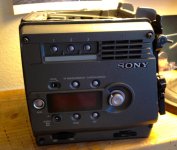
F35 No Picture but Menu and Cam Info is working: Possible Causes

yachacha

Well-known member
Ok this is continued from over in the new camera thread. I couldn't agree more with the opinion that if you are renting the camera, don't open it, it's not your equipment to risk. I have bought a 2nd optical block from another user here who damaged his optical block by opening it up and removing a cable, BEWARE! it is easy to break things in these situations if you are not familiar opening up electronics.

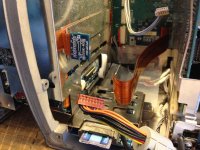
Checking the optical block connections is fairly easy. The optical block being connected wrong was exactly the cause of why I had menus and a black screen. The F35 will run with lots of it's internal parts not connected. It seems there are 3 cables which go to the optical block which might be worth a check if your F35 isn't getting anything but a black image and you are sure all your lens settings and camera settings are correct.
IMG_0782.jpg

To get to the optical block connections, remove the four screws on this plate.
 

Attachments

  • IMG_0783.jpg
    IMG_0783.jpg
    97.6 KB · Views: 0
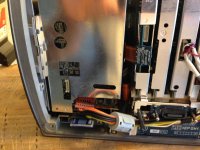
You can see the red connector on the bottom I have unplugged, and also the blue square circuit board connected to the ribbon cable. Take care but it should be very obvious if either of these are unplugged.

If these are both ok, remove the 4 corner screws from the front of the optical block, the four in the far corners, you don't need to remove any of the screws near the mount. This will make the optical block slide forward but take great care here, there is a thin ribbon cable going to the back of the optical block. Slide the optical block forward enough to see this ribbon cable and where it connects to the back of the optical block. Mine is also disconnected in the photo.

IMG_0784.jpg
 
Please also realize the following - even if you received genuinely damaged goods (whether by shipping fault, seller fault, seller accident, or seller fraud) by opening the item up and attempting to diagnose or repair the equipment yourself you open yourself to the seller claiming that you may have caused the damage yourself, and that they will offer reduced, negligible, or zero compensation or recourse. An honest seller in this situation can come to the reasonable (even if inaccurate) conclusion the the buyer/renter/lessee caused the damage themselves. You may also inadventently ruin any warranty coverage (manufacturer or third party) that the vendor still had on the equipment and that might have otherwise covered a repair. A dishonest seller who knew the fault existed will use the same argument. Either way, unless you succeed in the repair, you lose out.

When receiving damaged (or potentially damaged) goods, notify the vendor as soon as possible of the fault. Even if the vendor is away from their phone or email for the night or weekend, leave them a message. This documents when the claim was initially made. Also, make sure that all agreements, even if reached orally by phone are recapped in a written email.

Proceed with extreme caution!
 
I must agree, I was the one to forget to connect the cable and this is why it wasn't working. My F35 arrived with a loose screw inside the camera from shipping. I highly doubt any of the optical block cables could shake loose in shipping, they all snap in very secure. I would suspect this problem if you have bought a Nikon plate and just made the swap. This is more likely a reason a cable gets disconnected than thinking it might be loose from shipping.
 
I can NOT STRESS ENOUGH how much I think this is probably a bad idea to go routing around the insides of a hideously expensive camera.

SJX, I don't know which part of the world you're in, where you've bought the camera from, or how you've got it, etc... but I strongly suggest returning to the seller as DOA.

I am sure Yachacha and Viddo will probably agree with this.
 
SJX

If you are getting power and menus, do go to the diagnostics menu as that may shed some light on your situation.

James
 
I just wanted to shed light on this issue, I don't think it's a fix for a rented camera because it really shouldn't happen unless someone was inside to begin with. I wanted to post the info because I'm sure there are more to follow in the steps of changing out the mount on their front plates, in this process they could cause this issue. I spent a few hours going through menu settings trying to find a solution because I foolishly thought that the camera turning on meant everything was connected right inside.

From what I hear, You can find a Sony service center still working on these cameras. It would be a great idea to anyone who buys an discounted F35 with an issue, just send it in and get an estimate. I know others have had theirs worked on for the price of a go-kart rather than a real car. It would be the best investment to know a sony technician had been the last person inside your camera.
 
I just wanted to shed light on this issue, I don't think it's a fix for a rented camera because it really shouldn't happen unless someone was inside to begin with. I wanted to post the info because I'm sure there are more to follow in the steps of changing out the mount on their front plates, in this process they could cause this issue. I spent a few hours going through menu settings trying to find a solution because I foolishly thought that the camera turning on meant everything was connected right inside.

From what I hear, You can find a Sony service center still working on these cameras. It would be a great idea to anyone who buys an discounted F35 with an issue, just send it in and get an estimate. I know others have had theirs worked on for the price of a go-kart rather than a real car. It would be the best investment to know a sony technician had been the last person inside your camera.

This isn't bad advice, but really, when you buy something, or otherwise contract it's use, your first obligation is notificiation of the seller. The seller usually has legal rights and responsibilities.

Even in an AS IS sale there may be a warranty of merchantability that the seller is not legally permitted to waive (depends on jurisdiction). When equipment is sold "AS-IS" but not expressly qualified as "broken" or "for-parts" a buyer may have refund or recompense recourse, but only if they act very quickly to notify the seller of the apparent discrepancy between the representation ("It works!") and the reality (doesn't work). Failure to notify promptly may be interpreted as an implicit acceptance of condition, regardless of the representation made.

Mind you - if you buy something "AS-IS" at extreme discount, your rights may be different than if you pay close to market price under the "AS-IS" terms of sale. The reasoning being that if you paid a negligible price, you had less reason to beleive it should function properly, and should have known full well you were taking a gamble or getting spare parts.

Also, again, whether you have any recourse on an AS-IS sale depends greatly on specific terms of the sale, and the jurisdiction(s) of the transaction.

But, the larger point here is that the seller has a right to know if you beleive the contract of sale has not been executed faithfully. If you wish to take it to a technician shortly after purchase for a checkup, you might as well make that a condition of the sale. Otherwise, the seller may not be obligated to honor a return or repair bill based on the findings of the technician. They can claim anything from "I didn't authorize that" to "It was an AS-IS sale" or "You had three weeks with the camera, and now you tell me it's broken?"

Just be careful.
 
In the UK we have something called "fit for purpose". We also have the distance selling regulations act that means if you buy anything online or over the phone, you have 30 days to return it for ANY REASON AT ALL.

That probably won't apply to where you are.

But also, to echo the above, there are lots of Sony service centres out there and a quote is not expensive. the fix may be, but the quote won't be.

I don't know who you have bought the camera from, but considering all you need to power it up is a battery I find it very, very unlikely that they sold it not knowing it was bust.

That, or it may have been damaged in transit - how was it packed?
 
Ok I will not touch it.

SJX

If you are getting power and menus, do go to the diagnostics menu as that may shed some light on your situation.

James

Where is diagnostics menu? Can't find in manual. What to look for there?
 
Where is diagnostics menu? Can't find in manual. What to look for there?

It's called the "DIAGNOSIS" menu.

The F35 has two styles of menus - the LCD panel menu which features regular camera controls an operator uses all the time, and the deeper settings are in the Viewfinder menu, which is accessed by pressing the "VF Menu/Display" button once or twice.

However, just pressing this button gets the user menu, not the top menu, from which you can access the diagnosis menu.

To get to the top menu, press down on the rotary encoder while pressing the VF Menu button. This should get you the top menu, or at least, the word "TOP" in the upper right corner. Navigate to this with the cursor, and select the word top.

The diagnosis menu should now be at the bottom of the page.
 
I don't have my camera to hand to check, but on my F900 the DIAGNOSIS menu had a list of all the important boards and then would have "OK" or "NG" next to them. If you've got any NGs, there's your culprit.

It might all report as OK though, normally something being "NG" would flash a message on the display.
 
isn't there a menu that shows the firmware status of all the internal components, is the CCD listed in that menu? There must be a way to detect that the camera isn't seeing the optical block through a maintenance menu. In my case, I had plugged in the power to the ccd but not the information cable. I was able to see the black balance shutter close.
 
Back
Top