F35 ACES workflow, IDTs. LUT, etc

Wow, nice! Thanks a lot! Could you paste the link in the dedicated F35 color grading thread as well?
 
Really interesting; thanks for sharing your research! Are you able to post any images that show the gains from using your workflow vs. a Resolve/LUT post?
 
Hi Jon,

Since both programs are 32bit floating point, the gains are visually indistinguishable if the process is done right...
And utilize a properly converted F35 IDT transform.

I think what ACES does so well is map the skin properly so we aren't futzing around. We all have a reference for what skin looks like, so it's a great starting point for the grade.
On longer projects when I don't have the bandwidth for an uncompressed workflow, I output LUT from AE with the IDT/ODT transformation only,
and load the transform LUT in DaVinci and use it to create graded dailies from it.
Existing log and lin LUTS in Davinci seem kinda noisy and don't seem to map the skin right, so I bake my own 3D 32bit floating point LUT using the F35 IDT transform in After Effects.
Since the LUT created is 32bit floating point, it yields images that are practically identical in both programs, and the process seems non-destructive since it takes into account all existing rgb data.

This is the magic of stuff like ACES, linear, and OCIO color management, it really does free us up to use whatever grading tools we desire and transfer data between programs without crazy gamma shifts.

Attached are stills I output from AE and Davinci using two different processes, and the same original log DPX.
1. AE straight render, IDT/ODT transform, no grading
2. Davinci render with 3D 32bit after effects LUT applied, no grading
It'll give you a good idea of skin tone, and show that their output (when implemented properly) is nearly identical (confirmed with a difference matte in Photoshop).

Cheers

Test_Davinci_32bfloating_LUT.jpgTEST_AE_OCIO_ACES_still.jpg
 
Last edited:
Just tried this out with Davinci. I used Lut Buddy and OpencolorIO to generate a LUT for the IDT only, this way I can still set the ODT in Davinci for the desired destination, which is the main draw of ACES. Here are some comparisons. The first version is rendered out of After Effects with both the IDT and ODT applied. The second version is rendered out of Davinci with the generated LUT in place of the IDT and the proper ODT applied. The After Effects version seems to be slightly darker and warmer, especially in the grass. Definitely a much better starting place in Davinci than the original S-Log LUT though.

After Effects
After Effects.jpg

Davinci
Davinci.jpg

Stock Sony S-Log LUT
S-log.jpg

S-Log > Cineon > Kodak Emulation
Kodak.jpg
 
Cool, it's interesting to see the effects of Davinci's ODT implementation.
Here's another test comparing Davinci's sRGB ODT to AE's sRGB ODT.
I am still liking After Effects for final output, if you zoom into the skin area @300% on both images, AE feels slightly less noisy/blotchy, skin tone is more consistent, DaVinci is a little redder.
but that's just pixel peepin'. It's definitely close enough, either workflow will get the job done nicely.
I really love the overall saturation captured by the camera.

AE sRGB ODT
TEST_AE_OCIO_ACES_still_AEsRGB_ODT.jpg

DaVinci sRGB ODT
TEST_DaVinci_AE_IDT_ACES_DaVinci_ODTsRGB_ODT.jpg
 
Great to see this Film scientist! Thank you.

would you mind posting the IDT LUT for us to use in resolve (to save me the hassle if creating it myself ;)
 
So Resolve setting obviously set to ACES instead of YRBG but:
Do we apply the IDT LUT as 3d input LUT in project settings?
and ODT in ACES OUTPUT DEVICE TRANSFORM?
 
Last edited:
Thanks Manuel for the explanation and frame grabs -- I'm going to have to do some comparisons myself for our next project.

[UPDATE]
Quickly went back to some old footage and tried the same test--no grade, simply ACES vs CINEON + Fuji 3513 LUT.
Cineon + Fuji 3513 (ungraded):
Screen Shot 2014-04-02 at 3.49.36 PM.jpg
Film Scientist's ACES IDT (ungraded):
Screen Shot 2014-04-02 at 3.58.06 PM.jpg

Definitely more saturation in the ACES grade, knocking it down about 20% in Resolve is a closer match to the look of the Cineon + film emulation that I usually use. I could see using the ACES workflow if I wanted a quick, saturated grade. I do like the ability to stay in the LOG color space with Cineon, because a lot of my stock output LUTs are meant for that.
 
Last edited:
Yes the IDT LUT is selected as the 3d input LUT in project settings.
If you're grading on your laptop/computer monitor, select sRGB as your ODT,
if grading with a broadcast monitor you can go use a rec709 ODT,
or rec 2020 if you have a fancy new 4K broadcast monitor.
 
Yes the IDT LUT is selected as the 3d input LUT in project settings.
If you're grading on your laptop/computer monitor, select sRGB as your ODT,
if grading with a broadcast monitor you can go use a rec709 ODT

Funny, thats exactly how i been doing it, but the images are really dark and super contrasty.
 
Hi Jon,

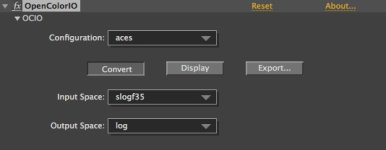
If you're still looking to use the Cineon output LUTs to replicate certain films,
you can use OCIO & the ACES IDT to convert to log space instead of ACES space.
OCIO is like your universal color re-mapper... it's all about mapping color data to the 'right' places.

ocio screencap.jpg
 
Last edited:
You're welcome. :)
It's nice to see cameras used to their fullest potential, instead of being tossed out for the latest flavor.
The F35 is capable of some pretty amazing images,
and has plenty of life left in the right hands...
There aren't too many s35mm, 14bit true 4:4:4 CCDs with global shutter out there.
 
Last edited:
Just tried this out with Davinci. I used Lut Buddy and OpencolorIO to generate a LUT for the IDT only, this way I can still set the ODT in Davinci for the desired destination, which is the main draw of ACES. Here are some comparisons. The first version is rendered out of After Effects with both the IDT and ODT applied. The second version is rendered out of Davinci with the generated LUT in place of the IDT and the proper ODT applied. The After Effects version seems to be slightly darker and warmer, especially in the grass. Definitely a much better starting place in Davinci than the original S-Log LUT though.

After Effects
View attachment 84405

Davinci
View attachment 84406

Stock Sony S-Log LUT
View attachment 84407

S-Log > Cineon > Kodak Emulation
View attachment 84408


QUick questions:
I like the image on the bottom by far the most, the one that says "S-Log > Cineon > Kodak Emulation".
To me that looks really good, like film does. What did you shoot this on? What Kodak emulation are you using?
Thanks!
 
Back
Top