Navigation
Install the app
How to install the app on iOS
Follow along with the video below to see how to install our site as a web app on your home screen.
Note: This feature may not be available in some browsers.
More options
You are using an out of date browser. It may not display this or other websites correctly.
You should upgrade or use an alternative browser.
You should upgrade or use an alternative browser.
F3: F3 shooters - what picture profile settings did you use?
- Thread starter robfilms
- Start date


Doug Jensen
Carbonite Member
I used to.
I sold my F3 more about three years ago but CINE2 was my favorite gamma when I did own it. And I really miss the look of that F3. In many ways it looked better than the F55/FS7 I own now when I need a WYSIWYG look.
I sold my F3 more about three years ago but CINE2 was my favorite gamma when I did own it. And I really miss the look of that F3. In many ways it looked better than the F55/FS7 I own now when I need a WYSIWYG look.
This is the profile I used for two years while matching to the F5 in Hypergamma. All the details are in the 6th post of this thread, here are the F3 settings here as well. This look was not intended to be "broadcast ready" but a good basis for further grading or even just contrast/saturation.
http://www.dvxuser.com/V6/showthrea...tching&p=1986475082&highlight=#post1986475082
F3:
Gain: I try not to ever go higher then 800, usual at 570 or 400.
Gamma: Cine 4 (expose grey card at 50 or skin highlights at 70)
Matrix: Cinema (no paint adjustments) -Level: +60
Phase: +20 (to better match F5, looked way to green at 0)
Detail: Level -17, Freq +20 (Will set to Off if I think there is a chance of moire, only seen twice with clothes in 2 years)
Aperture: +25 (Will use if Detail is on)
Black: -2
Black Gamma: 0
*Edit: Detail I always had to OFF when not trying to match F5.
In my very early days with the F3 I also used a couple of the Abel Cine picture profiles that do have paint adjustments. This is one where I used the Abel "Range" profile. Some slight grading was done for the final picture. http://blog.abelcine.com/2011/05/23/f3-scene-files-from-abelcine/
http://www.dvxuser.com/V6/showthrea...tching&p=1986475082&highlight=#post1986475082
F3:
Gain: I try not to ever go higher then 800, usual at 570 or 400.
Gamma: Cine 4 (expose grey card at 50 or skin highlights at 70)
Matrix: Cinema (no paint adjustments) -Level: +60
Phase: +20 (to better match F5, looked way to green at 0)
Detail: Level -17, Freq +20 (Will set to Off if I think there is a chance of moire, only seen twice with clothes in 2 years)
Aperture: +25 (Will use if Detail is on)
Black: -2
Black Gamma: 0
*Edit: Detail I always had to OFF when not trying to match F5.
In my very early days with the F3 I also used a couple of the Abel Cine picture profiles that do have paint adjustments. This is one where I used the Abel "Range" profile. Some slight grading was done for the final picture. http://blog.abelcine.com/2011/05/23/f3-scene-files-from-abelcine/
Last edited:
When I used the non-Abel profile like the one I listed above, it would vary. I used Cine 4 gamma because I was trying to match a Hypergamma F5 profile, this was a indoor studio shoot. In general though, if my memory serves me, Cine 1 was good for bringing down highlights in a bright outdoor scene where shadow detail was less important (Cine 2 is just the 100 IRE legal version of Cine 1). Cine 3 & 4 increasingly brought up the shadows, good for interiors. Gamma aside, I always used the Cinema color Matrix at around +40-60.
Again, this profile was always a starting point and I'd only deliver it as-is if the client was going to do a little CC/grade. It's not a vibrant contrasty ready to air profile but just adding a little contrast in post could get it there easily enough. Im sure Doug has some Rec709 "ready to air" knock outs in his archive somewhere.
Again, this profile was always a starting point and I'd only deliver it as-is if the client was going to do a little CC/grade. It's not a vibrant contrasty ready to air profile but just adding a little contrast in post could get it there easily enough. Im sure Doug has some Rec709 "ready to air" knock outs in his archive somewhere.
Last edited:
Alpha Beta Omega
Veteran
I shot in locked S-log on my F3 and liked what I got and didn't had the need for a picture profile tweak. Sure Slog was a bit of a problem to grade but the results often came out great.
Rob: The two profiles I use almost exclusively on my pair of F3s are the WYSIWYG profile found in Doug Jensen's F3 guide, and lately we've been using the Abel-cine "Range" PP for two camera shoots, at the request of the CC guy. Couple of caveats:
1. With Doug's profile, the blacks are very saturated. Outdoors, it's a great look. Indoors, I have a "Jensen 2" version where I've raised the blacks a bit, because they can get very opaque. Colors are very rich...sometimes the greens are a little too much, and this PP can be tricky when shooting with yellow/green CFLs in the background, but the overall predominant light (like from giant picture windows in stores) is daylight.
2. Our CC guy is very happy with the "Range" PP, and it looks great when he's done. Not so much trouble as S-log in tight turnarounds, but still gives him room to play. My issues with it in the field are that the softer image is harder to focus, compared to Doug's, and the pale chroma sometimes makes verifying good color balance a bit problematic sometimes. But you get used to it.
1. With Doug's profile, the blacks are very saturated. Outdoors, it's a great look. Indoors, I have a "Jensen 2" version where I've raised the blacks a bit, because they can get very opaque. Colors are very rich...sometimes the greens are a little too much, and this PP can be tricky when shooting with yellow/green CFLs in the background, but the overall predominant light (like from giant picture windows in stores) is daylight.
2. Our CC guy is very happy with the "Range" PP, and it looks great when he's done. Not so much trouble as S-log in tight turnarounds, but still gives him room to play. My issues with it in the field are that the softer image is harder to focus, compared to Doug's, and the pale chroma sometimes makes verifying good color balance a bit problematic sometimes. But you get used to it.
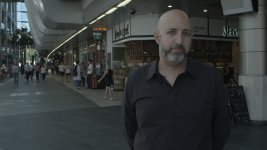
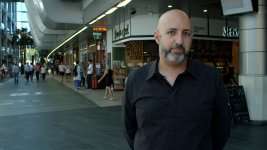
I still shoot in slog on the F3 using the free picture profile that came out years ago. Skin tones great, wide dynamic range for fast doco shooting, relatively easy to grade (I use Colorista as a plug in for FCP and Premiere as well as Resolve). What's more I shoot to the internal SXS cards mostly because of the weight and convenience factor as a mostly solo shooter. Attached shows ungraded and quick graded.