F3: F3 Odyssey 7Q+ peaking oddness

Harry Lime

Well-known member
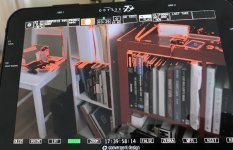
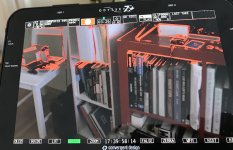
I fired up the F3 today with the Odyssey 7Q+ and am seeing some very odd focus peaking behavior.
I snapped a picture below. It looks like the peaking is being cut off and only working on part of the frame.
What's even weirder that the peaking looks to be out of sync with the image and somehow is vertically wrapping around the image.

Sony F3
444 sLOG RGB Upgrade
PL-mount

I tried several SDI cables and ran it with one and both (1.5G / 3G) and get the same results.

The built in focus peeking on the small F3 screen or in the viewfinder doesn't not exhibit this problem.

Has anyone else experienced this?

Thanks in advance

IMG_0272 copy2.jpg
 

Attachments

  • IMG_0272 copy.jpg
    IMG_0272 copy.jpg
    84.5 KB · Views: 0
F3:

23.98
3G RGB444 S-LOG (I have the paid slog upgrade)
Two SDI cables to Qdyssey 7Q+


Odyssey 7Q+:

CAMERA: Sony
Monitor-Record: HD 444 Prores
Codec: Prores 444 / Prores 444XQ
Project rate: Follows input

Video Cadence: Progressive / PSF
Timecode source : SDI
 
Sorry I have no idea other than to check cables, try with HD out just to eliminate variables, try HDMi also to eliminate variables, and screw around with those settings because the Odyssey menus are anything but clear ( at least to me.)
I have a feeling I've seen this before but I can't remember where or when.
Contact Convergence?
 
My guess would be to reload the firmware in the Odyssey. Like chicken soup it couldn't hurt, and it may clear up some oddball code incompatibility. It's sort of like rebooting your computer when it gets stupid.
 
My guess would be to reload the firmware in the Odyssey. Like chicken soup it couldn't hurt, and it may clear up some oddball code incompatibility. It's sort of like rebooting your computer when it gets stupid.

I upgraded the firmware on the Odyssey and that did not solve it, either.
Also did a reset on the F3.

I'm getting two new SDI cables today and will check the settings on the F3, again.

Will plug it into our ALEXA Mini at work and see if it does the same.


Very odd. Maybe CD has some answers...


thx
 
Last edited:
In 3G-SDI output, you only need a single SDI for 23.98 output. Have you tried that?

Yes, I tried 1.5G /. 3G with one and two cables.

Taking the odyssey to work today to plug it into an Alexa Mini and see what happens

thx
 
Looks like all of my SDI cables were broken. What are the odds of that? Three dead 3ft cables at once?


I finally tried the ones connecting my Flanders to the Resolve station, plugged them into the F3 / Odyssey and suddenly it all worked.


New cables on the way.

Awkward..
 
Looks like all of my SDI cables were broken. What are the odds of that? Three dead 3ft cables at once?


I finally tried the ones connecting my Flanders to the Resolve station, plugged them into the F3 / Odyssey and suddenly it all worked.


New cables on the way.

Awkward..

Wow. I would have lost that bet. Three bad ones at the same time... I may have had three bad ones(that I owned) total in all of these years.

Glad you got it figured out, though. That looked like one of those problems that would just drive you absolutely crazy.
 
I had something similar to this, odyssey connected to an Alexa mini. It turned out that the female SDI connector on the Odyssey had the “petals” in the connectors played apart a little bit so the SDI cable wasn’t making full connection. Closed them back together with needle nose pliers. It may be that the cable that worked for you had a thicker gauge core and made the connection. So it may be the female BNC connector and your cables may be okay. Even though this is solved, this may be something to double check!
 
I've had the same thing happens with the petals on my Odyssey and I fixed it the same way. In fact I've done it twice. Wonder if this is an odyssey issue.
 
They were Canare. The heavy duty type you get at filmtools.

Cables fail, especially if they are constantly flexed like they are on set. I was just surprised that all three failed at once.
 
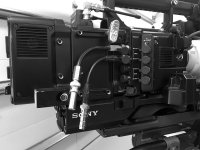
This is unrelated to your cable problem, but one thing I do to reduce wear and tear on the camera's connectors is to add 3" BNC cables that hang from the camera 100% of the time. I never take them off. Not only does it save the connectors, it is so much faster and easier to connect and disconnect from my monitor or Odyssey. The poeple who design cameras must have smaller hands than mine. :-)

BNCcables_on_F55.jpg
 
Although they will still allow stress to be put on the BNC's on the camera body, I ended up putting right angle connectors on all of my SDI OUT's on my 55 so that you can get to them and plug/un-plug more easily.
 
Back
Top